


The Apple Watch strap connector is a flat tang on each strap half that slides sideways into a milled channel in the case back, then locks under a sprung catch released by the small button on the underside. Apple Watch straps are sized by case family, not by a universal lug width in millimetres, because the connector is a shaped mechanism, not a standard spring bar.
Table of Contents
- What the Apple Watch Strap Connector Actually Is
- How the Slide-and-Lock Mechanism Works Step by Step
- Do All Apple Watch Straps Use the Same Connector
- The 42 mm Trap and Other Compatibility Surprises
- How to Fit and Remove a Strap the Right Way
- Spotting a Third-Party Connector That Will Last
- What the Connector Means When You Buy a Strap
What the Apple Watch Strap Connector Actually Is
An Apple Watch strap connector is the small locking end piece that lets an Apple Watch strap attach to the case. It is a slide-and-lock system, not a conventional spring bar sitting between two lugs.
That difference matters because you are not measuring a gap. You are matching a shaped connector to a shaped slot, then pushing the strap sideways until it clicks. It works like a key sliding into a keyed channel, not a pin stretching across an opening.
When the connector is right, the strap sits flush and stays put until the release button is pressed. When it is wrong, the strap may look close enough from the outside but still fail to seat properly. That is why Apple Watch strap fit is usually about the watch case family first, and only then about style, material, or color.
A good mental picture is simple. One hand holds the watch face down. The other hand holds a strap half with a flat end that moves in from the side, not straight up into place. If the connector slides cleanly and disappears into the case channel, the basic geometry is right.
| Aspect | Apple Watch connector | Traditional spring bar |
|---|---|---|
| How it attaches | Slides sideways into a case channel | Springs outward between two lugs |
| What releases it | A button on the underside of the watch | Tool pressure on the bar ends |
| What you measure | Case family compatibility | Lug width in millimetres |
| How it feels | A guided slide with a click | A pin snapping into lug holes |
| Main risk | Wrong case family or poor seating | Wrong width or weak bar tension |
Watches with conventional lugs work the other way round: the strap is held by a spring bar and sized by lug width, which is why quick-release straps for watches with standard lugs are listed in millimetres while Apple Watch straps are listed by case size.
Practical rule: if an Apple Watch strap needs force, the fit is wrong or the connector isn't aligned.
How the Slide-and-Lock Mechanism Works Step by Step
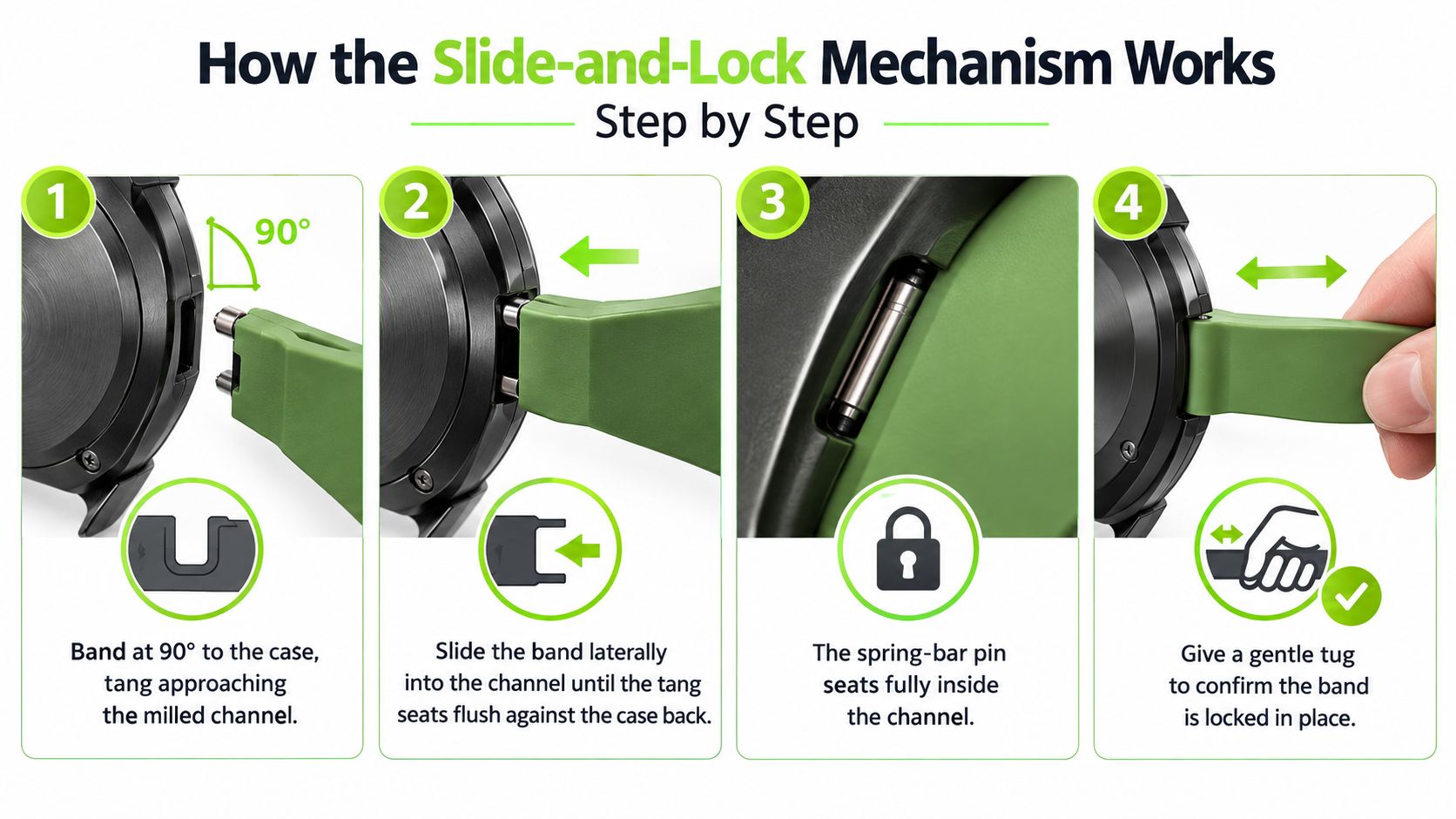
The Apple Watch strap connector works by sliding a shaped tang into a matching channel, then letting a latch catch hold of it. The watch does the locking for you, which is why the strap moves sideways instead of hinging open.
What's happening inside the case
The strap end is shaped to match a single slot in the watch body. As the tang enters that slot, a sprung catch inside the case engages automatically and holds the strap in place. The strap guidelines Apple published for accessory makers in 2015 tie that geometry to retention: the strap ends should resist a 5–20 kgf lateral slide-out force once installed, withstand a pull force of 20 kgf or more under a diver's-watch test, and pass a 72-hour ASTM B117 salt-mist test with no visible corrosion.
That means the connector is doing two jobs at once. It needs to sit in the channel cleanly, and it needs to stay engaged under real-world movement, while still releasing easily when the button is pressed.
What success looks like in the hand
A properly seated strap ends with a soft click. The strap sits flush against the case, the edge lines look even, and a gentle sideways tug does not show loose movement. If the strap clicks but sits crooked or wobbles laterally, the connector has probably not seated squarely.
A connector that only looks installed is not the same thing as one that's actually locked.
This is also why a traditional spring bar feels different. Spring bars push outward into lug holes. The Apple Watch connector slides in like a drawer and locks like a latch, so the sensation is guided and directional, not spring-loaded across an open span.
Do All Apple Watch Straps Use the Same Connector
Yes, every standard Apple Watch strap uses the same Apple-defined slide-and-lock connector, but the strap still has to match the correct case family. That's the part shoppers usually miss, because the number printed on the strap is a compatibility label, not a universal width measurement.
The small connector family covers 38 mm, 40 mm, and 41 mm cases, plus the 42 mm cases on Series 10 and Series 11. The large connector family covers the original 42 mm cases from Series 1 to Series 3, plus 44 mm, 45 mm, 46 mm, and 49 mm cases, including Ultra models. Apple's support page on changing a strap sets out which sizes cross-fit, including the Ultra-related exceptions for 49 mm and 46 mm straps.
| Connector family | Case sizes that fit | Apple Watch models covered |
|---|---|---|
| Small family | 38 mm, 40 mm, 41 mm, 42 mm | Smaller-case Apple Watch generations, including the 42 mm case on Series 10 and Series 11 |
| Large family | 42 mm, 44 mm, 45 mm, 46 mm, 49 mm | Original 42 mm Apple Watch models, larger standard models, and Ultra models |
Why the family label matters more than the number alone
A strap marked 42 mm does not mean the same thing across every generation. Older 42 mm watches sit in the large family, while the newer 42 mm cases sit in the small family. That's the 42 mm trap, and it's the reason a case-size-only search can still lead to the wrong purchase.
The cleanest way to read a listing is simple. Start with the watch case size, then check the model generation if the watch says 42 mm. If the listing uses family language rather than generic width language, that usually means the seller understands how Apple's connector system works.
For shoppers browsing replacement options, the Apple Watch straps collection is the right place to start because those straps are listed by Apple's case-size families rather than by a made-up lug width.
The 42 mm Trap and Other Compatibility Surprises
The 42 mm trap is real, because Apple has used the same millimetre label for two different connector families. A buyer who owns a newer 42 mm watch and a buyer who owns an older 42 mm watch do not necessarily need the same strap.
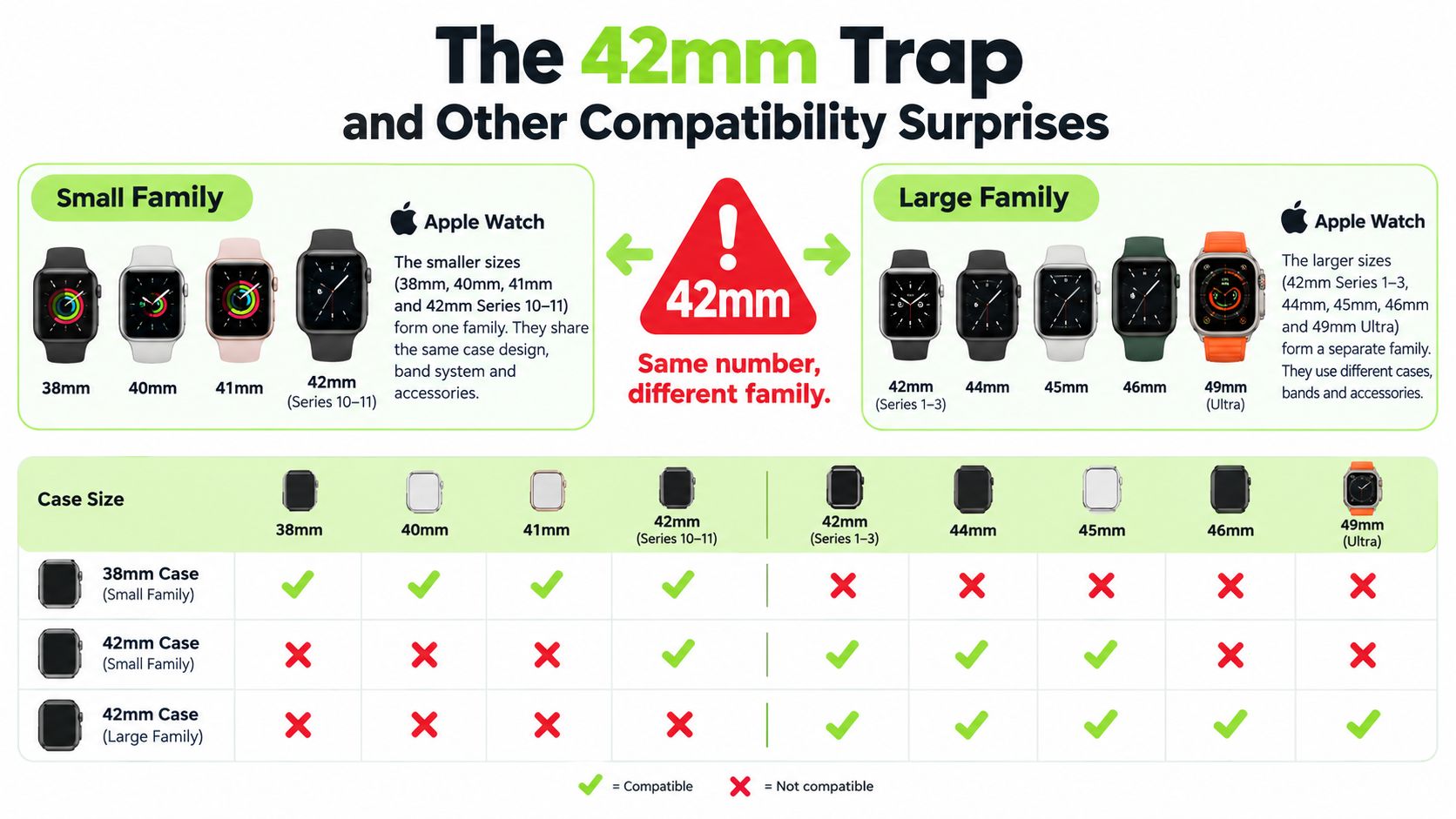
A small-family 42 mm case belongs with the 38 mm, 40 mm, and 41 mm group. A large-family 42 mm case belongs with the older 42 mm, 44 mm, 45 mm, 46 mm, and 49 mm group. That's why “42 mm” by itself is never the full answer.
One useful way to think about the problem is generation first, label second. If the watch is a recent 42 mm model, it belongs with the smaller family. If the watch is an older 42 mm model, it belongs with the larger family. A strap can slide into a slot and still be the wrong match if the family is off.
Apple's Ultra guidance adds one more wrinkle. Apple says 49 mm straps fit 44 mm, 45 mm, and 46 mm cases, and 46 mm straps also fit 44 mm and 45 mm cases, but Apple identifies the Ocean Strap, Alpine Loop, and Trail Loop as the 49 mm straps designed for Ultra models and rugged use such as hiking, running, climbing, kiteboarding, and diving. Apple also says 44 mm, 45 mm and 46 mm straps fit Ultra but should only be worn for casual, everyday use.
That means fit and purpose aren't the same thing. A connector can physically work on an Ultra and still be the wrong choice for demanding activity. When a listing says 42 mm, check which generation it is written for before you buy, so the label trap never comes into play.
How to Fit and Remove a Strap the Right Way
A strap should seat with one clean slide. If it catches, wobbles, or needs force, the problem is usually alignment, not strength. Start with the watch face down, press the strap-release button on the back of the case, and slide the strap straight out of the slot.
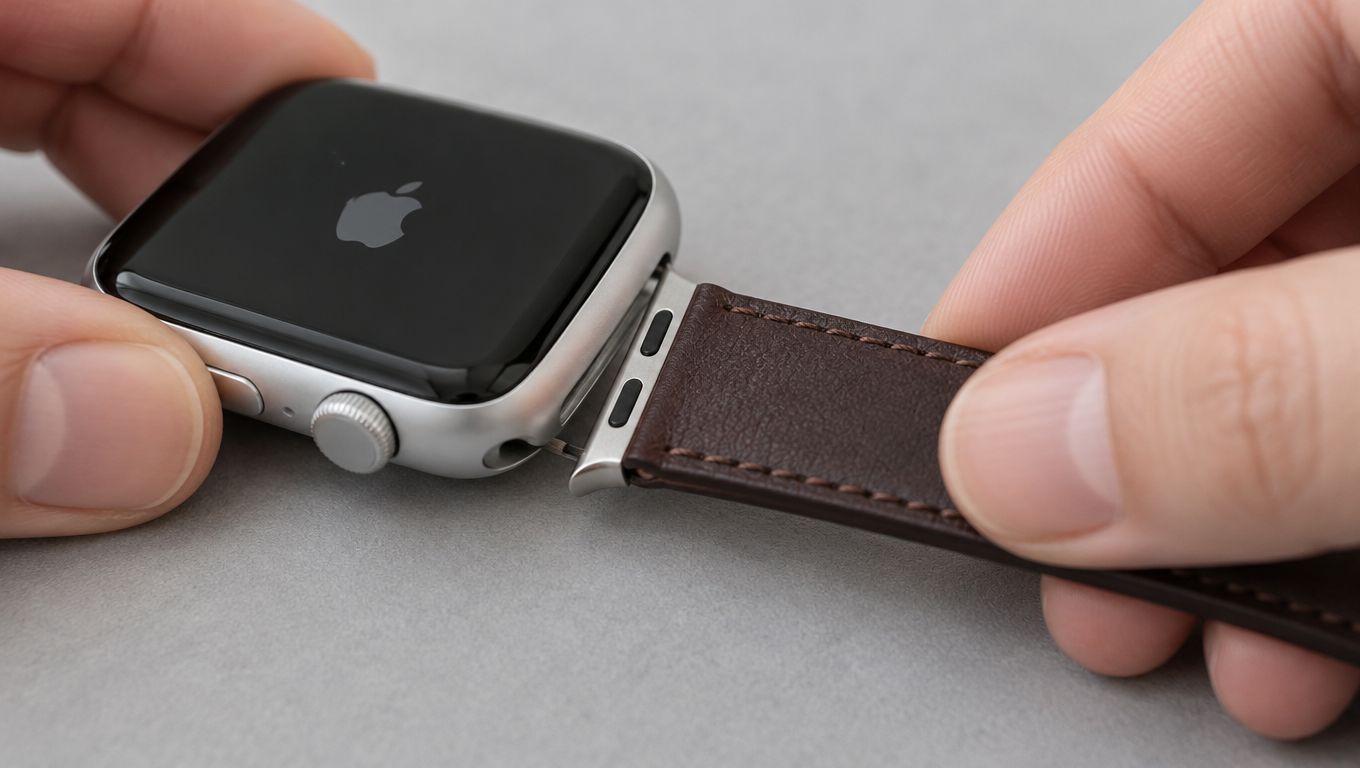
Installing the replacement follows the same path in reverse. Line up the connector with the channel, slide it in from the same side, and stop when you hear the click. Then give the strap a gentle tug. If it shifts or lifts, it has not fully seated yet.
Apple's own instructions are simple: never force the strap into the slot. If you don't feel or hear a click, slide the strap gently left and right until it seats; a properly installed strap won't slide freely until you hold down the release button. Forcing it can damage the watch or the strap.
The useful test is in the hand, not on the page. A correct fit feels steady, the click is quiet, and the strap sits flush without obvious play. If you have to twist, pry, or angle the connector sharply, stop and reset the alignment.
A soft surface helps because it keeps the case still while the connector finds its channel. For a normal swap, the steps above are enough to confirm the motion and check for a proper click. If the strap still will not move, that is a different problem and needs a separate stuck-band fix.
Spotting a Third-Party Connector That Will Last
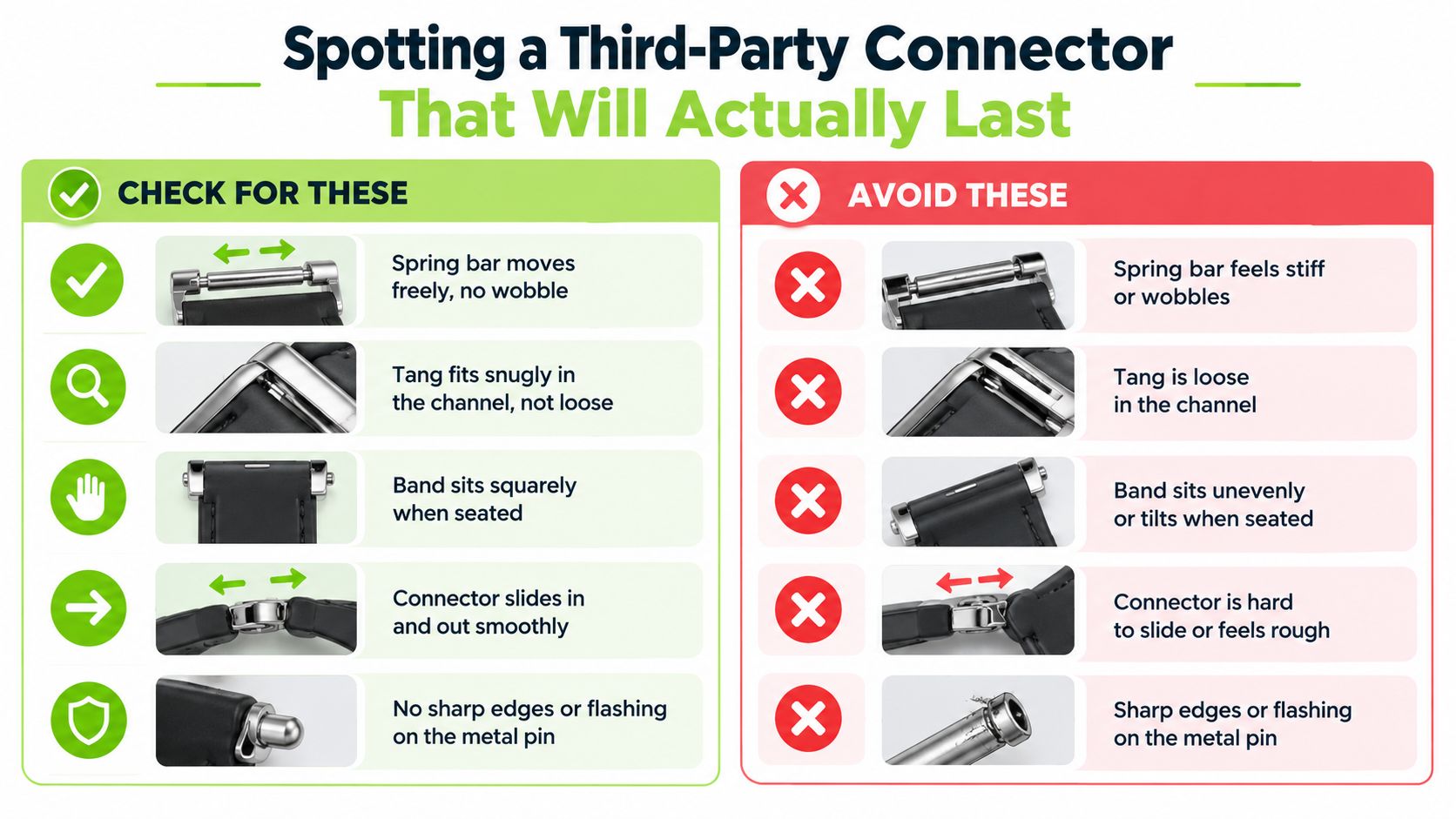
A connector can fit the Apple Watch slot and still be a weak choice for daily wear. The buyer has to judge both fit and hardware quality, not just whether the strap slides in.
What to check in under a minute
A sound connector usually feels smooth before it ever reaches the wrist. The release button should return fully, the strap should sit squarely in the slot, and the edges of the connector should feel clean rather than rough. If the strap clicks in but sits crooked, that is a warning sign, not a cosmetic quirk.
Look closely at the hardware before wearing the strap outdoors. Cracks, deformation, corrosion, and any pin or latch that does not seat squarely are reasons to stop using the strap. Apple's strap guidelines for accessory makers treat slide-out and pull resistance as part of retention, so a strap that merely “fits” is not enough if the hardware is sloppy.
Replacement rule: if the release button does not return cleanly, or the connector shows damage, retire the strap.
Material alone does not prove safety. A metal connector can still be poorly made, and a lighter connector can still be adequate if the tolerances and seating are right. The better question is whether the connector engages properly, sits squarely, and survives repeated swapping without loosening.
For shoppers comparing options, the Apple Watch collection at Nothing but Bands lists straps by case-size family, and the silicone watch straps collection keeps the material choice focused. The Halo Silicone Sport Strap for Apple Watch is one example of a standard Apple connector strap.
What the Connector Means When You Buy a Strap
The Apple Watch strap connector is a slide-in, latch-locked system, so the only purchase question that really matters is which case family the strap is cut for. Read the case size on the back of the watch, and use the model year as the tiebreaker if the watch says 42 mm.
That single habit clears up most wrong purchases. A strap for the small family fits 38 mm, 40 mm, 41 mm, and the newer 42 mm watches. A strap for the large family fits the original 42 mm, plus 44 mm, 45 mm, 46 mm, and 49 mm cases.
The safest buying rhythm is simple. Match the watch to the family, confirm the generation if needed, and then choose the material and style you actually want to wear. The connector is the gatekeeper, not the design choice.
For a straightforward next step, browse the Apple Watch straps collection with your case size in hand. Once the connector family is right, the rest of the decision becomes much easier.
Nothing but Bands offers replacement Apple Watch straps that use the standard Apple connector, so the main job is matching the correct case family before you choose a style. If you want to compare silicone, sport, and everyday options in one place, visit Nothing but Bands and start with the Apple Watch collection that fits your case size.
Related posts

- October 14, 2026
Find the best replacement watch straps for any smartwatch. Compare fit, material, and durability, with picks for everyday, sport, and...

- October 13, 2026
Learn how to clean rubber watch straps safely and effectively. Simple methods to remove dirt, sweat, and grime without harming...


