Apple's slide-in mechanism needs no tool: each Apple Watch strap half ends in a flat tang that slides sideways into a case-back channel, locks with a sprung catch, and releases through the small button underneath. Introduced with the original Apple Watch in 2015, this system uses no conventional projecting lugs or spring bars; a first install follows the same practical order, check compatibility, slide, close, then verify.
The packaging is open, the strap is on the table, and the watch is still face up. Before bringing the connector anywhere near the case, turn the watch over onto a clean, soft surface and put the packaging somewhere separate. You want room to handle the watch without dragging a buckle or magnetic clasp across it.
The important distinction is between attaching the strap to the watch and closing the strap around your wrist. Those are separate jobs. A magnetic clasp snapping shut doesn't confirm that the connector has locked into the case.
What belongs on the table
Keep the setup simple:
The watch: With its case size and generation identified.
The replacement strap: In the matching connector family, with protective packaging removed.
A clean, soft cloth: To support the watch without placing its display directly on the table.
The strap's fitting instructions: Especially useful when a loop or magnetic closure arrives already threaded.
We sell replacement straps and straps only, not tools, adapters, or connector parts. We don't manufacture Apple's connector, so there's no reason to substitute claims about our engineering for the checks you can perform yourself.
Practical rule: Finish the case attachment before trying the strap on. Your wrist shouldn't be what holds an unsecured connector in place.
Keep software setup separate, too. If you're also configuring health features, Qaly's guide to adding ECG to your watch is a separate resource, not part of fitting the strap. Get the physical attachment right before moving on to apps.
How the Apple Watch Connector Works and Why It Matters
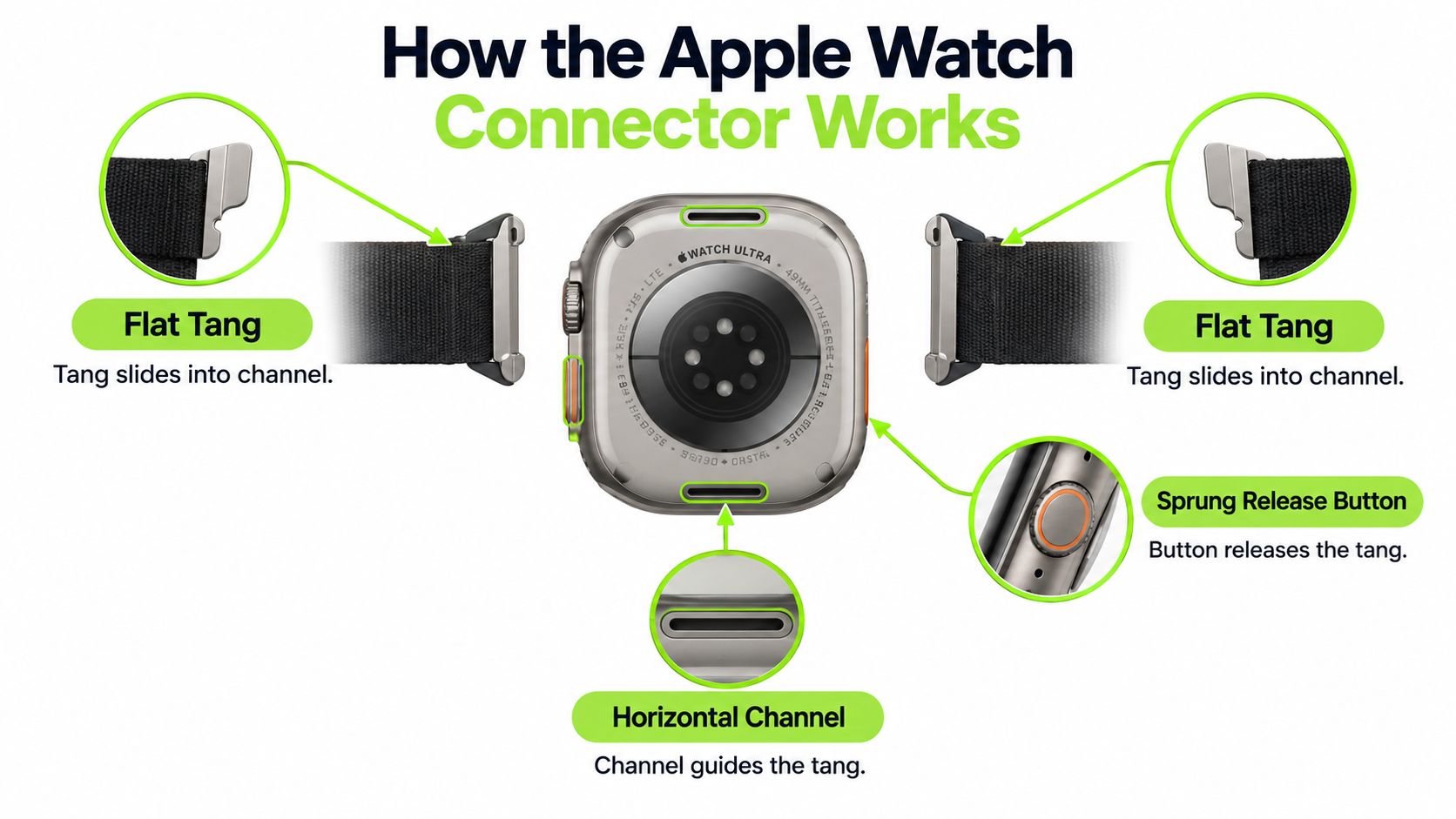
The flat tang is the rigid end of the strap half. The horizontal channel guides that tang across the watch case, while the locking catch retains it once centered. The nearby release button lets you disengage the attachment.
That means the fitting motion is sideways, not downward onto the back of the watch. You aren't compressing a spring bar between conventional lugs, and there's nothing to tighten with a screwdriver. Apple describes the same basic slide-and-release arrangement in its strap removal and fastening guide.
The diagram identifies the parts you're aligning.
Apple Watch case-size to strap-family mapping
Case size isn't wrist size. The measurement on the watch identifies the case, while the strap length determines how the closed strap fits around your wrist.
The compatibility distinctions below follow Apple's strap compatibility guidance. Treat the generation beside a size as part of the identification, not an optional detail.
Connector family
Compatible case sizes
Notes
Smaller family
38mm, 40mm, 41mm; 42mm introduced with Series 10 in 2024
The later 42mm designation belongs to this family, not the original larger group.
Larger family
Original 42mm, 44mm, 45mm, and 46mm
Original 42mm watches from Series 1 through Series 3 belong here. Don't choose by the number alone.
Ultra compatibility
49mm Ultra, with specified cross-compatible straps
Apple states that 49mm straps fit 44mm, 45mm, and 46mm cases. Ultra accepts 44mm, 45mm, and 46mm straps for casual, everyday use.
For rugged activities, Apple distinguishes the dedicated 49mm Ocean Strap, Alpine Loop, and Trail Loop from smaller compatible straps. Connector compatibility alone isn't permission to treat every strap as equivalent for hiking, climbing, kiteboarding, or diving.
The purchasing lesson is straightforward: check the model, case size, and strap listing together. A strap that looks about the right width isn't a confirmed match.
Pre-Flight Checks Before You Touch the Strap
Prepare the surface before opening the clasp. Use a clean, soft, lint-free cloth in good light, then rest the watch face down without balancing it on the crown. Keep loose metal closures away from the display and case edges.
Read the case engraving and confirm the model information in Settings, General, About. If the label on the packet leaves any doubt, use the Apple Watch size guide before attempting the fit. Changing the clasp adjustment won't correct a connector-family mismatch.
Which Apple Watch strap half goes where?
Apple Watch strap-half placement depends on the closure design and wearing orientation, so there isn't a reliable rule that every pin, buckle, or magnet must sit at the bottom.
With a conventional buckle-style arrangement, lay out the shorter closure half and longer adjustment half so you can fasten the strap comfortably without twisting either section. For loops, look at the threading path before separating anything.
Use these checks while the strap is still flat:
Skin-facing surface: Keep the intended underside facing the same direction as the watch back.
Closure path: Make sure the tail can reach its buckle, fastening patch, or magnetic landing surface without a twist.
Top and bottom placement: Follow the supplied orientation rather than assuming every closure uses the same layout.
Connector alignment: Compare the tang with the channel before starting. A visibly mismatched end isn't something to push through.
The halves may share a connector shape, but they don't necessarily perform interchangeable jobs around your wrist.
Leave the closure open enough to handle each connector independently. Pulling on a closed loop while fitting the tang makes it harder to keep the strap square to the case.
Sliding the Strap Into the Case the Right Way
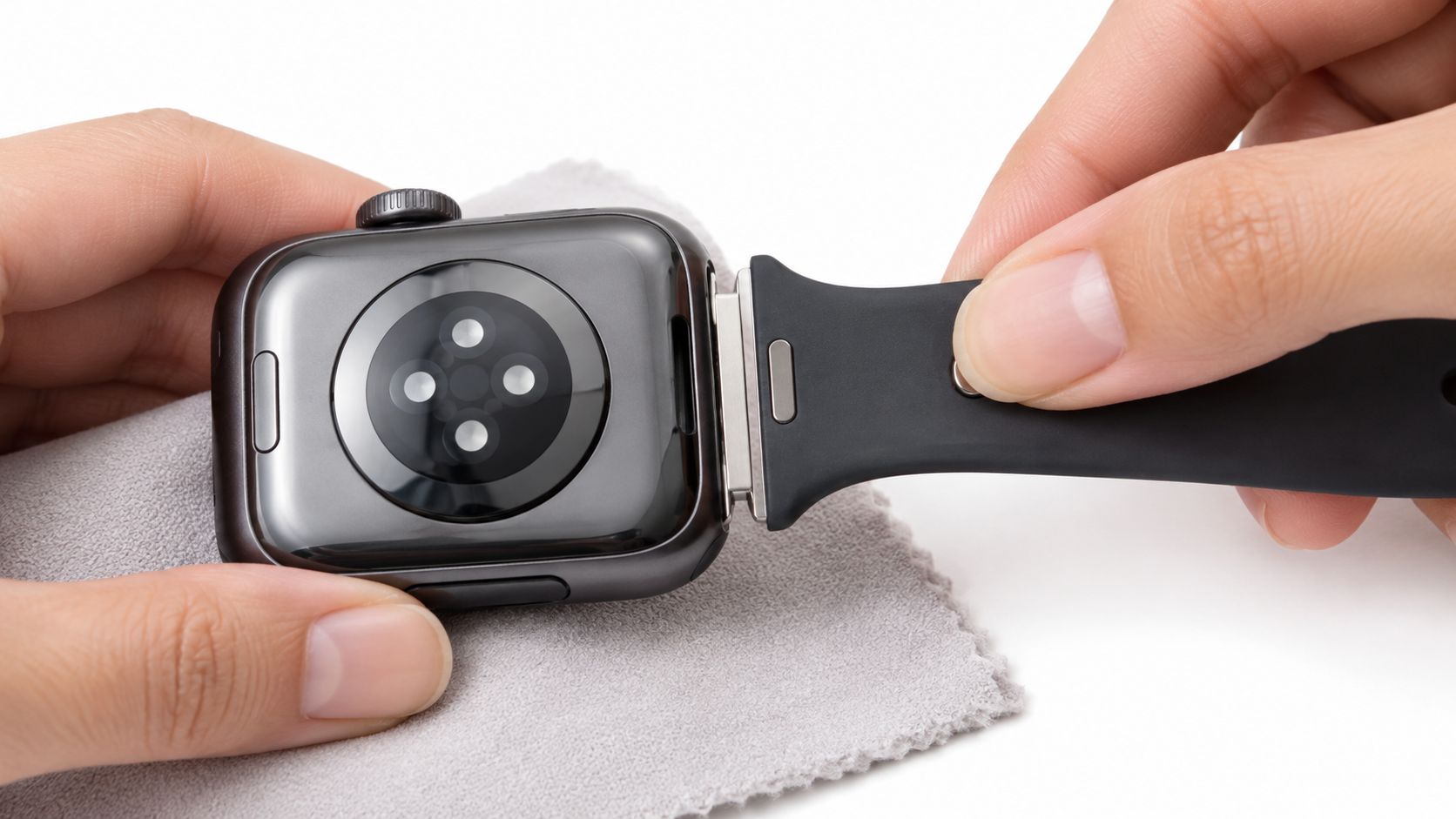
Bring one strap half alongside its channel, with the tang parallel to the opening. Support the watch on the cloth rather than gripping it so tightly that you accidentally press the opposite release button.
The close-up shows the direction of travel.
Press and hold the release button beside the channel you're using, then guide the connector horizontally into place. Use your fingers close to the connector so you're guiding the rigid end, not bending the flexible strap to push it.
As the connector reaches the center, let the release button return and allow the catch to engage. Don't keep the release button depressed while checking whether the strap has locked. You should feel or hear the click before treating the attachment as secure.
Apple's Ultra strap-fitting instructions emphasize that a strap must never be forced into the slot. If the motion becomes difficult, press the release button again rather than increasing pressure; if the connector still won't move normally, stop and contact Apple Support instead of improvising a repair.
Keep the connector straight
Repeat the movement at the other channel, checking that the strap remains untwisted. Don't rotate the tang into the opening or press it toward the sensors. The channel guides a sideways movement.
This fitting stage is separate from whether you choose silicone sport straps, mesh, or a textile loop. Their wrist closures differ, but a compatible Apple-style connector still needs to seat and lock.
For example, the Halo — Silicone Sport Strap — Apple Watch is a silicone replacement option. Its material doesn't replace the need to check the selected case-size variant and verify the attachment.
For a moving view of the fitting action, use the demonstration below.
Before lifting the watch, make sure neither half can slide back out with the release buttons untouched.
Closing Each Clasp Type We Actually Sell
Close the strap only after its connectors are seated. Support the watch while bringing the strap around your wrist, and start with a looser adjustment rather than pulling everything tight immediately.
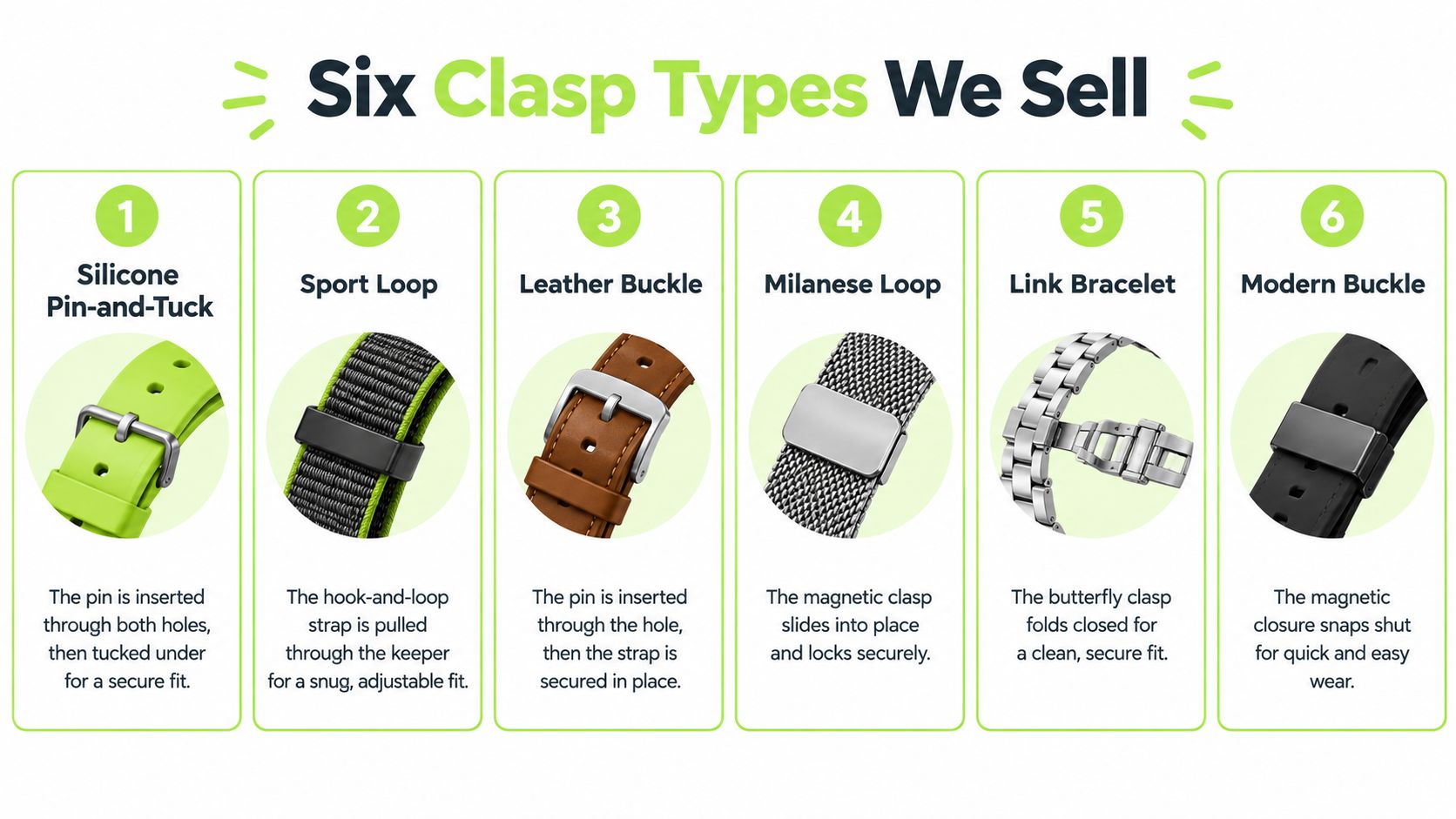
The clasp illustration is a visual reference, but use the instructions for the closure supplied with your strap.
Pin-and-tuck silicone and leather buckles
For pin-and-tuck silicone, bring the perforated half over the pin, choose a comfortable adjustment hole, and press that hole fully onto the pin. Feed the remaining tail through the tuck opening so it rests underneath. The tuck opening and adjustment hole have different jobs; don't try to push the pin through every opening in the strap.
A leather tang buckle closes differently. Pass the strap through the buckle frame, place the tang through the chosen adjustment hole, then feed the tail through the keeper loops. Keepers control the loose end, while the buckle tang provides the fastening.
Hook-and-loop and stretch nylon
With a hook-and-loop sport loop, retain the supplied routing through the connector or keeper. Draw the free end back over itself and press the fastening area flat. Follow the actual strap's routing rather than adding an extra pass through an opening.
For stretch nylon, first identify whether you have a continuous loop or an adjustable design. A continuous loop stretches over the hand and has no clasp to close. An adjustable version should follow its supplied reinforced-loop or slider arrangement; pull the designated free section through without twisting the fabric.
The nylon watch straps category can include different constructions, so material alone doesn't tell you the closure method.
Magnetic silicone and Milanese mesh
Bring magnetic silicone surfaces together in their intended overlapping position, then adjust the overlap while supporting the watch. Let the surfaces align rather than folding the strap into an unintended shape.
For magnetic Milanese mesh, draw the free end through its intended loop and lay the magnetic closure flat against the mesh. Slide it to adjust, then check that the closure lies evenly.
Apple notes that its Milanese Loop redesigned in 2018 can open completely, because the magnetic closure passes through the connector; earlier versions cannot. Don't assume a third-party mesh strap shares that construction.
For help identifying an unfamiliar fastening, compare it with the closure types above before pulling anything apart.
Verifying a Clean Install Before You Wear It
A strap that looks attached isn't necessarily locked. The useful distinction is between a connector occupying the channel and a catch retaining the connector. Check the attachment off your wrist, where you can see and feel what happens.
Don't judge the fit by the clasp alone. A neatly closed buckle or aligned magnet says nothing about whether either end is secured to the watch case.
The flush, release, and tug check
Flush join: Inspect both channel openings. The connector should look centered and evenly seated, without an obviously raised end or uneven gap. Don't expect every decorative strap shoulder to have exactly the same outline as the case.
Returned release button: Take your finger away and check that the button has returned to its normal resting position. “Proud” means no longer held down, not protruding above the case.
Click and tug: Support the watch and gently pull each connector sideways without pressing its release button. Neither half should slide out. Then apply a controlled pull along the strap, without jerking or trying to stress-test it.
Before wearing: If either half slides out without the release button being pressed, the install isn't complete.
What counts as a failed check?
An end that keeps moving, a button that remains depressed, or a connector that won't center is a reason to stop. Don't compensate by wearing the strap tighter. Wrist tension can't correct a detached case attachment.
Also avoid using a claimed installation time as your acceptance test. A careful first fitting is finished when the checks pass, not when you've beaten a stopwatch.
Finally, open and close the clasp while supporting the watch over the cloth. Confirm that you understand which part releases the wrist closure and which buttons release the strap from the case. Those controls solve different problems, and confusing them makes the next handling attempt unnecessarily awkward.
Comfort, Skin Tolerance, and When to Stop and Link Out
A mechanically secure Apple Watch strap can still be uncomfortable. Start with a gradual wearing period, keep the strap and skin dry, and avoid tightening the closure merely to eliminate every trace of movement.
Read the material and cleaning instructions before washing the strap. Let it dry fully before putting it back on, particularly where moisture can remain underneath a loop or folded tail. Silicone, nylon, mesh, and leather shouldn't automatically receive the same cleaning treatment.
What should you do if an Apple Watch strap causes irritation?
If an Apple Watch strap causes redness or itching, remove the strap, clean and fully dry the skin and strap as appropriate, and reconsider the material and tightness before wearing it again.
A published case report describing a rash beneath a synthetic-rubber Apple Watch strap illustrates why connector fit isn't the whole comfort question. It doesn't establish that every rubber or silicone strap is hazardous, or that one material will suit everyone.
Review possible irritants and wearing habits, such as trapped moisture, detergent residue or a strap worn too tightly. Seek medical guidance for persistent, worsening, or severe symptoms rather than repeatedly trying tighter or different adjustments.
Keep the stopping point clear
A normal Apple Watch strap install shouldn't become a repair job. If a connector won't move, stop using force and follow our guide to Apple Watch straps that are stuck or contact Apple Support. Don't introduce a knife or screwdriver to a tool-free fitting.
Before putting the packaging away, finish with this short check:
Match: Confirm the watch generation and connector family.
Seat: Make sure both ends are retained.
Close: Use the fastening method supplied with the strap.
Wear: Check comfort as well as security.
For another material or closure, browse the Apple Watch straps collection with both requirements in mind. A different look is useful only when the connector and wrist fit are right.
Nothing but Bands offers replacement straps and straps, not tools, adapters, or loose connector parts. Visit Nothing but Bands to choose an Apple Watch replacement by the correct case-size family and a closure you're comfortable fastening, then complete the fit with the same seat-and-check routine.
Written by Alex· Published October 26, 2026
· 12 min read
About the author
Alex — Founder, Nothing but Bands
Alex runs Nothing but Bands from Austin, TX. Every fit claim in these guides is verified against manufacturer specs — including the watches our bands don't fit. More about Alex →