


If your Apple Watch strap won't come off, the fix usually isn't strength. It's motion. Hold the band release button down and keep holding it while you slide the band sideways across the channel, not away from the case. If the strap still won't move, release the button, press it again, and try the other direction rather than forcing anything.
3 Key Takeaways: Removing a Stuck Apple Watch Strap
Hold and slide: Press the release button fully and slide the band straight sideways.
Never pull up or twist: Pulling or prying jams the connector against the slot.
Reset and retry: Release, press again and try the other direction before forcing anything.
Table of Contents
- What is the correct way to remove a stuck Apple Watch band?
- Why won't my Apple Watch band slide out?
- How do you clean a jammed Apple Watch band channel?
- Do third-party Apple Watch bands get stuck more often?
- When should you stop trying and replace the band?
- Frequently Asked Questions
What is the correct way to remove a stuck Apple Watch band?
The correct way to remove a stuck Apple Watch band is to press and hold the Apple Watch band release button fully, then slide the Apple Watch band straight sideways through the channel. Apple's official method is exactly that: hold down the release button and slide the strap horizontally, and if it doesn't move, press the button again rather than forcing it into the slot (Apple Support).
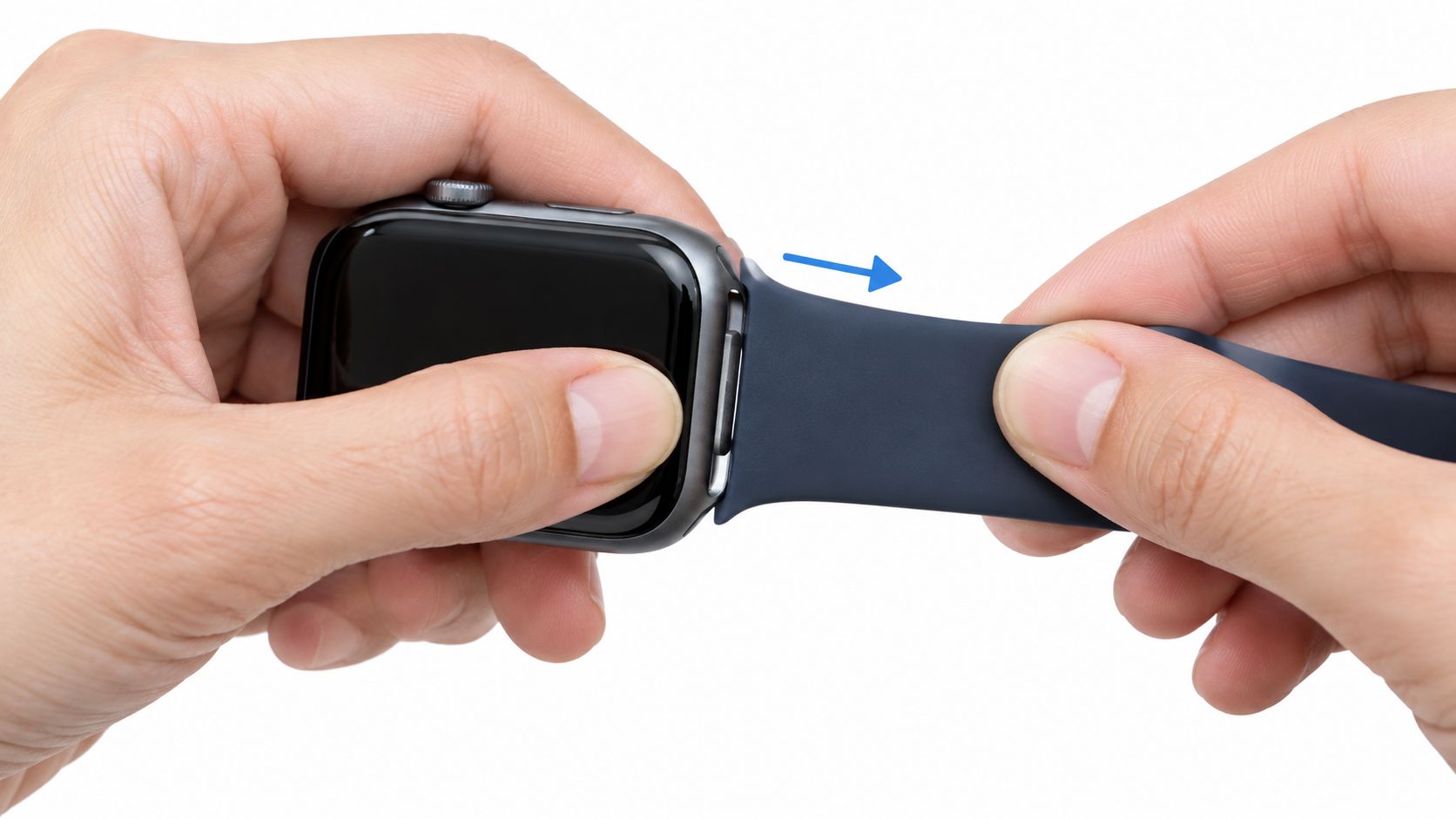
Set the watch face-down on a soft microfibre cloth first. That gives you two advantages. It protects the screen, and it stops the case from shifting while you press the button and push the band across the groove.
For reference, swapping an Apple slide-in band takes us about 10 to 20 seconds, and a first-timer roughly one to three minutes. Those are our own estimates rather than stopwatch records, and most of a first-timer’s time goes on identifying the fitting, finding the release, and working over a safe, well-lit surface.
Most Apple Watch straps stuck complaints start with the same wrong movement. People pull upward, twist the connector, or pry at the band end because that feels natural when something jams. The Apple Watch lug system doesn't release that way. The connector is meant to travel in a straight horizontal line.
The motion that works
Use your thumb on the release button, and keep full pressure on it for the entire movement. Then grip the band close to the watch case and slide the band left or right through the slot.
A tight slide-in channel is the awkward one for us too. We hold the release button fully down, push from the far end of the band, and let it slide straight out.
If the band doesn't move on the first pass:
- Stop pulling away from the case: Upward force only loads the connector against the slot.
- Release and reset: Press the button again fully.
- Try the opposite direction: Apple's own advice is to try again, not force it.
- Keep the slide straight: Don't angle the band up or down.
Practical rule: An Apple Watch band never pulls straight out. It only slides out sideways.
If you only need the normal band-swap steps, keep that separate from this failure case and use a standard guide on how to change an Apple Watch band or the walk-through on how to replace an Apple Watch band. If you're dealing with another small consumer device that's jammed by debris rather than broken outright, this calm approach is similar to how technicians remove something stuck in an iPad port. Correct direction and controlled pressure matter more than force.
What not to do
The fastest way to scratch an Apple Watch case is to panic and improvise. Avoid:
- Prying tools: Screwdrivers, knives, coins, keys, and paperclips slip.
- Twisting the band: Twisting can score the slot or deform the connector.
- Brute force: If the button is released even slightly, the lug can re-lock instantly.
Apple's own guidance is explicit that forcing the band is the wrong approach (Apple Support). If the motion is wrong, more effort just creates damage.
From the messages we get, the scratches people describe usually come from using a knife or screwdriver during removal. Apple's slide-in bands need no tool at all, and you should never lever against the watch case.
Why won't my Apple Watch band slide out?
An Apple Watch band usually won't slide out because the Apple Watch release button isn't being held fully, debris is packed into the channel, the band material has tightened or softened from wear and heat, or the connector on a third-party band is slightly out of tolerance. Those are the causes I'd check in that order.
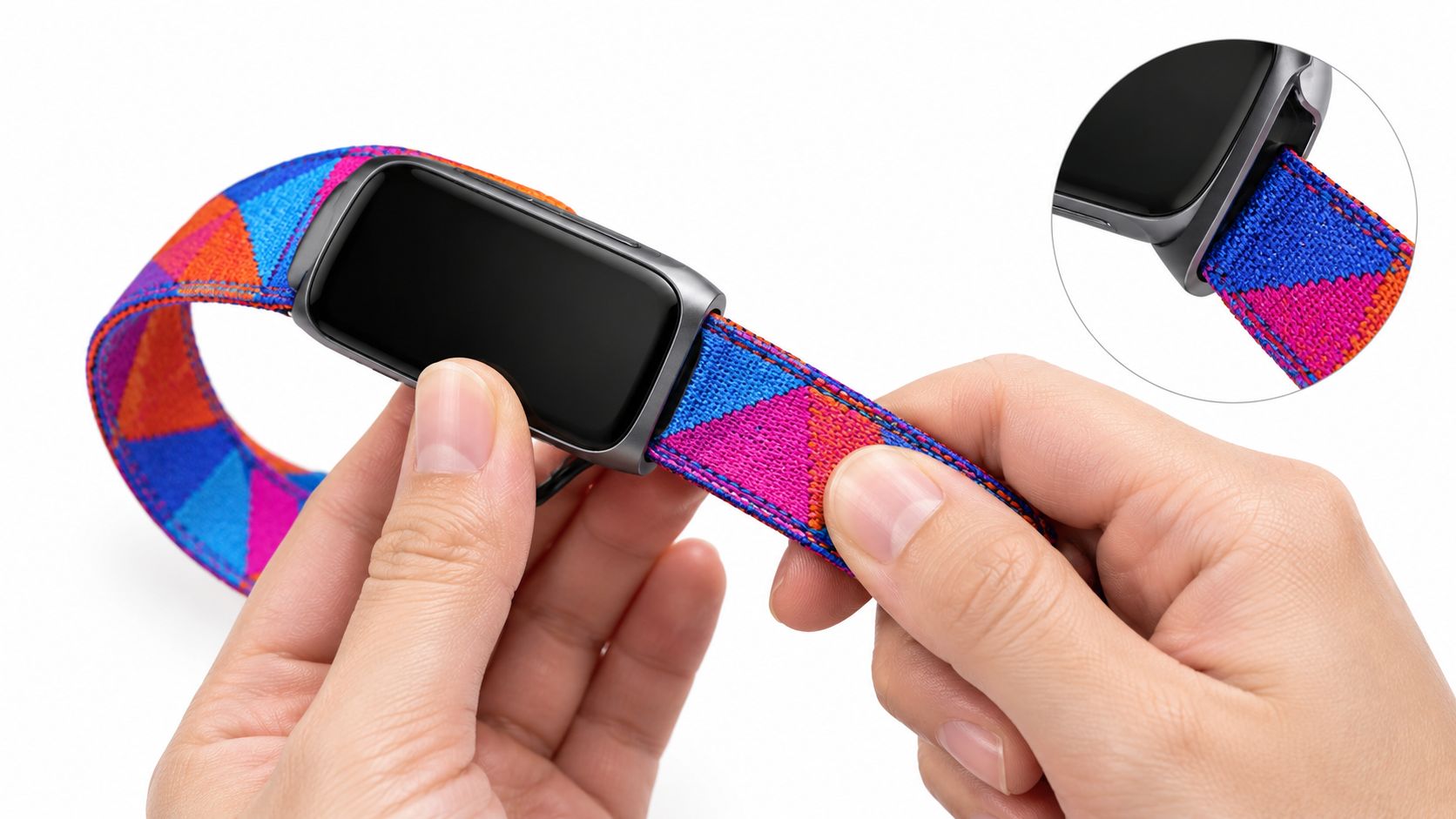
Is the button really going all the way down?
A stiff release button often creates a false diagnosis. The band feels jammed, but the lock is still engaged because your finger is slipping before the button bottoms out.
Grip helps more than strength here. Use the pad of your thumb, not the point of a fingertip. If your thumb slides, lay a dry microfibre cloth over the button for traction. A clean pencil eraser can also help you press the recessed button without skating across the case.
What doesn't help is metal. Keys, coins, screwdrivers, and knife tips scratch cases and can dig into the channel.
Pressing harder with a bad tool isn't control. It's just a larger mistake with sharper edges.
What builds up in the slot?
A stuck Apple Watch strap often has contamination inside the recess rather than a broken watch. Apple's own removal instructions don't cover dirt at all, but repair forums are full of the same pattern: debris packed into the button recess or channel, freed by cleaning rather than by tools. On one long-running iFixit thread about a band that wouldn't release, warm water and a little dish soap is the answer owners keep coming back to (iFixit Answers).
The usual culprits are ordinary daily residue:
- Dried sweat
- Sunscreen
- Soap film
- Pocket lint or sand
- Skin oil
That residue can make the connector feel glued in place. In practice, a watch that worked fine for months can suddenly feel seized because the channel has slowly filled with grime.
That matches what we see in customer messages: a stuck band is usually dried sweat, sunscreen or soap in the channel, and that is not a reason to force it.
Can the band material itself be the problem?
Yes. Some bands become more grabby when they've been compressed, bent, or exposed to heat. A silicone-style strap that has softened in a warm environment can drag more inside the slot. A swollen connector is less common than dirt, but it does happen.
This is also where materials matter. A breathable nylon option such as the Arden, Nylon Loop, Apple Watch is designed exclusively for Apple Watch and uses a soft nylon weave with a stretch fit, which makes repeated wear comfortable. Comfort isn't the same thing as connector fit, though. Any band, whatever the material, still depends on the connector block being accurately made and clean.
When the problem is the watch, not the band
Apple community guidance points out an angle many generic troubleshooting pages miss: if the release button itself is obstructed or broken, the issue shifts from a tight strap to a hardware service problem (Apple Discussions). If the button feels stuck down, wobbly, or dead under your thumb, stop treating it like a simple jam.
How do you clean a jammed Apple Watch band channel?
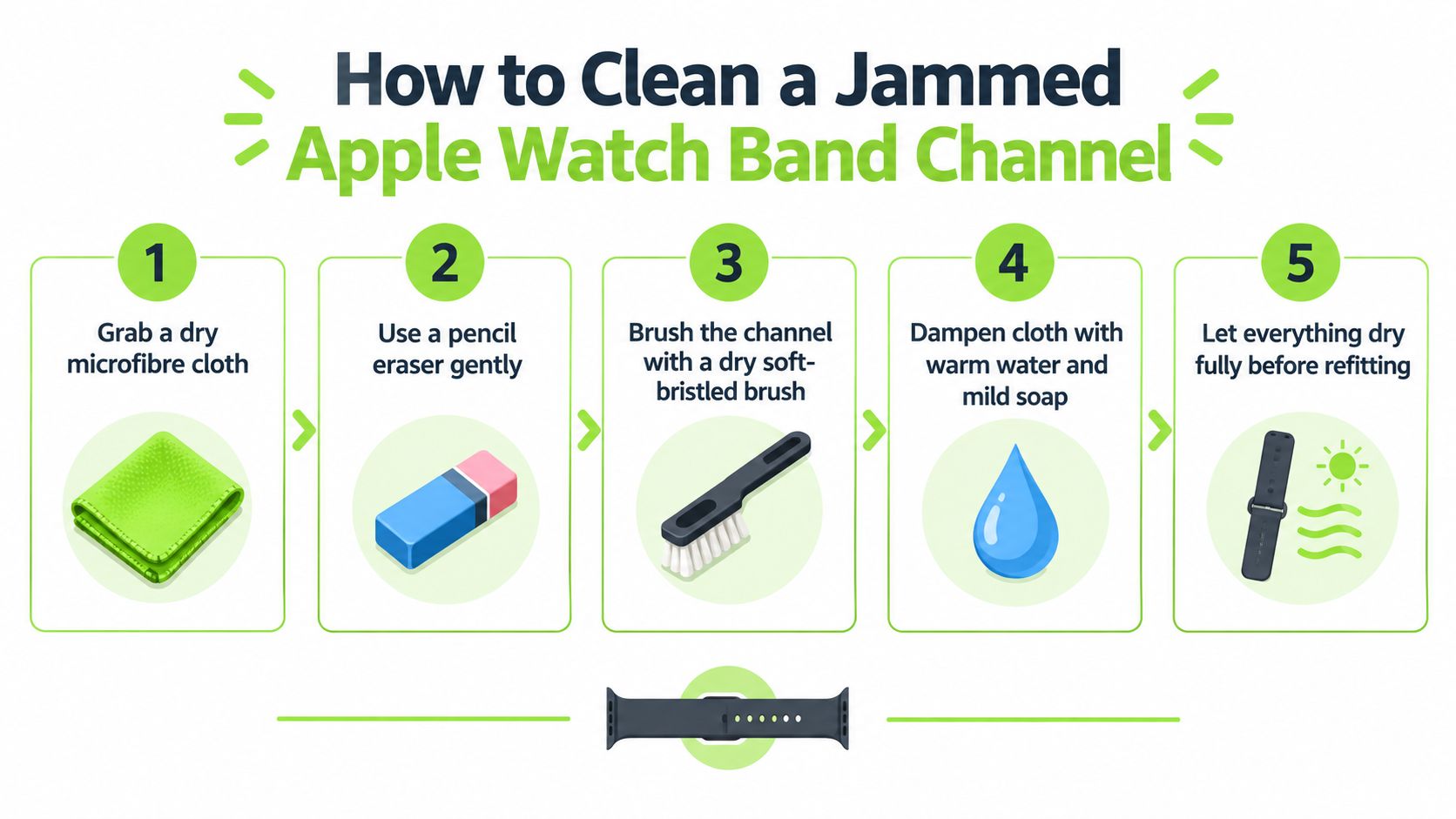
You clean a jammed Apple Watch band channel by removing loose debris first, then cleaning the Apple Watch channel and release-button area with non-metal, low-moisture methods, and letting everything dry fully before trying again. Cleaning is the fix. Lubricant isn't.
Oil, penetrating sprays, and silicone lubricants are the wrong answer. They attract grit, they creep, and around a smartwatch they can reach seals or adhesive. If you're trying to free apple watch straps stuck in the channel, adding oily residue usually creates the next jam.
Start dry before you try anything wet
Independent how-to guidance recommends a soft, non-scratching work surface and non-metal aids such as a cotton swab, toothbrush, or wooden or plastic stick, with a practical escalation sequence for stuck bands: brush out lint first, then move to more targeted cleaning if needed (The Tech Gorilla).
Use this order:
- Soft brush first: Sweep along the channel with a clean soft toothbrush or similar brush.
- Button recess next: Brush around the release button where lint can pack into the edges.
- No metal picks: Don't scrape at the slot.
If you only need routine strap care after the jam is cleared, keep that separate and use a dedicated Apple Watch band cleaning guide.
When dry brushing isn't enough
A cloth barely damp with warm water and a trace of mild soap can lift surface grime from the channel edges. Keep it controlled. You want the cloth damp, not dripping.
Apple's cleaning guidance sets the limits here: wipe with a nonabrasive, lint-free cloth, lightly dampened with fresh water if needed, and avoid getting moisture into any openings — the band channel and the button recess are openings (Apple Support). Apple allows a mild hypoallergenic hand soap on most band types, but not on fabric or leather bands, and it says not to submerge the watch in any cleaning agent. That rules out the trick you'll see on repair forums of pooling alcohol into the button recess and leaving it to soak: it puts liquid exactly where Apple says not to.
Here's the careful sequence:
- Damp, never wet: Wring the cloth out until it leaves no visible moisture behind.
- Work the edges: Trace the channel edges and the rim of the button recess.
- Work the button gently: A few light presses help shift loosened residue.
- Retry the band slide: Keep the motion horizontal.
Before trying again, this quick visual walk-through helps:
A clean channel should feel dry, not slick. If the slot looks shiny with residue, it isn't ready.
One last step people skip
Dry the channel fully before refitting any band. A damp slot can trap fresh lint immediately, and a wet connector never gives you a clean read on whether the fit is correct.
If the band still doesn't release after one or two gentle cycles, stop and inspect instead of escalating force: look again for dirt in the channel, for a protective case fouling the button, and for a button that doesn't spring back the way the one on the other side does.
Do third-party Apple Watch bands get stuck more often?
Yes, third-party Apple Watch bands can get stuck more often because third-party Apple Watch band connectors are more likely to vary slightly in fit, and small tolerance errors are enough to jam the Apple Watch channel. That doesn't mean every aftermarket band is a problem. It means connector accuracy matters more than appearance.
Some stuck bands aren't “stuck” in the usual sense at all. The connector block is a little too wide, the release slider on the band doesn't retract cleanly, or the adapter edges aren't finished well enough for smooth travel. One of the most-read stuck-band threads on iFixit is exactly this case: a third-party band on an Apple Watch where the release button wouldn't press down at all with that band fitted (iFixit Answers).
What to inspect on the band itself
Take a close look at the connector once the band is out, or before you try to force a new one in.
Check for these signs:
- Uneven edges: One side of the connector sits proud or rough.
- Bent slider parts: The locking section doesn't retract cleanly.
- Visible burrs: Small raised edges catch inside the slot.
- Poor centering: The connector looks offset in the strap end.
A new band that won't click in is often the same problem in reverse. The watch may be fine. The band hardware may not be shaped correctly for the channel.
What works better than gambling on a jam
Quality replacement bands exist outside Apple's own range, but they still need accurate fitment. If you're comparing options, a straightforward place to judge styles and connector types is a roundup of third-party Apple Watch bands.
If you want alternatives after removing a problem strap, options like the Halo Silicone Sport Band or breathable nylon bands are examples of replacement bands made for Apple Watch fitment. That's the goal here. Not fancy hardware. A connector that slides in, locks, and comes back out without drama.
When should you stop trying and replace the band?
You should stop trying to free an Apple Watch band when the Apple Watch band has already been forced, the connector keeps jamming after proper cleaning, or the Apple Watch release button itself seems damaged. A band that has been forced once tends to keep sticking, and replacing the band is safer than risking the watch.
This is the point where stubbornness gets expensive. If you've already twisted the connector, pried at the slot, or dragged a rough-edged lug through the channel, the band may come out eventually and still be unfit to reuse. The next removal is often worse.
That is our own stopping rule as well: if a band still resists after a proper attempt, we stop. The watch case is more expensive than the band.
Replace the band if the band is the repeat offender
A repeatedly jammed strap is usually telling you something simple: the connector is no longer trustworthy. Don't keep proving it.
Replace the band when:
- The connector was forced: Damage may be minor but permanent.
- The strap sticks again after cleaning: The fit is likely wrong, not dirty.
- The connector looks scored or bent: The slot in the watch shouldn't be your test rig.
- A new band won't seat cleanly: Don't sand, shave, or modify the hardware.
If you're shopping for a way out of this, what you need is a band that fits properly, not a gadget to lever the old one free. We sell replacement bands and no watch tools at all, and for this particular problem that's the right end to start from.
Seek service if the watch is the problem
Persistent non-release after repeated correct attempts is a signal to seek service, not to escalate force (The Tech Gorilla). If the Apple Watch release button remains stuck, depressed, obstructed, or broken, that points to the watch hardware rather than the strap.
Apple's support path also matters if a protective case has been removed, the correct sideways motion has been used, and the band still won't move. A jam inside the watch itself is one for Apple Support, not more home improvisation.
Once the watch starts losing metal in the form of scratches, the band has already cost too much.
For readers replacing a strap that keeps sticking, here's a verified customer review on a replacement option: William Johnson on the Halo, Silicone Sport Band, Apple Watch: "The silicone sport band fits perfectly and feels super comfy. Seller was on point with communication, any questions I had got answered fast!"
If you want a broader look at compatible replacements, there are dedicated Apple Watch bands, including silicone bands, made for straightforward swaps once the faulty strap is out.
Frequently Asked Questions
Does my protective case block the band release button?
Yes, some Apple Watch protective cases can block the Apple Watch band release button enough to prevent full travel. A case that wraps around the back edge can sit over the button or stop it short, so the lug never fully unlocks even though the button feels like it moved. Apple's band instructions don't cover cases at all, so this one is on you to rule out: if the button feels oddly shallow, take the case off and try again before assuming anything is broken.
How do I remove a stuck Link Bracelet?
A stuck Apple Watch Link Bracelet must be separated with the Link Bracelet quick-release button before the Apple Watch release slot method will work normally. Apple's own instructions state that you must separate the Link Bracelet into two pieces — hold down the quick-release buttons and gently pull the links apart — before removing it from the watch (Apple Support), so don't treat one like a standard sport band when it jams. If the bracelet hasn't been split first, removal can feel falsely blocked.
Do older Apple Watch models use the same band sizes?
Apple Watch band compatibility is grouped by case size family, not just by model name, and older Apple Watch 42 mm sizing does not always match newer Apple Watch 42 mm sizing. Bands group as 38/40/41/42 mm in one family and 42/44/45/46/49 mm in the other, which is why 42 mm appears twice: the newest 42 mm case takes the smaller-family bands, while an older 42 mm case takes the larger-family ones. If a band won't slide in cleanly, check the size family before assuming the watch or band is defective. Confusing the case size with the band family is a mix-up we see often from Apple Watch customers, which is why we made our own case-size explanation clearer.
Can I fix a new band that won't click in?
A new Apple Watch band that won't click in should be removed and checked for fit, orientation, dirt, or connector defects rather than forced into the Apple Watch slot. If the connector sits unevenly or binds halfway, stop there. A correct band should slide horizontally and lock securely without shaving metal or needing extra force. A band that looks attached but has not actually clicked into place is one of the things customers contact us about, and after seeing the same mistake in messages we added a proper "click and tug" check after installation to our own guidance.
If you're done fighting a jammed strap and just want a replacement that fits cleanly, Nothing but Bands focuses on replacement bands for Apple Watch and other smartwatches, not tools or risky workarounds. You can browse silicone, nylon, and other Apple Watch band styles with the goal that matters here: a secure fit that swaps on and off without scratching the watch.
Articles similaires

- October 06, 2026
Clear installation instructions for smartwatch bands. Learn how to attach, verify, and troubleshoot Apple, Samsung, Garmin, and Fitbit straps safely.

- October 05, 2026
A practical guide to changing watch bands across Apple, Garmin, Samsung, and Fitbit, covering tools, fitment, daily rotation, and common...

- October 02, 2026
Everything to know about the Coros Pace 4 nylon band including sizing, quick-release installation, cleaning tips, and compatible third-party options.

