


You can tell which Fitbit you have by checking the device name in the Fitbit app or reading the model text on the case back, then matching that exact model name to its band family before ordering. If you can't access either option, use the case shape, button layout, screen, and band attachment as clues, but don't rely on appearance alone.
3 Key Takeaways: Which Fitbit Do I Have?
Check the app: The device tile in the Fitbit app shows your exact model name.
Or check the back: The model or regulatory text on the case back confirms it.
Looks can mislead: Similar Fitbits often use different band fittings, so confirm before buying.
That matters because Fitbit has shipped a long run of Charge, Versa, Sense, Inspire, and Luxe generations since 2014, and several of them share almost the same shell while using different band fittings. The practical answer to “which Fitbit do I have” is therefore the exact device name first, band compatibility second.
Table of Contents
- Which Fitbit Do I Have Answer in 30 Seconds
- How Do I Know What Fitbit I Have in the Fitbit App
- Where Is the Fitbit Model Number Location on the Device
- How Can I Tell Which Fitbit I Have When Models Look Alike
- Does My Fitbit Band Fit Another Model
- Shop Bands for Your Fitbit Model
Which Fitbit Do I Have Answer in 30 Seconds
The two fastest ways to identify your Fitbit are the device tile in the Fitbit app and the model or regulatory text printed on the case back. Use either one before you buy a replacement band.
If the Fitbit app is available, open it and go to your profile or devices area. Your connected device tile displays the device name, such as Charge 4, Versa 3, Sense, or Luxe. Write down the full name exactly as shown. Band listings usually identify compatibility by that model or model family, not by the general Fitbit brand.
If you have a Fitbit watch with a screen, you can also check the device itself through Settings, then About, then Regulatory Info. The model number appears at the top of that screen. Fitbit's on-device route is especially useful when the app is signed into another account or the tracker won't sync.
For a physical check, remove the band if it covers the underside of the case. Look for small model or regulatory text on the back. The engraving can be faint on a heavily worn device, so use bright light and read it slowly rather than guessing at one or two characters.
Practical rule: Confirm the model name or model number first. Treat shape, screen, buttons, and band pins as supporting evidence only.
This caution is necessary because Fitbit's product line expanded rapidly and many generations remain in circulation. Monthly active users rose from 6.7 million in 2014 to 40.2 million in 2020, and more recent estimates place Fitbit at about 33 million active users worldwide in 2025, after peaking above 41 million in 2021, according to Fitbit usage statistics from Business of Apps. Older Charge, Versa, Inspire, and Sense devices can still be worn, resold, or fitted with replacement accessories.
The rest of the identification process is simple. Confirm the device digitally or physically, compare its appearance only as a cross-check, then use the model-to-band mapping below.
How Do I Know What Fitbit I Have in the Fitbit App
The Fitbit app shows your connected Fitbit device name on its device tile, so the app is usually the most reliable way to know what Fitbit you have before ordering a band.
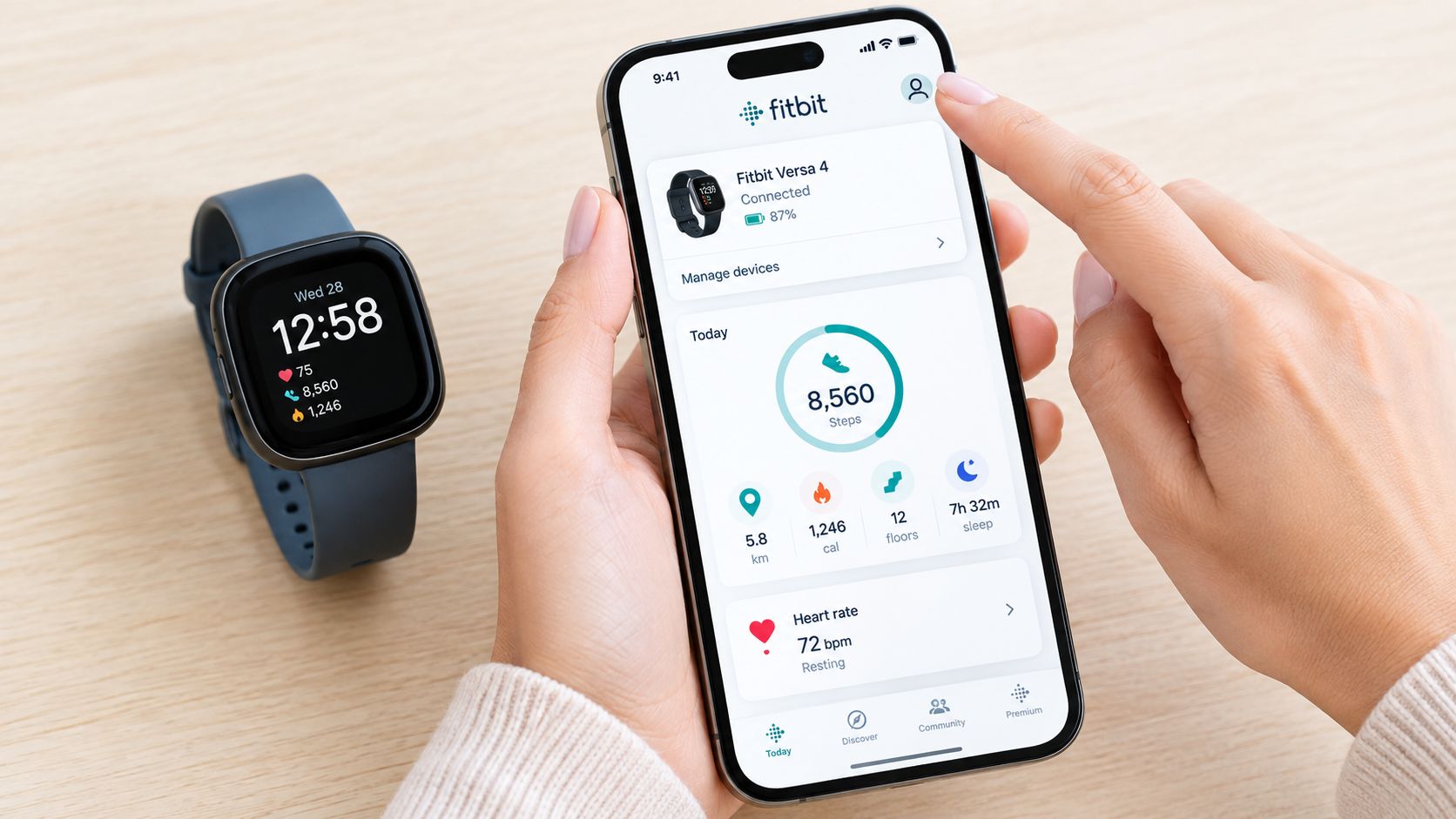
Open the Fitbit app while your tracker or watch is nearby. Tap your profile icon or devices icon, then look for the tile representing the connected Fitbit. The exact device name appears there. Don't stop at “Fitbit” or a general family label if the app provides a more specific model.
What to record before buying
Write down the complete name shown in the app. For example, Charge 3, Charge 4, Charge 5, and Charge 6 are different band-fitting groups, even though they all use a narrow tracker-style case. Similarly, Versa 2, Versa 3, and Versa 4 shouldn't be treated as interchangeable because they look like rounded square watches.
The app name is also more useful than a product photo when a device has a replacement band already attached. A third-party band can hide the original attachment shape, and a worn case can make buttons or grooves difficult to see.
If the app lists more than one device, select the Fitbit currently on your wrist. Remove old devices from consideration unless you're identifying a second tracker. The model name you need is the one associated with the physical device you're planning to accessorize.
What if the Fitbit app isn't available
A Fitbit with a screen can provide a direct fallback. Wake the device, open Settings, tap About, and select Regulatory Info. The model number appears at the top of the screen, giving you a short identifier to compare with Fitbit documentation or a support lookup.
The practical sequence is:
- Open the Fitbit app: Tap the profile or devices icon and read the device tile.
- Check the watch menu: Use Settings, About, and Regulatory Info on a Fitbit with a screen.
- Record the exact model: Keep the name or model number beside you while checking band compatibility.
The video below shows the app-based identification process visually.
Don't order from a listing that says only “fits Fitbit.” The exact model name is the detail that prevents a wrong clip, pin, or connector from arriving at your door.
Where Is the Fitbit Model Number Location on the Device
The Fitbit model number location is normally on the underside of the case, in the small regulatory or model text, and you may need to remove the band to see it.
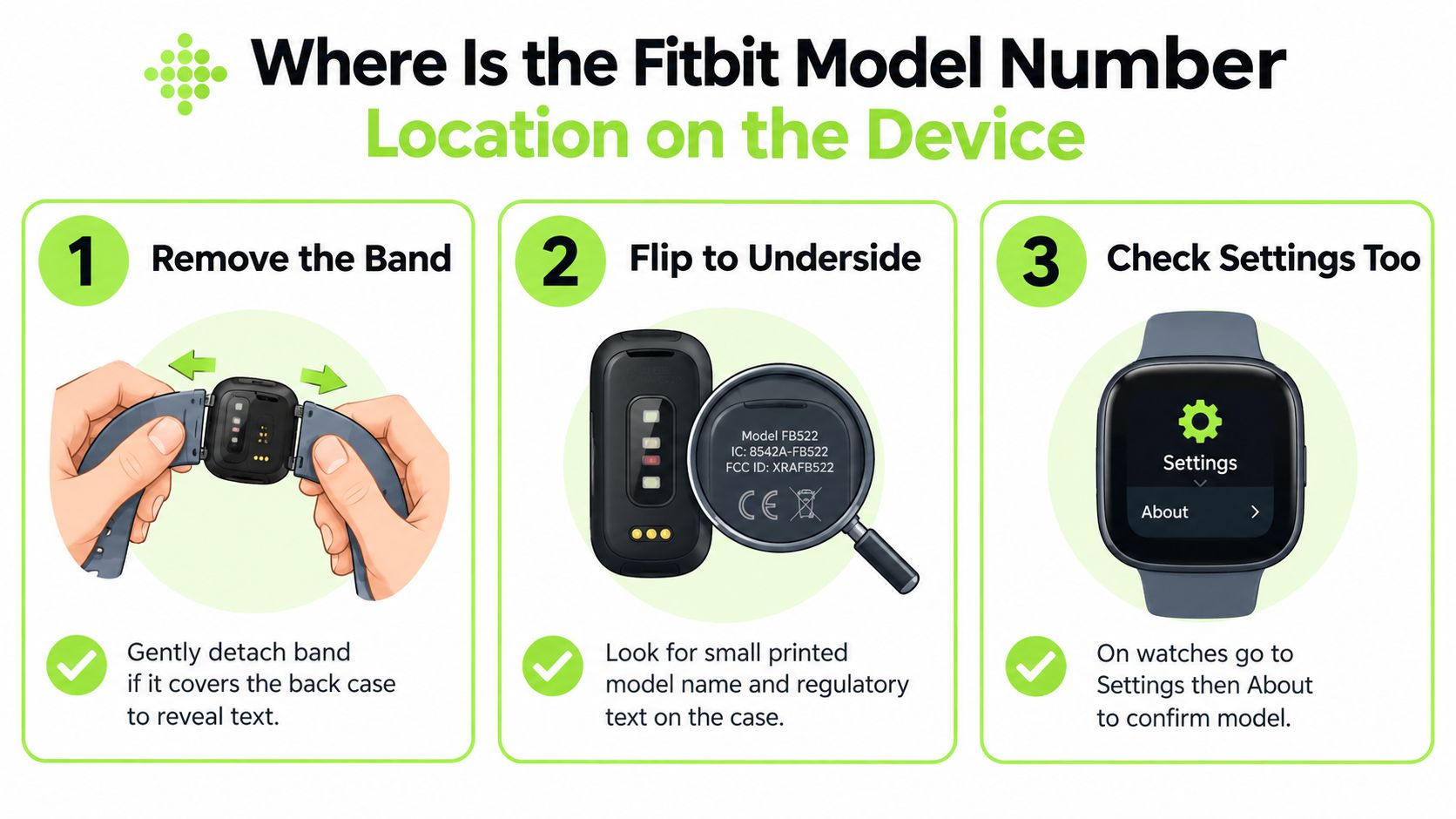
Turn the device over and inspect the back case rather than the band. If the strap covers part of the engraving, detach the band carefully using its release mechanism. The text is small by design, and sweat, skin oils, scratches, or years of handling can make it difficult to read.
How to inspect the case back
Use a bright lamp or your phone's flashlight, but angle the light across the surface instead of pointing it straight down. Side lighting often makes shallow printed or engraved characters easier to distinguish. Clean the case gently with a soft, dry cloth before reading it.
Look for model text, regulatory information, or a model identifier. Don't invent a model from an uncertain character sequence. If one symbol looks like a 3, 8, or B, record the full visible text and cross-check it against Fitbit support information rather than placing an order based on a partial guess.
The physical Fitbit identification guide from The Gadget Buyer recommends reading the device code on the case back rather than relying on photographs, because many models look almost identical from a short distance. Accessory geometry is worth a second look once you've done that: the shape of the attachment, pin mounts, clip mechanism, or slot style can help when the label is worn, but those details shouldn't replace a readable device name or code.
What if the engraving is worn off
Use the Fitbit app if the device still connects. If the app is unavailable, use the on-watch Settings, About, and Regulatory Info path where the device supports it. You can then cross-check the result with Fitbit's support lookup and documentation.
A partially visible case-back label doesn't justify guessing. Older devices may have been reset, paired with a different phone, or separated from their original packaging. The most durable identification record is the confirmed model name saved in your notes or purchase history, especially if you expect to replace bands again.
If the label is unreadable, don't let the band decide the model. A previous owner may have fitted an incorrect strap, and the existing band can be the source of the confusion.
Accessory geometry is still useful after the digital check. A narrow tracker with a clip-style connector points toward a Charge or similar tracker family, while a wider rounded-square case points toward Versa or Sense. But cosmetic similarities are common, and the exact band-end shape can differ within one visual family.
Once you have a model number, don't search by case color or screen size alone. Search the confirmed model name, then verify that the listing names that model explicitly.
How Can I Tell Which Fitbit I Have When Models Look Alike
You can tell similar Fitbit models apart most safely by combining the confirmed app or case-back identification with the device's shape, button treatment, screen appearance, and band attachment style.
The visual clues below are useful for narrowing the possibilities, not for making the final purchase decision. Charge models generally have a narrow vertical rectangle on a slim band, while Versa and Sense models have a squarish rounded case on wider bands. Luxe is a slim, jewelry-style tracker, but its proportions and attachment system separate it from Charge.
Fitbit look-alike families at a glance
| Model Family | Case Shape and Size | Button and Screen Cue | Band Attachment Clue |
|---|---|---|---|
| Charge 3 and Charge 4 | Narrow vertical tracker case on a slim band | Screened tracker format, with an inductive side button that answers with a vibration rather than a click | Shared Charge 3 and Charge 4 fitting, distinct from Charge 5 and Charge 6 |
| Charge 5 and Charge 6 | Narrow vertical tracker case, visually close to earlier Charge models | Charge 5 has no side button at all and is driven entirely by its touchscreen; Charge 6 brought a side button back, but it is a haptic button you squeeze rather than a protruding mechanical one | Shared Charge 5 and Charge 6 fitting |
| Versa and Versa Lite | Rounded-square smartwatch case on a wider band | Screened watch format; the original Versa carries three physical buttons, one on the left and two on the right, while Versa Lite has only the single left-hand button | Versa 1, Versa 2, and Versa Lite share a fitting |
| Versa 2 | Rounded-square smartwatch case | A single physical side button; the capacitive control treatment belongs to the later Versa 3, not to this generation | Uses the Versa 1, Versa 2, and Versa Lite fitting family |
| Versa 3 and Versa 4 | Rounded-square smartwatch case | Versa 3 replaces the protruding button with a recessed capacitive indent that buzzes when pressed; Versa 4 returns to a physical side button | Shared Versa 3 and Versa 4 fitting |
| Sense and Sense 2 | Rounded-square smartwatch case, closely related to Versa 3 and Versa 4 | Sense uses the same recessed capacitive indent as Versa 3; Sense 2 switched to a physical side button | Sense 1 and Sense 2 share the Versa 3 and Versa 4 fitting family |
| Luxe | Slim, narrow tracker with a more refined profile | Small colour touchscreen with no button at all | Dedicated Luxe attachment style, not the Charge fitting |
The table's most important distinction is not the color or bezel. It's the connector geometry. Pin placement, band-end shape, and the way the strap enters the case tend to be more useful than cosmetic details that can change with a case or replacement accessory.
A physical button can help separate generations, but don't treat the absence of a button as conclusive. Fitbit has used physical buttons, capacitive grooves, and button-free control treatments across related products, and a protective case can obscure the detail. Screen type and proportions narrow the options, but the app or underside text confirms them.
If you need to remove an existing strap before inspecting the connector, follow this guide to replacing a Fitbit band. The purpose is not to match the old band. It's to expose the case and verify the fitting that the new band must use.
Why photographs cause wrong orders
Product photographs often show the same case from an angle that hides the attachment points. A Versa and a Sense can look nearly identical in a seller's image, while Versa 1, Versa 2, and Versa Lite share a different fitting from Versa 3, Versa 4, Sense, and Sense 2.
The same problem appears within Charge. Charge 3 and Charge 4 resemble Charge 5 and Charge 6 at a glance, but their bands aren't interchangeable. Confirm the model name before comparing listings, particularly when a marketplace seller uses a broad “Fitbit Charge” title.
Inspire 2 versus Inspire 3 and Luxe versus Charge are also common visual mix-ups. Their narrow profiles can encourage a quick guess, but a narrow tracker shape doesn't establish band compatibility.
Does My Fitbit Band Fit Another Model
Confirm that both devices share the same fitting family before purchasing a replacement band. This model-to-band check prevents a close-looking case from leading to the wrong order.
Fitbit bands are model-specific rather than chosen by lug width alone. Many Fitbit families use proprietary attachment systems, so a band may appear similar yet fail to clip securely into the case. Wrist circumference alone won't resolve an incompatible connector, although the correct size still matters after the fitting has been verified.
The band-fitting families
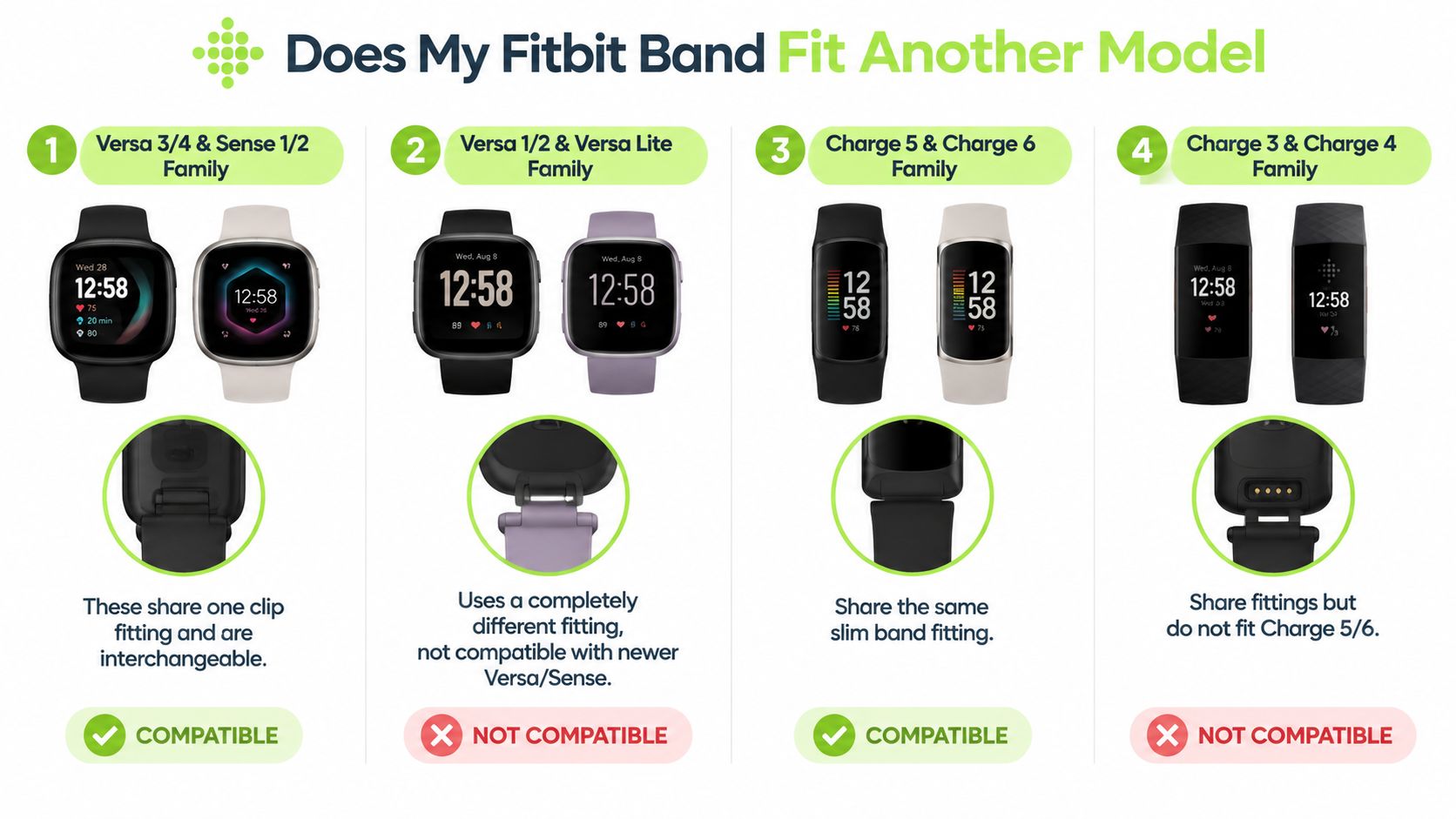
- Charge 5 and Charge 6: These models share band fittings.
- Charge 3 and Charge 4: These models share band fittings, but their bands do not fit Charge 5 or Charge 6.
- Versa 3 and Versa 4, Sense and Sense 2: These models share the same fitting family.
- Versa, Versa 2, and Versa Lite: These models share another fitting family, separate from Versa 3, Versa 4, and Sense.
The older and newer families can look related while using different attachment arrangements. Versa 1, Versa 2, and Versa Lite belong together, as do Versa 3, Versa 4, Sense, and Sense 2. Charge follows the same purchasing rule: Charge 3 and Charge 4 share a fitting, while Charge 5 and Charge 6 share another.
Size is a separate question
Replacement bands may come in small and large sizes. That selection concerns wrist circumference, not device compatibility. Measure around your wrist with a flexible tape, or wrap paper around it, mark the overlap, and compare the measurement with the seller's stated range.
A general watch band width chart applies to watches using standard attachment measurements. Use it as a width reference only. Fitbit's family-specific connectors still require the exact device name and a verified fitting match.
Use this order workflow:
- Confirm the device: Read the Fitbit app tile or case-back model text.
- Confirm the family: Match the model to Charge 3/4, Charge 5/6, Versa 1/2/Lite, or Versa 3/4 and Sense.
- Confirm the wrist size: Choose small or large after the fitting is correct.
- Confirm the listing: The description should name your exact Fitbit model or its verified shared family.
The most common Fitbit fit problem is selecting the wrong model family.
Shop Bands for Your Fitbit Model
Once you've confirmed the exact device, use the matching collection rather than browsing every Fitbit strap. These routes separate the families that are frequently confused.
- Shop Fitbit Charge 6 bands
- Shop Fitbit Charge 5 bands
- Shop Fitbit Charge 4 bands
- Shop Fitbit Charge 3 bands
- Shop Fitbit Versa 4 bands
- Shop Fitbit Versa 3 bands
- Shop Fitbit Versa 2 bands
- Shop Fitbit Versa Lite bands
- Shop Fitbit Sense 2 bands
- Shop Fitbit Sense bands
- Shop Fitbit Luxe bands
- Browse all Fitbit bands
For a Charge 3 or Charge 4, the Lurea Magnetic Milanese band is a specific example of why exact identification matters. It's made for that shared fitting family, rather than for every Charge tracker.
"Just got this Lurea Magnetic Milanese band for my Fitbit Charge 4, and wow, I'm loving it! It’s so easy to put on and take off with that magnetic closure—no fussing around like those buckle ones. The silver finish looks sleek; I've worn it with everything from casual tees to dressier outfits and it totally works. For the price, it's a solid buy since the quality feels top-notch; you can tell they really put some effort into the materials. No worries about it snagging or wearing out anytime soon either—definitely durable! Plus, who doesn’t love a bit of sparkle on their wrist? This one’s definitely worth every penny!"
Thomas Walker, verified buyer, Lurea — Magnetic Milanese — Fitbit Charge 3/4
A buyer on the other main Fitbit fitting family — Versa 3/4 and Sense 1/2 — describes the step that comes after the model is settled, which is sizing:
"This magnetic Milanese band is so nice! The light pink color is perfect and goes with everything. Plus, the quality feels solid and it’s held up well even after a few months of daily use. Had a little question about sizing, but the seller was super responsive and helpful — made the whole experience easy."
David Rodriguez, verified buyer, Nova — Magnetic Milanese — Fitbit Versa 3/4 & Sense 1/2
Nothing but Bands offers Fitbit replacement straps in materials including genuine leather, silicone, nylon, and Milanese stainless steel, with 100% secure checkout and a 30-day money-back guarantee. Check the device name first, choose the matching collection, then select the material and wrist size that suit how you wear your Fitbit.
Visit Nothing but Bands with your confirmed Fitbit model name ready. You'll find model-specific replacement bands in leather, silicone, nylon, and Milanese styles, so you can choose the correct fitting before selecting the look and size that suit your daily wear.
Related posts

- October 07, 2026
Discover why comfortable watch straps feel different. Learn the materials, closures, and fit rules that actually matter for Samsung Galaxy...

- October 06, 2026
Clear installation instructions for smartwatch bands. Learn how to attach, verify, and troubleshoot Apple, Samsung, Garmin, and Fitbit straps safely.

- October 05, 2026
A practical guide to changing watch bands across Apple, Garmin, Samsung, and Fitbit, covering tools, fitment, daily rotation, and common...


