


A grubby, sticky, or sour-smelling Galaxy Watch band needs a simple fix: remove the band from the watch, clean it according to its material, and dry it completely before refitting it. For rubber or silicone, Samsung's safest routine is a clean-water wipe with a soft cloth, followed by thorough drying. Keep soap, harsh cleaners, abrasives, heat, high-pressure water, and ultrasonic cleaning away from the watch and its strap unless the material and manufacturer guidance clearly allow otherwise. (Samsung's Galaxy Watch care guidance)
3 Key Takeaways: Cleaning a Galaxy Watch Band
Remove the band first: Keep water away from the sensors, charging contacts and seals.
Know your fitting: Galaxy Watch 4 to 7 use 20mm quick release. Watch Ultra and Watch 8 use Dynamic Lug.
Clean by material: Wipe silicone and metal often. Spot-clean fabric and leather, then dry fully.
The right removal method also depends on your Galaxy Watch. Galaxy Watch 4, 5, 6, and 7 use standard 20mm quick-release spring-bar straps, while Galaxy Watch Ultra and the Watch 8 series use Samsung's Dynamic Lug slide-and-lock system. Clean the band, lugs, and exposed case area separately, then replace the strap when cracks, stretched fabric, failed clasps, or permanent staining make cleaning a waste of time.
Table of Contents
- Why Your Galaxy Watch Band Stinks and What to Do First
- Which Galaxy Watch You Have Decides How the Band Comes Off
- Cleaning Silicone and Rubber Galaxy Watch Bands the Safe Way
- Cleaning Fabric, Nylon and Braided Galaxy Watch Bands
- Cleaning Milanese and Stainless Steel Galaxy Watch Bands
- Cleaning Leather Galaxy Watch Bands Without Ruining Them
- When Cleaning Will Not Fix It and How to Replace Smart
Why Your Galaxy Watch Band Stinks and What to Do First
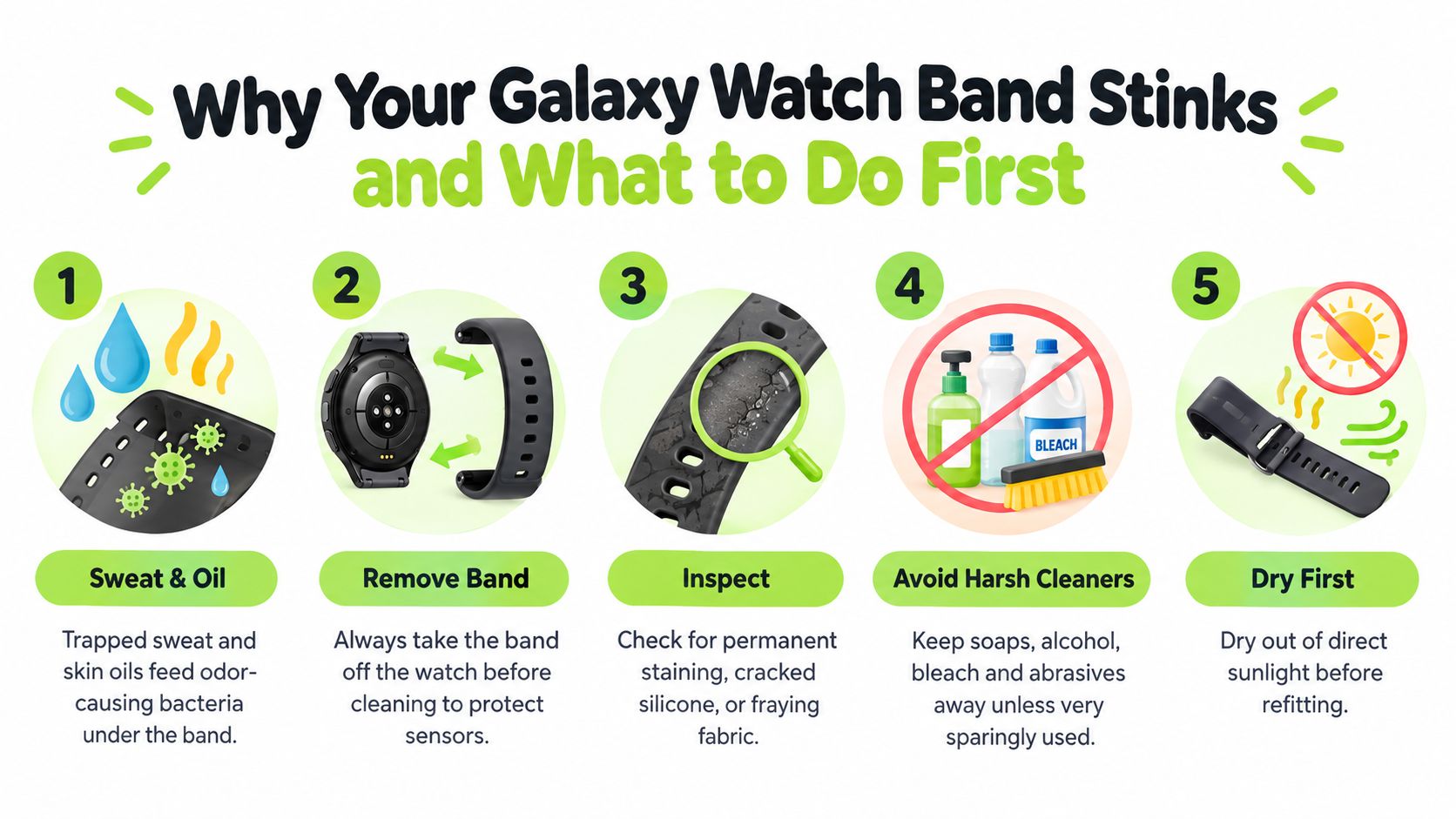
You notice the smell after a workout, a long commute, or a full day with the watch pressed against your wrist. Sweat, skin oils, sunscreen, hand lotion, and dead skin collect on the underside of a strap, especially where the material sits tightly against your skin. A band that stays damp for hours becomes unpleasant quickly, and grooves around the holes and lugs hold onto the residue.
The rule that protects your Galaxy Watch is simple: remove the band before using water. Keep liquids away from the sensors, charging contacts, speaker grille, seals, and case openings. Set the watch face-down on a soft towel, then inspect the exposed lug area or Dynamic Lug mechanism for grit before you start.
Build a safe cleaning kit
Start with a microfiber or other lint-free cloth, a soft-bristled toothbrush, cotton swabs, a small bowl of lukewarm water, and mild fragrance-free dish soap. You won't need all of those tools for every material, and Samsung's own care guidance is especially conservative with rubber and silicone. It advises clean water, gentle wiping, thorough drying, and avoiding soap, cleaning agents, abrasive materials, compressed air, ultrasonic waves, and external heat.
Before wet cleaning, dry-wipe the band to lift loose dust and surface grime. If you're dealing with odor rather than visible dirt, clean the whole band instead of treating only the smelly patch. The detailed routine in this guide to remove odors from watch bands follows the same principle, remove residue first, then dry the material properly.
Samsung also recommends cleaning the wrist and watch strap after exercise or sweating, rather than waiting for an occasional deep clean. In practice, wipe silicone and metal regularly, spot-clean fabric and leather when needed, and rinse a removable band promptly after sunscreen or saltwater exposure.
Which Galaxy Watch You Have Decides How the Band Comes Off
Galaxy Watch 4, Galaxy Watch 5, Galaxy Watch 6, and Galaxy Watch 7 use standard 20mm quick-release spring-bar straps, while Galaxy Watch Ultra and the Watch 8 series use Samsung's Dynamic Lug slide-and-lock system. Remove the strap according to that system, and don't pry against the case with a metal tool.
On a 20mm quick-release band, hold the watch body securely and find the small spring-bar lever on the underside of the strap. Press the lever inward toward the band, then slide the strap sideways out of the lug. Repeat on the other side. The smaller Galaxy Watch FE also uses the standard 20mm quick-release style, so check the exact model before ordering a replacement.
Dynamic Lug bands work differently. On Galaxy Watch Ultra and Watch 8 models that use the system, press the release button on the inside of the strap while sliding the band sideways. Don't treat that button like a spring-bar lever or try to lever the strap out from the case. Force can damage the internal release mechanism or scratch the watch.
| Galaxy Watch Model | Lug System | Removal Method |
|---|---|---|
| Galaxy Watch 4, 5, 6, and 7 | Standard 20mm quick-release spring bar | Press the small underside lever inward, then slide the strap sideways |
| Galaxy Watch FE | Standard quick-release spring bar | Press the spring-bar lever inward and slide the band out |
| Galaxy Watch Ultra | Samsung Dynamic Lug | Press the release button on the case-side of the strap and slide it sideways |
| Galaxy Watch 8 series | Samsung Dynamic Lug | Press the release button, then slide the strap sideways |
Fit check: Galaxy Watch 4, 5, 6, and 7 need a compatible 20mm quick-release strap. Galaxy Watch Ultra and Watch 8 Dynamic Lug bands aren't interchangeable with standard quick-release straps unless the specific product is designed for that connector.
If you need model-specific removal guidance, the Samsung Galaxy Watch 4 strap guide covers the spring-bar approach. After removal, clean both the strap and the exposed lug area, but keep moisture away from the watch body, sensors, and charging contacts.
Cleaning Silicone and Rubber Galaxy Watch Bands the Safe Way
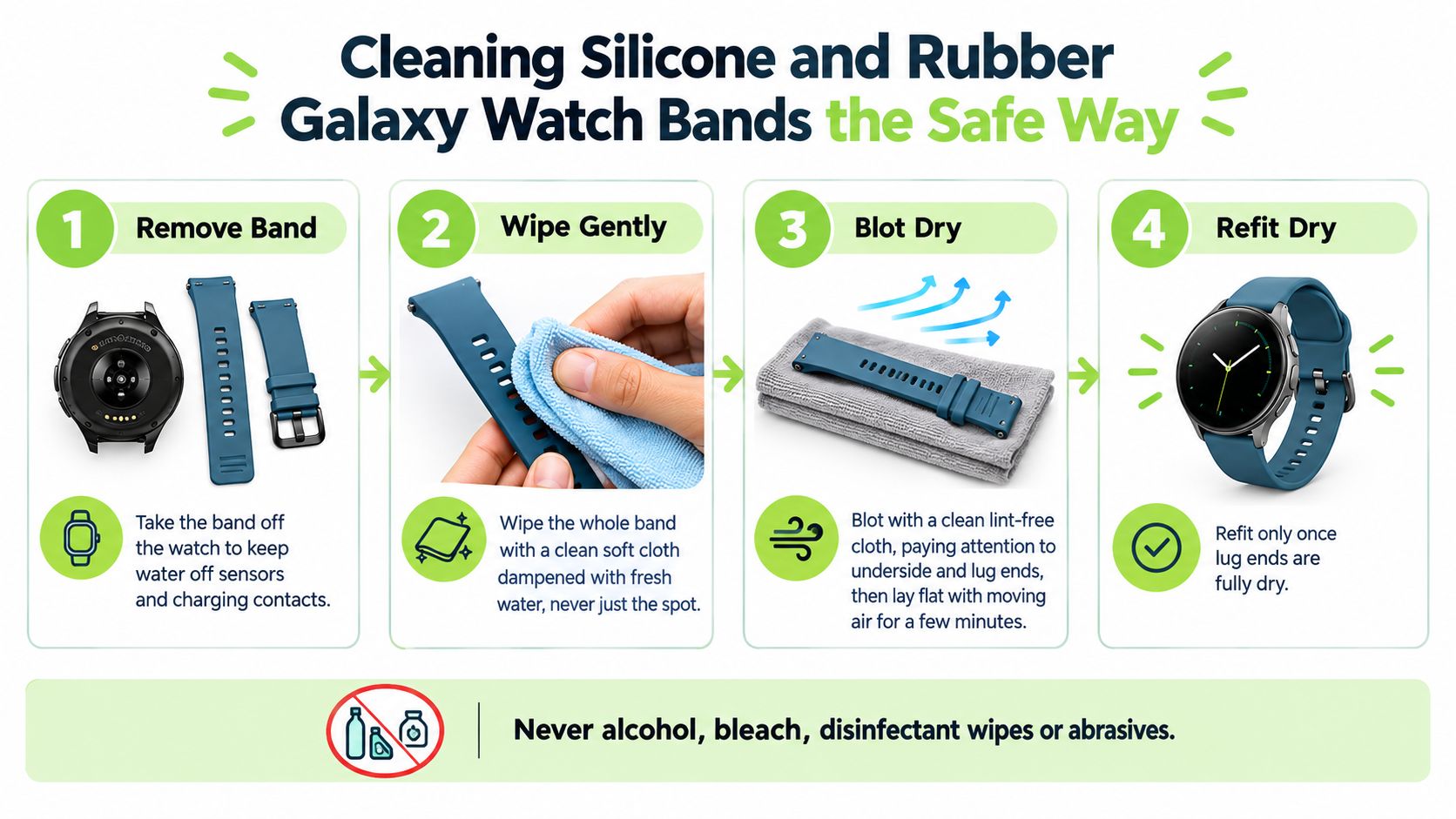
Samsung recommends wiping a rubber or silicone Galaxy Watch band with a clean, soft cloth dampened with fresh water, then drying it thoroughly before reattachment. Remove the strap first, rinse it briefly with lukewarm water if sweat or sunscreen has dried onto the surface, and wipe the entire band, including the inside groove and every hole. If the band is grimy, use the mildest unscented soap very sparingly on the removable strap only, rinse until no film remains, and don't put soapy water near the watch case. Samsung specifically warns against soap, cleaning agents, abrasives, compressed air, ultrasonic waves, external heat, high-pressure water, and ionised water.
A soft toothbrush is useful only on textured undersides and recessed grooves. Use light pressure, and don't scrub glossy finishes because even a soft brush can dull a surface over time. Skip bleach, rubbing alcohol, disinfectant wipes, abrasive sponges, dishwashers, and household solvents. Plain lukewarm water is the correct everyday answer for sweat, sunscreen, and hand lotion, and frequent gentle cleaning beats aggressive rescue jobs.
For a washable polymer band, a Florida Atlantic University wristband study found that Lysol Disinfectant Spray and 70% ethanol achieved a 99.99% kill rate within 30 seconds, regardless of the wristband material, but that result doesn't override Samsung's material-specific restrictions. (Prevalence and Disinfection of Bacteria Associated with Various Types of Wristbands) Don't apply a disinfectant to a Galaxy band because it worked on another wristband.
Blot the strap with a clean lint-free cloth, paying attention to the underside, holes, slots, and lug ends. Lay silicone flat in a ventilated area away from direct sunlight, and refit it only when the lug ends are fully dry. For the full material-specific routine, see how to clean a silicone watch band.
Cleaning Fabric, Nylon and Braided Galaxy Watch Bands
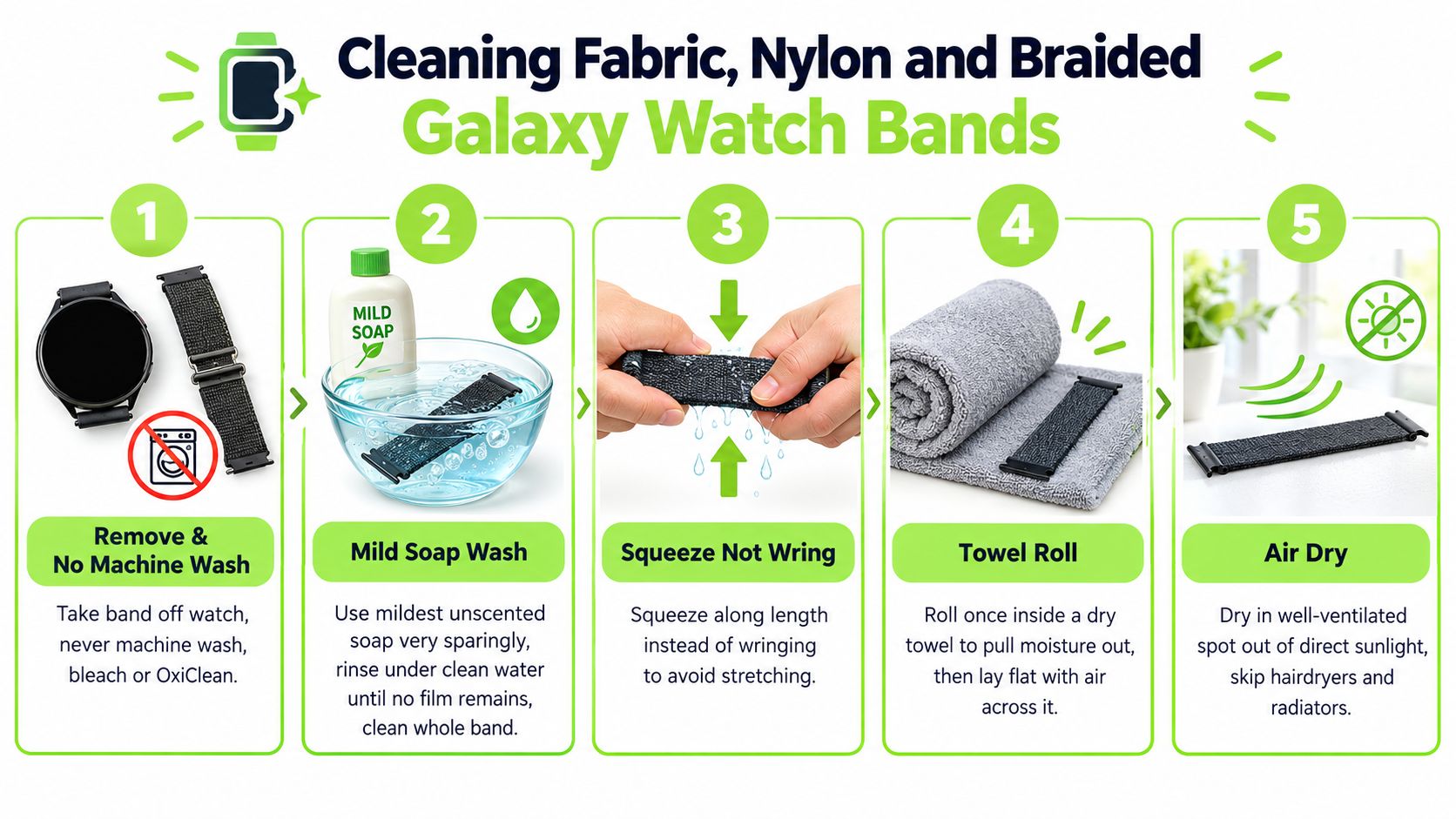
Clean a fabric, nylon, or braided Galaxy Watch band by hand with lukewarm water and a very small amount of mild unscented detergent, then rinse fully and air-dry it flat. Detach the band first, rinse it, and work the detergent into the weave with your fingers rather than attacking it with a stiff brush. A soft toothbrush can help lift sunscreen from a small area, but dab gently instead of scrubbing. Never use a washing machine, bleach, OxiClean, hot wash cycle, or dryer, because friction and heat can fray stitching, strip dye, shrink nylon, or leave the weave stiff.
Squeeze along the length of the band instead of wringing it. Roll it once inside a dry towel to pull out moisture, then lay it flat in a well-ventilated spot away from direct sunlight. This method is slower than blasting the strap with heat, but hairdryers, radiators, hot cars, and direct sunlight can distort fibers or weaken bonded sections.
Sunscreen and oily residue often leave a shadow in fabric even after grit has washed out. Clean the entire band, not just one visible spot, and rinse until the water runs clear and no detergent film remains.
Braided loop bands deserve a blunt warning. Once the loop stretches and stops holding the watch securely in the right position, washing won't restore the lost structure, and a replacement loop is the only real fix.
Cleaning Milanese and Stainless Steel Galaxy Watch Bands
Clean a Milanese or stainless steel Galaxy Watch band off the watch with a soft brush, mild diluted soap, a clean-water wipe, and thorough drying. Lay the band on microfiber cloth, mix lukewarm water with a small amount of mild unscented soap, and dip a soft-bristled toothbrush into the solution. Work down the Milanese mesh or between stainless links so loosened debris falls away from the clasp instead of being pushed deeper into it.
Use a damp lint-free cloth to remove residue, then dry with a second microfiber towel. Pay special attention to the magnetic Milanese clasp, the underside of links, and the connector ends. Moisture left inside a clasp or between links can lead to corrosion, staining, or a rough-feeling closure.
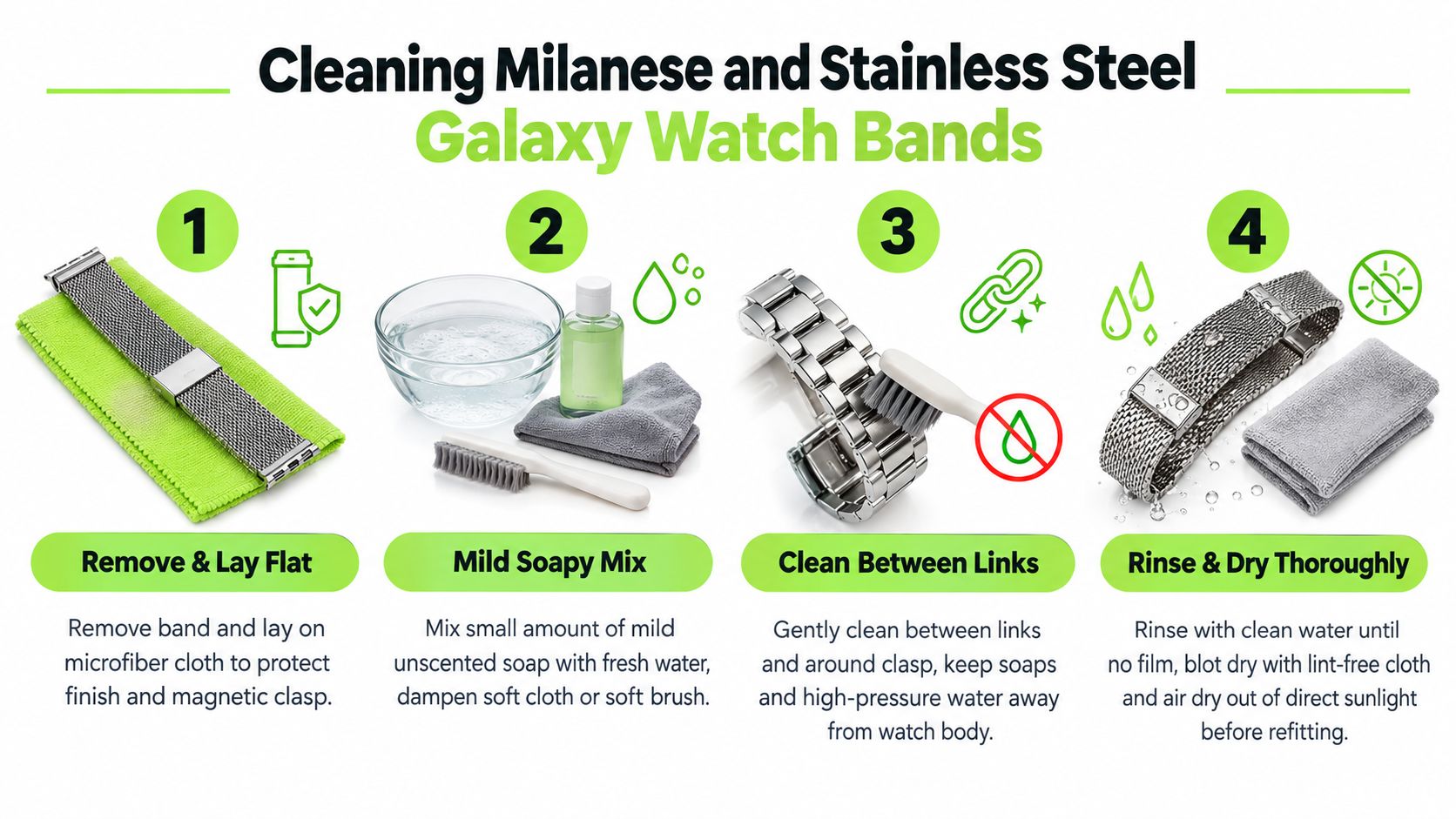
Don't soak the bracelet, use a polishing compound, or place it in an ultrasonic cleaner. Samsung's published strap care guidance lists ultrasonic waves, abrasive materials, high-pressure water, and external heat among the things to avoid. Stainless steel and mesh are more tolerant than leather or coated fabric, but that doesn't make the watch head safe in a cleaning bath.
Metal-band rule: Never push out Link Bracelet pins just to clean between links. Work around the installed pins with a soft brush, and leave any sizing or repair work to a suitable tool and a careful hand.
After cleaning, blot rather than rub aggressively, then air-dry the band away from direct sunlight. Keep the watch itself on the dry towel while you clean the bracelet, and don't reconnect it until every connector and clasp surface feels dry.
Cleaning Leather Galaxy Watch Bands Without Ruining Them
Clean a leather Galaxy Watch band with a dry or barely damp microfiber cloth, never by soaking it or washing it under a tap. Leather absorbs sweat and responds badly to household cleaners, saddle soap, alcohol wipes, abrasive pads, and prolonged moisture. Wipe the surface and edges after wear, then leave the band open in a ventilated room away from direct sunlight and heat.
A small amount of leather conditioner can help maintain flexibility when the product is suitable for the band's finish. Apply a pea-sized amount to a soft cloth, work it in lightly, and buff the surface dry after a short wait. Test an inconspicuous area first, because coated and finished leathers can react differently to conditioners.
Sweat stains are where people waste the most time. Dark wrist rings, edge darkening, and body-oil buildup often penetrate the leather, so repeated scrubbing only removes finish and makes the damage more obvious. Samsung's guidance keeps leather care cautious, telling you to clean a leather band with a soft, lint-free cloth rather than the clean-water routine it gives for rubber. (Samsung's Galaxy Watch care guidance)
Don't wear leather for gym sessions, hot yoga, pool use, or long sweaty days if you want it to keep its finish. Rotate to silicone or nylon for exercise, and reserve leather for dry daily wear. Once the underside has darkened, the keeper has cracked, or the strap feels stiff and brittle, replacement is more sensible than another cleaning attempt.
When Cleaning Will Not Fix It and How to Replace Smart
Cleaning only removes surface residue. It can't repair a strap whose material, stitching, clasp, or connector has failed. If the band still smells after a proper clean and complete drying, or the watch no longer sits securely, stop treating a structural problem like a hygiene problem.
Look for these replacement signals:
- Cloudy or cracked silicone: A cloudy finish may be permanent discoloration, while hairline cracks can spread under wrist tension. Clean water won't rebuild the surface or restore its flexibility.
- Stretched or fraying fabric: A nylon loop that no longer holds the watch centered has lost its shape. Loose stitching can continue unraveling even if the band looks clean.
- Darkened or cracked leather: Contact-point darkening, a cracked keeper, and stiff edges indicate sweat and wear inside the leather. More conditioner won't reverse broken fibers.
- Weak Milanese magnet: A magnetic clasp that no longer holds reliably is a security failure. Don't keep wearing it because the mesh itself still looks presentable.
- Damaged stainless links: Stripped pins, missing adjustment parts, or loose links require replacement or proper repair. A toothbrush can remove grime, not restore a connection.
| Band Type | Replace-Now Sign | Why Cleaning Fails | Smart Next Step |
|---|---|---|---|
| Silicone or rubber | Permanent staining, cloudiness, or cracks | The finish or structure has changed | Choose a compatible replacement and verify the connector |
| Fabric or nylon | Stretched loop or fraying weave | Fibers and stitching have lost their shape | Replace the loop rather than tightening it repeatedly |
| Leather | Dark contact points, cracked keeper, stiff edges | Sweat and oils have penetrated the material | Move workouts to silicone or nylon and replace worn leather |
| Milanese mesh | Magnetic clasp no longer holds | The closure has lost secure tension or magnetic performance | Replace the mesh before the watch can slip free |
| Stainless steel links | Stripped pins or missing adjustment hardware | Mechanical parts are damaged or absent | Replace the affected bracelet or use qualified repair |
A replacement also gives you a clean contact surface against the wrist and a strap that holds the watch in the intended position. That's useful for comfort and for keeping the back of the case clean, but a new band won't compensate for dirty sensors or damaged seals. Clean the watch case carefully with a barely damp cloth, keep water out of openings, and make sure the sensor area and charging contacts are dry before charging.
Compatibility is where many otherwise sensible purchases fail. Galaxy Watch 4, 5, 6, and 7 readers should look for the correct 20mm quick-release spring-bar connector. Galaxy Watch Ultra and Watch 8 owners should choose a band made for the Dynamic Lug system, with the release button and case connection designed for that model family. Don't assume a standard 20mm strap will seat flush on a Dynamic Lug watch.
Nothing but Bands offers a Samsung Galaxy Watch band collection for shoppers comparing replacement styles by model and material. Watch 8 owners can go directly to the Galaxy Watch 8 and Watch 8 Classic collection, while Ultra owners should use the Galaxy Watch Ultra band collection and confirm the Dynamic Lug fit before ordering.
The Vornis Silicone Sport Band for Samsung Watch Ultra is one example of a replacement option listed for that connector family. Shirley Martinez wrote, "The craftsmanship is spot on; no rough edges or weird smells that sometimes come with other bands." (Vornis Silicone Sport Band for Samsung Watch Ultra)
If your current band has only sweat, sunscreen, dust, or dried salt on it, clean it today and dry it properly. If it has cracks, permanent staining, stretched fabric, a failed clasp, or damaged pins, don't keep scrubbing. Buy the correct replacement for your Galaxy Watch's lug system, then keep the old strap out of rotation.
Visit Nothing but Bands to compare Galaxy Watch replacement straps by model, connector, and material. Choose a washable silicone or breathable nylon option for workouts, or select a metal or leather style for drier everyday wear, and verify the fit before placing your order.
Related posts

- October 06, 2026
Clear installation instructions for smartwatch bands. Learn how to attach, verify, and troubleshoot Apple, Samsung, Garmin, and Fitbit straps safely.

- October 05, 2026
A practical guide to changing watch bands across Apple, Garmin, Samsung, and Fitbit, covering tools, fitment, daily rotation, and common...

- October 02, 2026
Everything to know about the Coros Pace 4 nylon band including sizing, quick-release installation, cleaning tips, and compatible third-party options.

