


Choose a Pixel Watch if you use a Pixel phone and want Fitbit health tools; choose a Galaxy Watch if you use a Samsung phone or want the standard 20 mm band option available on selected Galaxy generations. The counterintuitive part is that the watch with more advertised health features isn't necessarily the watch that enables more of them on your phone.
Your phone, country and band connector matter more than a headline sensor count. This Pixel Watch vs Galaxy Watch guide treats Google and Samsung as product lines, not as fixed specifications that stay the same across every model.
Table of Contents
- Which Watch Should You Choose, Pixel or Galaxy?
- How Do Battery, Size and Water Ratings Compare?
- Which Health Tools Work on Your Phone
- Should You Pick a Pixel Watch?
- Should You Pick a Galaxy Watch?
- Do Pixel Watch and Galaxy Watch Share Bands?
- Which Band Material Should You Wear All Day?
- Frequently Asked Questions
Which Watch Should You Choose, Pixel or Galaxy?
The phone in your pocket narrows this choice more than either spec sheet does. Pixel Watch fits a Google-and-Fitbit routine; Galaxy Watch fits a Samsung Health routine, provided the exact watch supports your phone and the features you want are available where you live.
Your daily app settles most of the decision. If your activity history already lives in Fitbit, moving to Samsung Health for a longer feature list creates more work than value. If Samsung Health already holds your routines, buying a Pixel Watch asks whether you are willing to rebuild that habit inside Fitbit instead.
Sensor count is the wrong tiebreaker. The right watch is the one whose functions you can reach: no phone replacement, no coaching subscription you never wanted, no discovery after purchase that the band you prefer will not attach.
The checks that should decide your shortlist
- Your current phone: Confirm the exact phone and software requirements on the watch maker's page. A familiar brand pairing is a sensible starting point, not a substitute for checking compatibility.
- Your must-have health tools: Separate everyday activity tracking from regulated readings, coaching services and account-specific features.
- Your preferred band system: Decide whether you are happy buying model-specific bands or prefer a watch with a standard quick-release attachment.
If you are still deciding what you need from a smartwatch at all, find the right smartwatch for you lays out a broader checklist. Work through it before comparing individual watches.
Buying rule: Don't pay for a feature until you've confirmed that your phone, account and country let you use it.
Nothing but Bands sells replacement bands, not watches or trackers. We sell bands for the Galaxy side only; we sell no Pixel Watch bands.
That leaves a clear situational pick. Pixel Watch for the Google phone owner who already lives in Fitbit; Galaxy Watch for the Samsung phone owner who already lives in Samsung Health. Anyone outside those two camps should let the three checks above decide before a spec sheet does.
How Do Battery, Size and Water Ratings Compare?
Pixel Watch and Galaxy Watch battery, size and water specifications are model-specific, so compare the exact case and operating mode rather than assigning one specification to either product line.
Maker-stated Pixel Watch and Galaxy Watch differences
| Point | Pixel Watch (Google) | Galaxy Watch (Samsung) |
|---|---|---|
| Size options | Google's Pixel Watch 3 support information lists 41 mm and 45 mm cases. | Samsung's comparison page includes 40 mm, 44 mm, 46 mm and 47 mm examples. |
| Battery as the maker states it | Pixel Watch 3 is rated for up to 24 hours with always-on display and up to 36 hours in Battery Saver. Google lists 307 mAh for the smaller case and 420 mAh for the larger case. | Samsung doesn't publish one universal Galaxy figure. Its comparison page lists battery capacity per model and case size, and the figures differ between generations and cases. |
| Water and ruggedness rating | Check the exact model's rating and permitted activities on Google's support page. Don't copy another watch's rating. | Samsung lists 5 ATM, IP68 and MIL-STD-810H on several models, and 10 ATM, IP69K and MIL-STD-810H on another listed model. |
The Pixel figures above are Google's stated specifications for Pixel Watch 3; the Galaxy examples come from Samsung's official watch comparison page.
The visual comparison keeps those model boundaries in view.
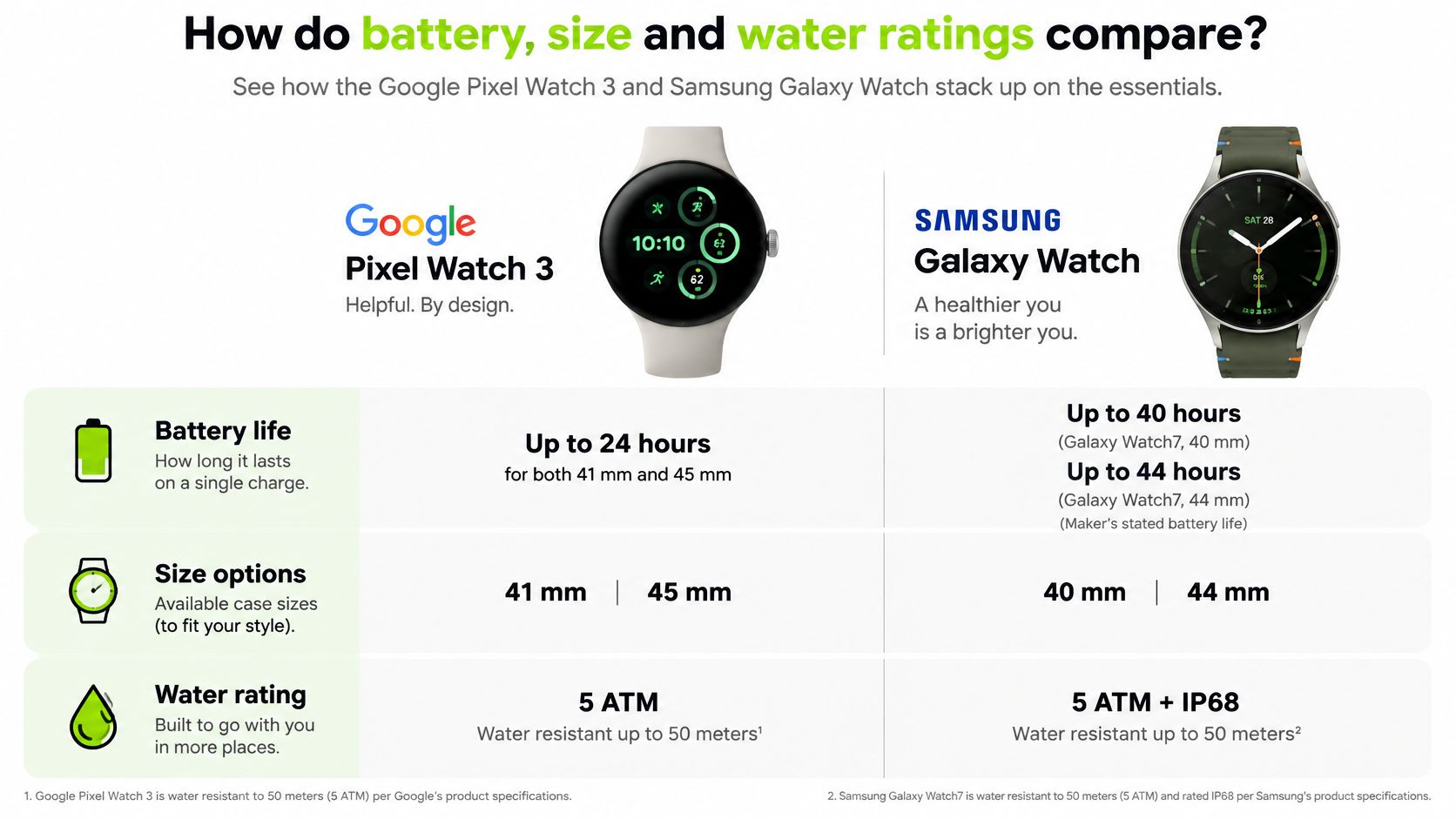
Compare the routine, not just the capacity
A battery's capacity doesn't tell you how long your own combination of workouts, notifications and overnight tracking will last. Nor does a Battery Saver claim describe the same experience as an always-on-display claim.
Before buying, write down your intended routine: display setting, outdoor workouts, overnight wear and opportunities to charge. Then check the maker's conditions for the exact model. If you want sleep tracking, an easy daytime charging window may matter more than a larger capacity on paper.
Treat water ratings just as carefully. Read the maker's activity restrictions and care guidance rather than translating a rating into permission for every water sport.
Don't transfer a specification between generations. A larger case, a rugged model and a standard model can belong to the same watch family while requiring quite different buying decisions.
Which Health Tools Work on Your Phone
A health spec sheet is the easy part. Whether a feature works for you is decided elsewhere: by the phone you pair, the account you sign into and the country you use it in.
Check Pixel Watch's Fitbit experience and Galaxy Watch's Samsung Health experience against your phone, your account and your country before you compare sensors. Owning the hardware does not grant the software feature. Four questions settle it: does the exact model carry the sensor, does the maker enable the feature where you live, does your phone meet the requirement, and does the service need a subscription.
Answer those four and the health decision stops being a tool count.
Health features by phone and account
| Check | Pixel Watch | Galaxy Watch |
|---|---|---|
| Best-matched phone | A Pixel phone is the natural Google-first shortlist. Confirm your exact phone and required apps with Google. | A Samsung phone is the natural Samsung Health shortlist. Confirm your exact phone with Samsung. |
| Tools that may be locked | Advanced Fitbit coaching can require Fitbit Premium. Confirm the included tools and current subscription terms. | ECG, blood-pressure measurement, irregular-heart-rate monitoring and sleep-apnea detection can require a Samsung phone and a supported country. |
| Sensors to read on the maker page | Check for optical heart rate, ECG-capable electrical sensors, SpO2, motion sensing, skin temperature and skin-conductance tracking on the exact model. | Check heart rate, blood oxygen, temperature and motion sensing. Read the exact model's GPS specification separately. |
| If you switch brands | One caution covers both directions: an export only proves you downloaded records. Whether the other platform can rebuild your dashboards, coaching history and goals is a separate question. | Verify any medical-style feature on the new watch-and-phone combination before you retire the old setup. |
For a concrete example, Android Authority's Pixel Watch 4 and Galaxy Watch 8 comparison identifies those Samsung-phone restrictions. Treat it as a prompt to read the maker's current eligibility and subscription pages rather than a fixed package for every model and market.
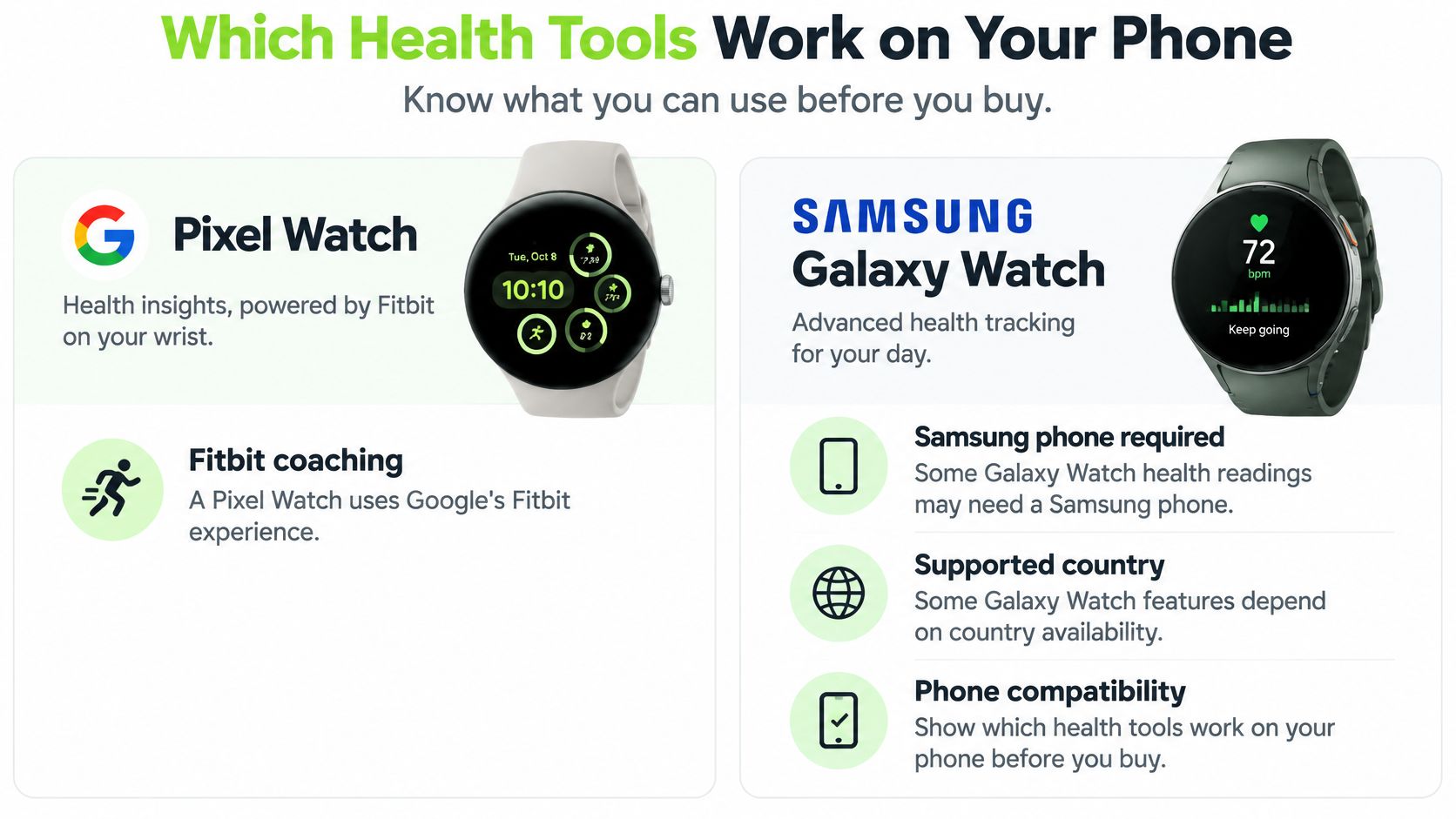
Hardware isn't the same as an enabled health feature
An ECG-capable sensor does not, by itself, establish that you can record an ECG on your phone in your country. The same gap applies to every medical-style function on the product page, including blood-pressure measurement and sleep-apnea detection: the page advertises the capability, while the eligibility rules decide your access.
For Galaxy Watch, read Samsung's local health-feature requirements rather than a product page aimed at another country. Look for the phone restriction, local availability and setup steps tied to the specific feature you want.
For Pixel Watch, separate recorded measurements from paid interpretation and coaching. If a coaching experience is your reason for buying, confirm what your account already includes and what the subscription costs once any included offer ends.
A sensor list alone produces no winner. A buyer who wants simple activity records gets little from an advanced coaching package, while another buyer will pay for structured guidance and never touch a medical-style reading.
Match the purchase to your actual situation
With the checklist answered, the pick is situational:
- Samsung phone, one specific Samsung feature: Galaxy Watch gets the first look when that function is the reason for the purchase.
- Pixel phone, an established Fitbit habit: Pixel Watch gets the first look if you want Fitbit continuity and accept the coaching terms.
- Another Android phone: Confirm the watch's pairing requirements and each must-have health function separately.
- A move between countries: Recheck regional eligibility before buying for a feature you expect to keep using after the move.
A genuine country-by-country answer lives on the makers' local eligibility pages. A universal yes/no chart would hide exactly the restrictions that matter, so do not substitute an overseas review for your local product and health pages.
Protect your health-history continuity
Changing watch brands is also an account decision. Before switching, check what each platform lets you export, which format the file uses and whether the destination platform imports it. Keep access to your original account until you have seen what remains available and what, if anything, transfers.
Keep the distinction clear: Downloading your records and continuing the same coaching experience are different outcomes.
One caution covers the whole decision: surface signals prove nothing about eligibility. A successful pairing and an equivalent-looking feature label can both mislead, and an ECG-capable replacement watch can still withhold the function because of your phone or your country.
Decide in this order: phone first, country-enabled features second, subscription terms third, sensors last. Once the health questions point to a watch, the band connector finishes the decision; on the Galaxy side, Nothing but Bands sells standard 20 mm and 22 mm quick-release bands plus dedicated bands named for Galaxy Watch 8 & 9 and for Galaxy Watch Ultra & Ultra 2.
Should You Pick a Pixel Watch?
A Pixel phone owner who already opens Fitbit every morning has the easiest decision in this comparison. Pixel Watch keeps your account, your dashboard and Google's services on one wrist, without asking you to adopt a second health platform.
Pick a Pixel Watch if Google and Fitbit already run your routine. The strongest buyer knows where they want to review their activity and wants a watch that supports that habit. Chasing every possible measurement is a weaker reason.
When the Google-first choice makes sense
- You want Fitbit continuity: Keeping your existing account and familiar dashboard matters more than adding a different platform.
- You value coaching: Inspect the included service carefully and pay for additional tools only if you will use them.
- You accept model-specific accessories: Choose bands by exact Pixel Watch size and connector instead of shopping by ordinary watch-band width.
Decide on charging before you buy. If you plan to wear the watch overnight, identify a regular daytime window when it can leave your wrist. A battery figure quoted for one operating mode does not describe continuous workouts, notifications and sleep tracking together.
Comfort decides whether the watch gets worn. A case that catches on cuffs or a band that pinches ends up on the charger, and a watch in a drawer tracks nothing.
Pick Pixel Watch for the Google-and-Fitbit routine it builds on your phone. It earns its place by fitting the apps and habits you already keep.
Skip Pixel Watch when a Samsung-specific health function is your main reason for buying. Reconsider it as well if reusing a collection of conventional quick-release straps is a firm requirement, because Pixel Watch bands are chosen by model and connector rather than generic width.
Nothing but Bands sells no Pixel Watch bands; our range covers the Galaxy side of this comparison. For a Pixel Watch, buy from a seller that identifies the exact supported Pixel Watch model and size.
Should You Pick a Galaxy Watch?
Pick a Galaxy Watch if you use Samsung Health, want an eligible Samsung health feature or prefer choosing among Samsung's different case and connector arrangements.
Galaxy Watch makes the clearest sense when Samsung is already part of your daily routine. Keeping your phone and health dashboard familiar can be more valuable than changing platforms for an isolated specification.
Case choice deserves attention, but don't automatically choose the larger watch. Try to balance screen readability, clearance under sleeves and how securely the watch sits without overtightening the band.
Choose the exact Galaxy, not just the family
For outdoor activity, read the model's location specification rather than assuming every Galaxy Watch uses the same hardware. Samsung states that Galaxy Watch7 uses dual-frequency GPS with L1 and L5 bands, which Samsung says improves positioning around obstructions such as dense buildings, on its Galaxy Watch7 product page.
That's a reason for an urban runner to consider that model, not a claim that we've measured better route accuracy. A useful shortlist still needs the right case fit, battery expectations and health-feature eligibility.
- Choose for Samsung Health: Make your required function and local eligibility explicit before ordering.
- Choose for physical fit: Compare the actual cases rather than treating maximum size as an upgrade.
- Choose for accessories: Identify the attachment system before deciding that an existing band collection will carry over.
If that generation is on your shortlist, check its band attachment before you buy; the Galaxy Watch7 takes standard 20 mm quick-release bands.
A Pixel phone owner shouldn't buy Galaxy Watch solely for a Samsung-restricted health reading. Confirm access first, then decide whether maintaining Samsung's health account alongside your other services is worthwhile.
Skip Galaxy Watch if your priority is staying with Fitbit and you don't want to manage a separate health platform. Samsung's range offers choices, but extra choices only help when you select the exact model that suits your routine.
Do Pixel Watch and Galaxy Watch Share Bands?
No, Pixel Watch and Galaxy Watch don't share bands: Google uses a slide-and-lock connector, while Samsung uses standard quick-release attachments on some generations and dedicated attachments on others.
That connector choice settles accessory compatibility before colour or material enter the decision. Two watches can sit in the same price bracket and still accept completely different straps.
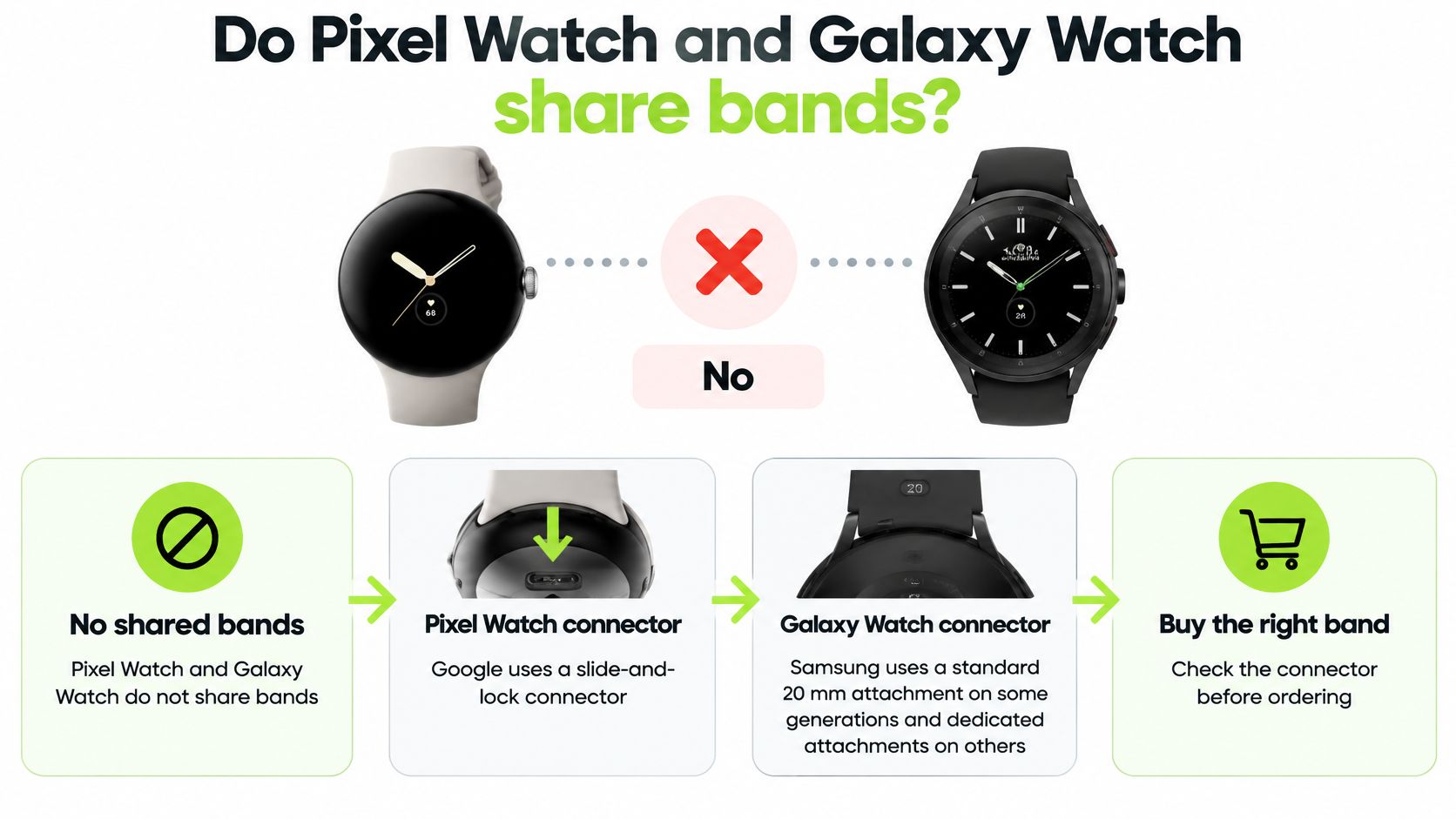
Which band connector each watch line uses
| Watch line | Connector | What fits | Nothing but Bands |
|---|---|---|---|
| Pixel Watch | Google slide-and-lock, not ordinary lugs | Exact-size Pixel bands. Google's size guidance distinguishes the smaller Pixel bands from the larger Pixel Watch 3 band line. | None: we sell no Pixel Watch bands |
| Galaxy Watch4 through Watch7 | Standard 20 mm quick release, as identified in Samsung's compatibility guidance | Matching 20 mm quick-release bands | Standard 20 mm quick-release bands |
| Galaxy Watch8 and Watch8 Classic | Dedicated attachment for those models in Samsung's compatibility guidance | Matching Watch8/Watch8 Classic bands, not standard 20 mm straps | Dedicated bands named for Galaxy Watch 8 and 9 |
| Galaxy Watch Ultra | Dedicated Ultra connection | Matching Ultra bands, not Watch8 bands | Dedicated bands named for Galaxy Watch Ultra and Ultra 2 |
Google's size guidance states that 41 mm bands don't fit the 45 mm Pixel Watch 3. Pixel Watch won't take ordinary lug-style straps either, so choose a band listed for your exact Pixel Watch size.
Check the model before the band name
Open the watch's settings and record the exact model. Then match connector format, attachment width where applicable, and wrist range against the individual listing before ordering.
We carry standard 20 mm and 22 mm quick-release bands, and those widths are not interchangeable. A standard 20 mm band won't attach to a Galaxy Watch8 just because both products carry the Galaxy name.
Browse the Samsung Galaxy Watch bands collection or the Galaxy Watch 8 and 8 Classic bands collection only after identifying your connector. Collection names aren't a substitute for confirming an individual listing's exact model fit.
For an Ultra-specific example, the Zelro Silicone Sport Band is named for Galaxy Watch Ultra & Ultra 2. A model-specific listing proves fit for those models only, so don't extend it to another Galaxy generation.
The Galaxy range also covers older Galaxy, Active and Gear families, each with its own attachment history. The band connector you accept is part of the watch decision itself, so confirm it before you shop.
Which Band Material Should You Wear All Day?
For Pixel Watch or Galaxy Watch, pick nylon for soft all-day wear, silicone for sweaty routines, or Milanese mesh for fine adjustment and a smarter look. Whichever material you choose, buy the connector that fits your exact watch. The right material on the wrong attachment is useless.
Our Galaxy range covers silicone, nylon, stainless steel, leather and Milanese, so treat material and attachment as two separate decisions. Settle the material first using the guidance below, then confirm the connector on the individual listing.
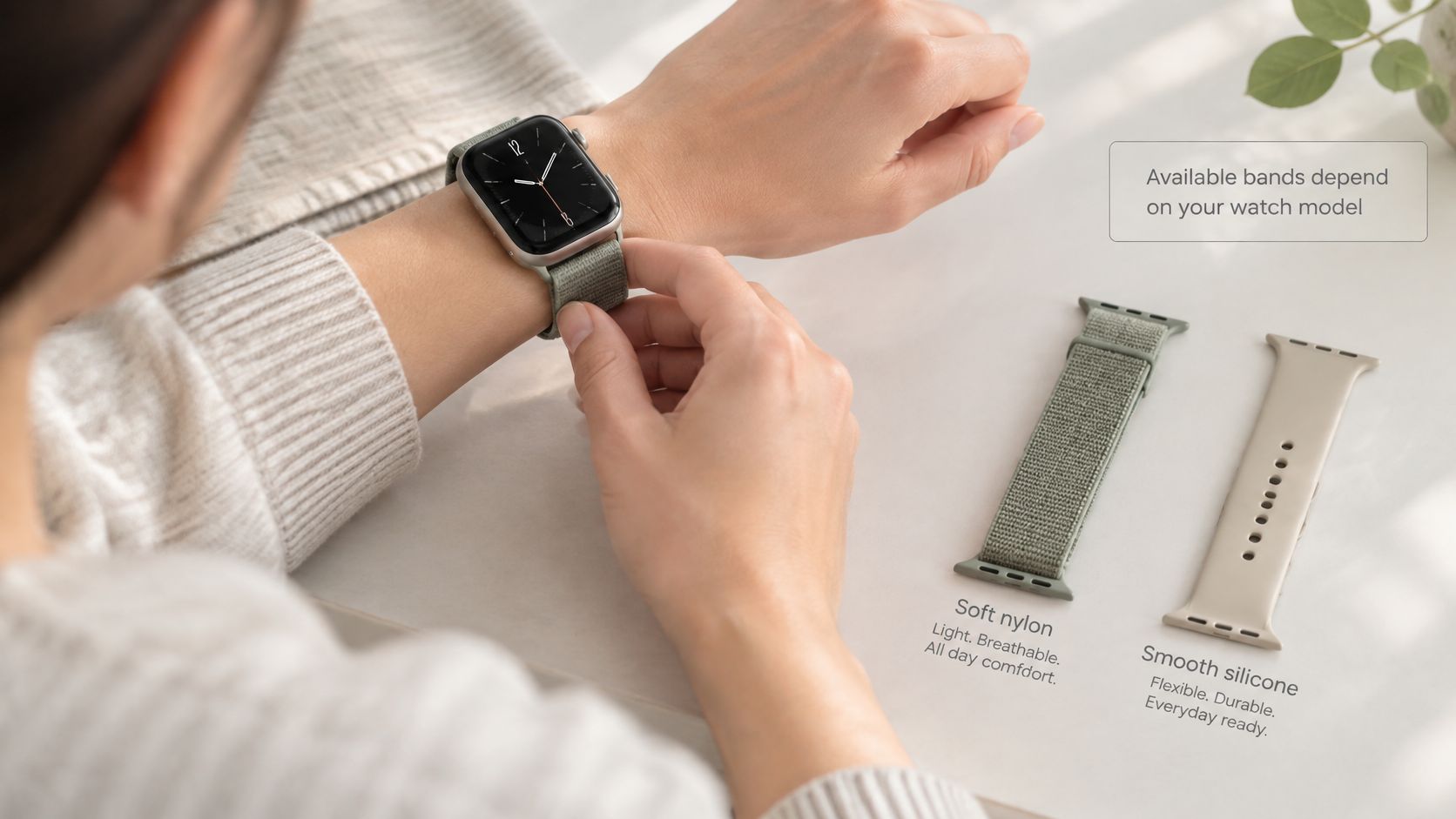
Choose for the part of the day that causes discomfort
A nylon loop is the right starting point if a rigid strap bothers you at a desk or in bed. Pick a flexible weave and an adjustment range that keeps the watch centred without pressing into your skin.
Silicone suits workouts because the material doesn't absorb sweat. You still need to remove and clean a sweaty band, dry your wrist and let everything dry before putting the watch back on. Tightening a band over trapped water doesn't solve the problem.
Magnetic Milanese mesh allows small fit adjustments through the day and pairs well with smarter clothing. Mesh holds water between its links, so give it time to dry rather than putting a damp band straight back against your wrist.
If your main decision sits between easy cleanup and a softer fabric feel, weigh how often the band gets wet against how much you value a soft weave.
Match those materials to your connector
Named listings tell you the model, not just the material. For Galaxy Watch 8 and 9, the Rovan Magnetic Silicone Sport Band covers workouts, and the Oryn Magnetic Milanese is the smarter-wear alternative; confirm the exact attachment on that listing rather than assuming it carries over to other Galaxy generations. Galaxy Watch Ultra and Ultra 2 owners get a dedicated silicone option in the Vornis Silicone Sport Band.
Attachment size isn't wrist length. A band can connect correctly and still sit too loosely to hold the sensor against your wrist.
Check the stated wrist range, keep the watch snug without pinching, and take off a damp band until it's dry. Pixel Watch owners should apply the same comfort rules but buy elsewhere, from a band explicitly listed for their exact Pixel size; we sell no Pixel Watch bands.
Frequently Asked Questions
Should I Buy the Watch or Choose the Band First?
Pick the watch first, but check its connector before you pay. A Galaxy Watch 6 buyer accepts standard quick-release pins and shops a wide band range, while a Galaxy Watch 8 buyer should confirm the dedicated attachment listed for that generation. If you dislike the attachment system a model uses, choose a different model rather than hoping a workaround appears later.
Can a Different Band Fix an Uncomfortable Watch Case?
No. A band changes flexibility and adjustment range, never the case's shape or dimensions. If a Galaxy Watch Ultra presses into your wrist even at a sensible fit, swapping to silicone will not solve it. Move to a smaller Galaxy case, or reconsider the Pixel Watch, instead of cycling through straps.
Do I Need Separate Bands for Exercise and Everyday Wear?
One band is enough for most owners. A spare earns its place if you train daily: wear silicone on a Galaxy Watch 8 for workouts and keep a Milanese ready for the office, so a damp strap never has to double as evening wear.
Once you have picked a model, match the band to its exact attachment and your wrist size. Nothing but Bands carries replacement bands for Samsung Galaxy Watch models, not Pixel Watch, so confirm the connector on the listing before choosing your everyday or workout band.
Ähnliche Beiträge

- November 10, 2026
Learn how to fix a watch strap that is loose, popped off, stuck or torn, and when replacing it is...

- November 06, 2026
Compare Garmin watches for women by case size, style and use, from everyday and running to outdoor and health, with...
