


A loose, popped-off or stuck watch strap usually comes down to a spring bar, an unlatched connector or a dirty channel, which you can put right at home; replace torn, cracked or permanently stretched straps, and replace bent attachment hardware rather than reshaping it.
Is the strap broken, or has the part holding it to the watch stopped doing its job? That distinction is the starting point for learning how to fix a watch strap without damaging the case or trusting an attachment that could release again.
Table of Contents
- Which Strap Failure Are You Dealing With?
- Does a Replacement Strap Fit My Watch Model?
- How to Refit a Spring-Bar or Quick-Release Strap
- How to Fix a Loose, Stuck or Non-Closing Bracelet
- What to Avoid When Fixing a Strap
- Should You Repair or Replace a Damaged Strap?
- Frequently Asked Questions
Which Strap Failure Are You Dealing With?
A loose or detached watch strap usually needs an attachment check, a stuck strap needs careful cleaning, and a strap with failed material needs replacement. Diagnose the point of failure before buying a band or reaching for a tool.
Take the watch off and place it on a cloth. Look at where the movement happens: between the case and strap, inside a bracelet link, at the clasp, or through the strap material itself. A sound strap with a displaced pin is a different repair from leather tearing around the buckle.
The first thing we check when a band drops off is the spring bar. A band can look broken when one end of the bar simply hasn’t seated in the watch’s lug hole. Inspect it, refit both ends securely, and give the band a gentle pull before wearing it. A damaged or bent spring bar needs replacement. If the strap material, watch lug or locking connector is cracked, reseating the band won’t solve the underlying problem.
Strap symptoms, likely causes and whether to repair
| Symptom | Likely cause | Fix at home or replace |
|---|---|---|
| Strap pops off with one end free | Spring bar not fully seated in the lug hole | Fix at home: refit the bar |
| Quick-release strap looks attached but never clicked | Connector not latched into the watch | Fix at home: reseat until it clicks |
| Band will not slide out of the lug or channel | Dried sweat, sunscreen or soap residue in the channel | Fix at home: clean before any force |
| Bracelet feels too loose | Too many links for the wrist | Fix at home: use available micro-adjustment or remove a link |
| Clasp will not close | Dirt in the clasp, or a bent tongue | Clean at home; replace if bent |
| Link pin loose or missing | Pin pushed out or worn | Reseat with a pin pusher, or replace the pin |
| Leather torn at a hole or buckle bend | Material failure | Replace the strap |
| Silicone split at a hole or keeper | Material failure | Replace the strap |
| Stretch weave no longer springs back | Elastic fatigue | Replace the strap |
A click is useful feedback, but it isn't proof that the entire attachment is secure. Check whether the strap sits level and whether the connector moves independently of the case.
Safety rule: A strap that looks attached isn't necessarily locked.
A watch strap that keeps releasing after a correct refit may indicate case or connector damage rather than a defective band. Stop wearing the watch and check the maker's support guidance or arrange professional inspection before trying another band.
Does a Replacement Strap Fit My Watch Model?
A replacement watch strap fits only when both its attachment width and connector format match your exact watch model. Confirm those details on the watch maker's support page before repairing the attachment or ordering a replacement.
Case diameter isn't strap width. Galaxy Watch3 45mm, Galaxy Watch 46mm, Gear S3 Frontier and Gear S3 Classic take 22mm bands, while Galaxy Watch4 to Galaxy Watch7 take 20mm quick-release bands whatever their case size, and Galaxy Watch8 models use Samsung's own Dynamic Lug connector instead; confirm your exact model on Samsung's support pages. A 20mm strap isn't interchangeable with a 22mm strap: the narrower strap leaves side-to-side clearance rather than providing the intended fit.
Check the attachment itself, not just how similar the replacement looks.
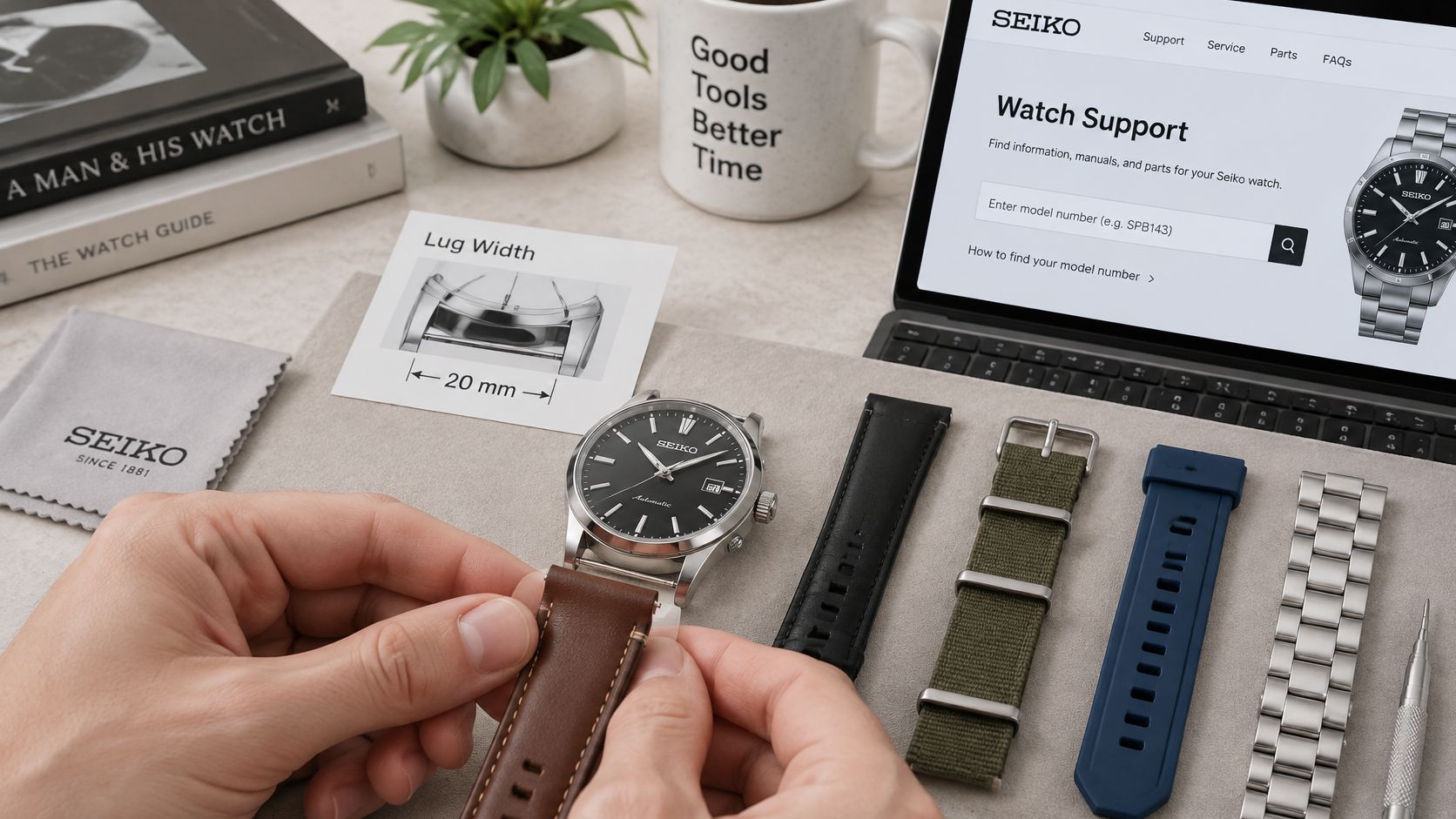
Check width and connector separately
For conventional lugs, measure the inside distance between the lugs, not the outside case edges. For a smartwatch, also note the exact model and case size, which are usually printed on the watch back; check the maker's identification guidance if you can't locate them.
Brand names alone aren't enough:
- Apple Watch: Bands fit by case-size family, not lug width. The smaller family covers 38, 40 and 41mm cases plus the 42mm case on Series 10 and 11; the larger family covers the original 42mm case (Series 1 to 3), 44, 45 and 46mm cases and the 49mm Ultra. Check Apple's band compatibility guidance for your exact case.
- Fitbit: Charge, Versa and Sense use different release mechanisms. Charge 5 and 6 share fittings, Charge 3 and 4 share theirs, Versa 3, Versa 4, Sense and Sense 2 share one fitting, and Versa, Versa 2 and Versa Lite share another, so identify the exact model before buying.
- Garmin: QuickFit comes in 20, 22 and 26mm widths and latches into the watch; it isn't interchangeable with ordinary quick-release spring bars, and not every Garmin uses QuickFit.
A band that doesn't match the watch shouldn't be forced into place or modified to fit. Use our Watch Band Finder to help identify the required size, then verify the connector format against the maker's model-specific guidance.
How to Refit a Spring-Bar or Quick-Release Strap
For an ordinary spring-bar strap, gather a double-ended spring-bar tool with forked and pointed ends, a soft nonabrasive cloth and a clear bench surface. Work with the watch face-down so an accidental slip is less likely to mark the visible lug surfaces.
The sequence below keeps fit verification and retention checks separate.
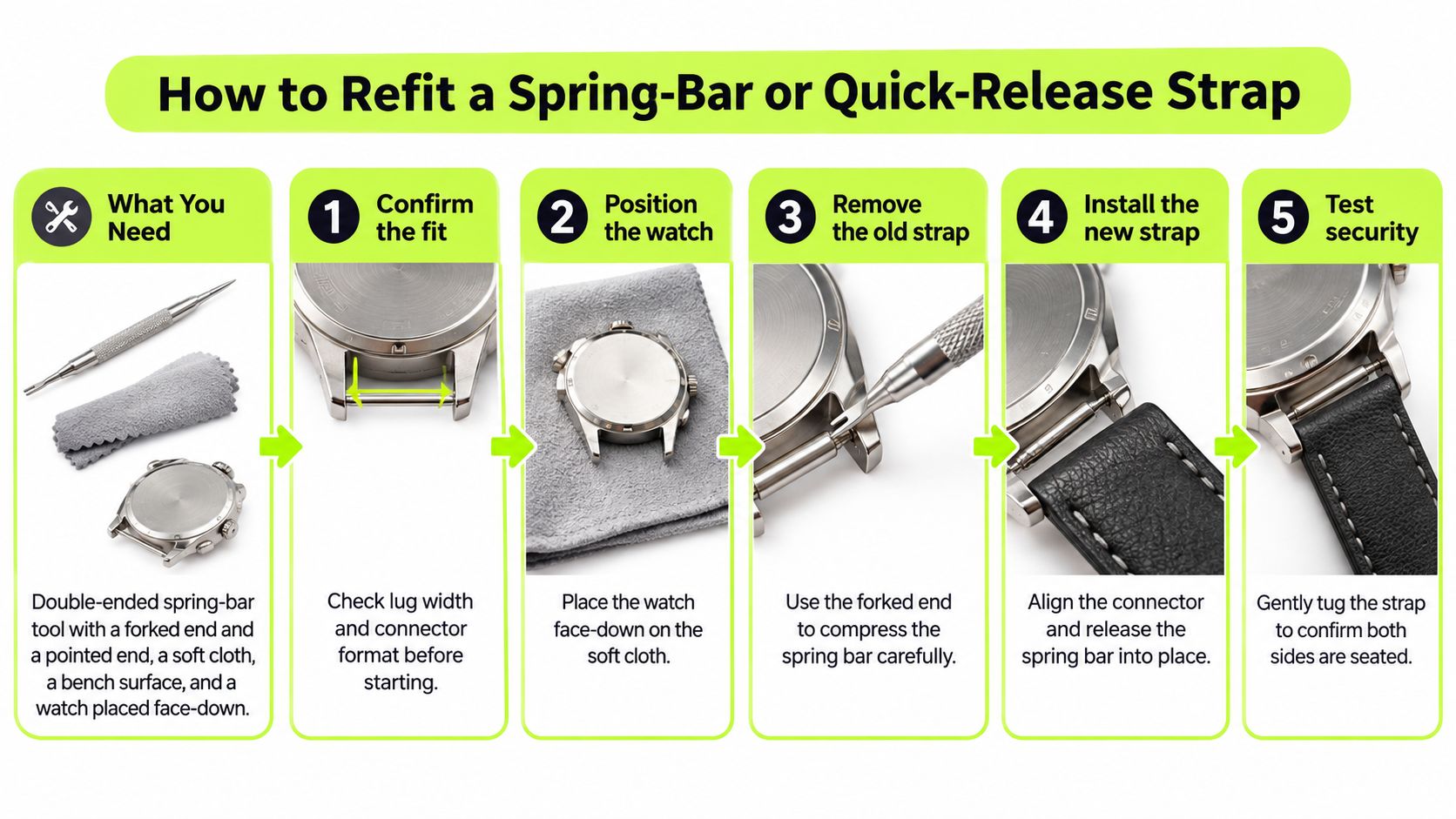
Refit an ordinary spring-bar strap
- Confirm the fit and orientation. Check the lug width and inspect the strap opening for damage. On conventional watches, the buckle section normally belongs at 12 o'clock and the longer adjustment section at 6 o'clock.
- Lay the watch face-down on the cloth. Keep loose hardware in a shallow tray so a dropped bar doesn't disappear across the bench.
- Seat the spring bar. Insert the bar fully through the strap and seat both tips in their lug holes with the forked end of a spring-bar tool; our guide to using a spring-bar tool covers tool positioning. Don't substitute force for correct seating.
- Inspect the attachment from the case back and the sides. The strap should sit level, with neither bar tip resting against the outside of its receiving hole.
- Finish with a controlled pull-test. Hold the watch over the cloth and pull the strap firmly but without jerking, checking several directions. Partial seating is the common trap: a bar can look installed while a tip sits against the lug instead of inside its hole.
Fit a quick-release attachment
Retract the release mechanism, align the attachment ends with their receiving holes or guide slots, and release the mechanism without twisting the strap. Inspect the connection and finish with the same controlled retention check. Huawei's strap replacement instructions reinforce the importance of aligning the attachment correctly and checking that it's secure.
An audible click doesn't replace inspection. If the slider doesn't return, the attachment stays crooked, or the strap pulls free, remove it from use rather than repeating the motion harder.
Work over a protected surface, not over a tiled floor or while the watch is already on your wrist.
Tool-free attachment systems don't need the forked-tool procedure. Apple Watch slide-in bands, Garmin QuickFit bands and many quick-release or Milanese attachments use their own release controls; follow the instructions for that exact connector.
Watch the fitting motion before handling a small spring bar if the mechanism is unfamiliar.
How to Fix a Loose, Stuck or Non-Closing Bracelet
Start with a proper pin pusher and bracelet holder, a soft brush or old toothbrush, a soft cloth, and warm water with a drop of mild soap where the material's care instructions permit it. Don't immerse the watch or assume its water-resistance rating allows cleaning chemicals.
A loose bracelet, a migrating pin and a clasp that won't latch need different treatment. Cleaning comes first because residue can hide the actual fault.
- Clean accessible channels and clasp recesses. Use a lightly dampened soft brush to lift dried sweat, sunscreen and soap. Keep moisture away from materials or watch components that shouldn't get wet, remove soap residue and dry thoroughly before testing.
- Check whether the clasp offers micro-adjustment. Use that for a small fit correction, following the clasp's design; some mechanisms adjust without tools, while spring-bar micro-adjust holes require a suitable tool.
- Resize only when necessary. For a larger correction, use the correct pin pusher and bracelet holder, keeping the clasp reasonably centred beneath the wrist. For the link removal itself, follow our guide to removing links from a watch strap.
- If a link pin is loose, identify the retention system before reseating it. A split pin, screw or pin-and-collar assembly needs its matching parts; a missing collar won't be fixed by pushing the pin harder.
- Check the clasp after cleaning. A tongue that remains misaligned, bent or cracked needs replacement, not repeated bending.
Separate cleaning problems from damage
An expandable metal stretch bracelet is shortened with its own stretch-band link removal method, never by cutting; permanently stretched textile elastic is a material problem instead.
Discolouration can come from sunscreen, denim transfer, grime or worn coating. Cleaning may remove deposits, but it won't restore missing finish.
Skin irritation also isn't automatically a defective strap. A dermatology review of allergic contact dermatitis from personal electronic devices, fitness watches included, lists (meth)acrylates, metals and rubber compounds among the reported allergens and notes that friction, sweat and prolonged skin contact can raise the risk.
Remove the watch if redness, burning or itching develops, clean and dry the contact surfaces, and don't rewear it until the skin settles. Persistent, spreading, painful, blistering or recurrent symptoms warrant medical evaluation.
What to Avoid When Fixing a Strap
A good fix ends with a strap that stays seated when you tug it and a watch case unchanged. The risky shortcuts are the ones that trade holding power for a tidy look.
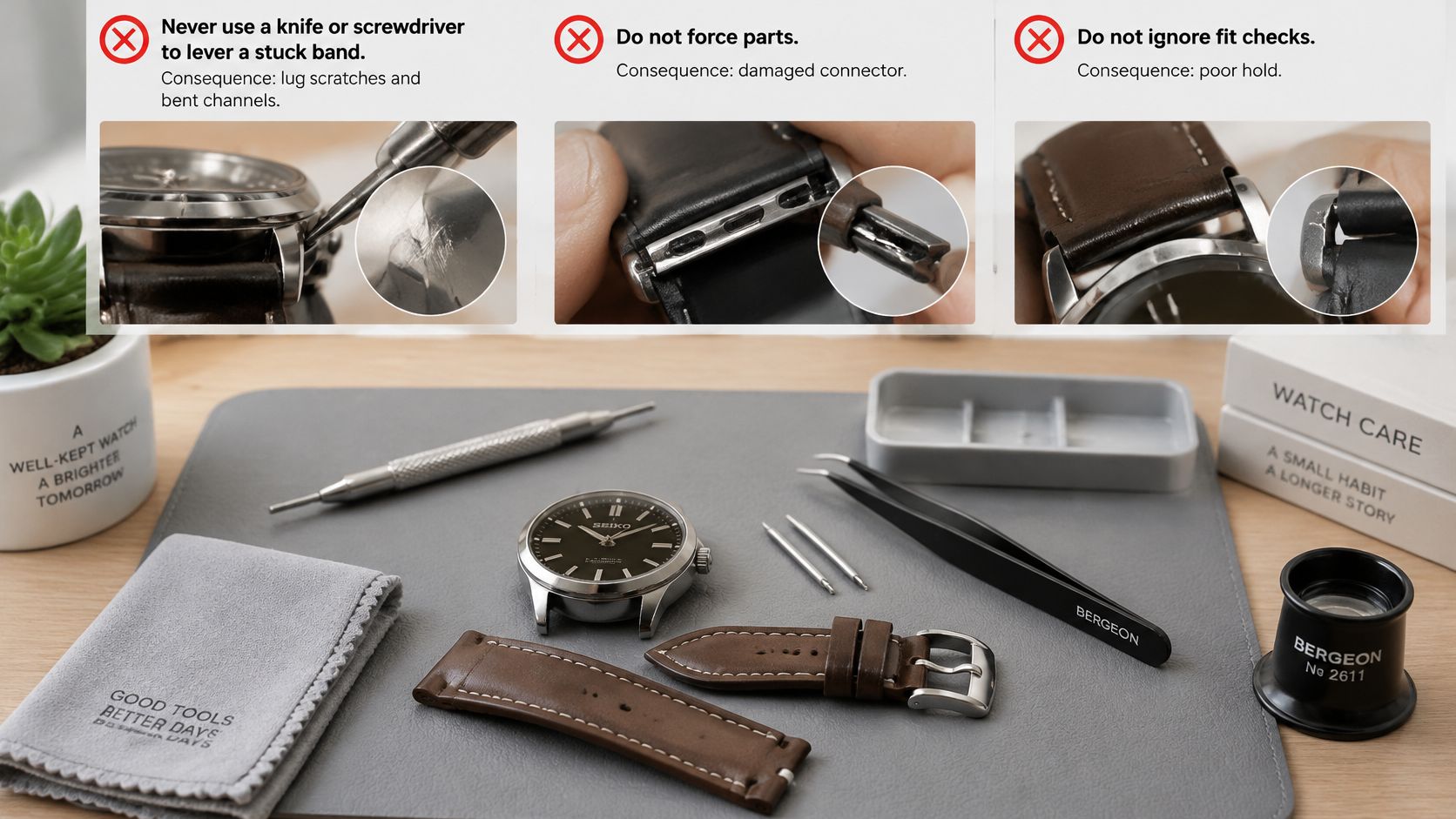
- A stuck band calls for the release path it was designed for. Forcing it out with a knife or screwdriver can scar the lugs, deform the channel, or put the blade in your hand.
- Improvised punches turn small hardware jobs into case damage. A nail, screwdriver or pliers can drive a spring bar or link pin off line and burr the hole that has to hold it.
- Leave the case geometry alone. Drilling, filing or stripping the lugs to make the wrong attachment fit removes the surfaces the strap depends on.
- Glue can tidy a tear, but torn leather and split silicone still cannot carry load at the lug or buckle. A neat bond leaves the weak material around the attachment unchanged.
- A new hole punched beside a torn one has the same weakened leather around it. Move the buckle to a sound hole or treat the strap as worn out.
- A band that releases again after correct seating is telling you to inspect the connector, release control and channel before blaming the strap.
Practical limit: Stop when the next step requires changing the shape of the watch rather than servicing the strap.
A slide-in Apple Watch band is its own job, separate from a spring-bar repair: our guide to a stuck Apple Watch strap covers it, and a release control or channel that looks damaged needs service.
Should You Repair or Replace a Damaged Strap?
Repair a watch strap when a serviceable part has come loose; replace the failed component or the entire strap when its clasp, connector or fastening can no longer hold securely. A replaceable bar doesn't condemn a sound strap, and a cosmetic patch doesn't save a failed one.
Use the condition of the load-bearing parts to make the decision.
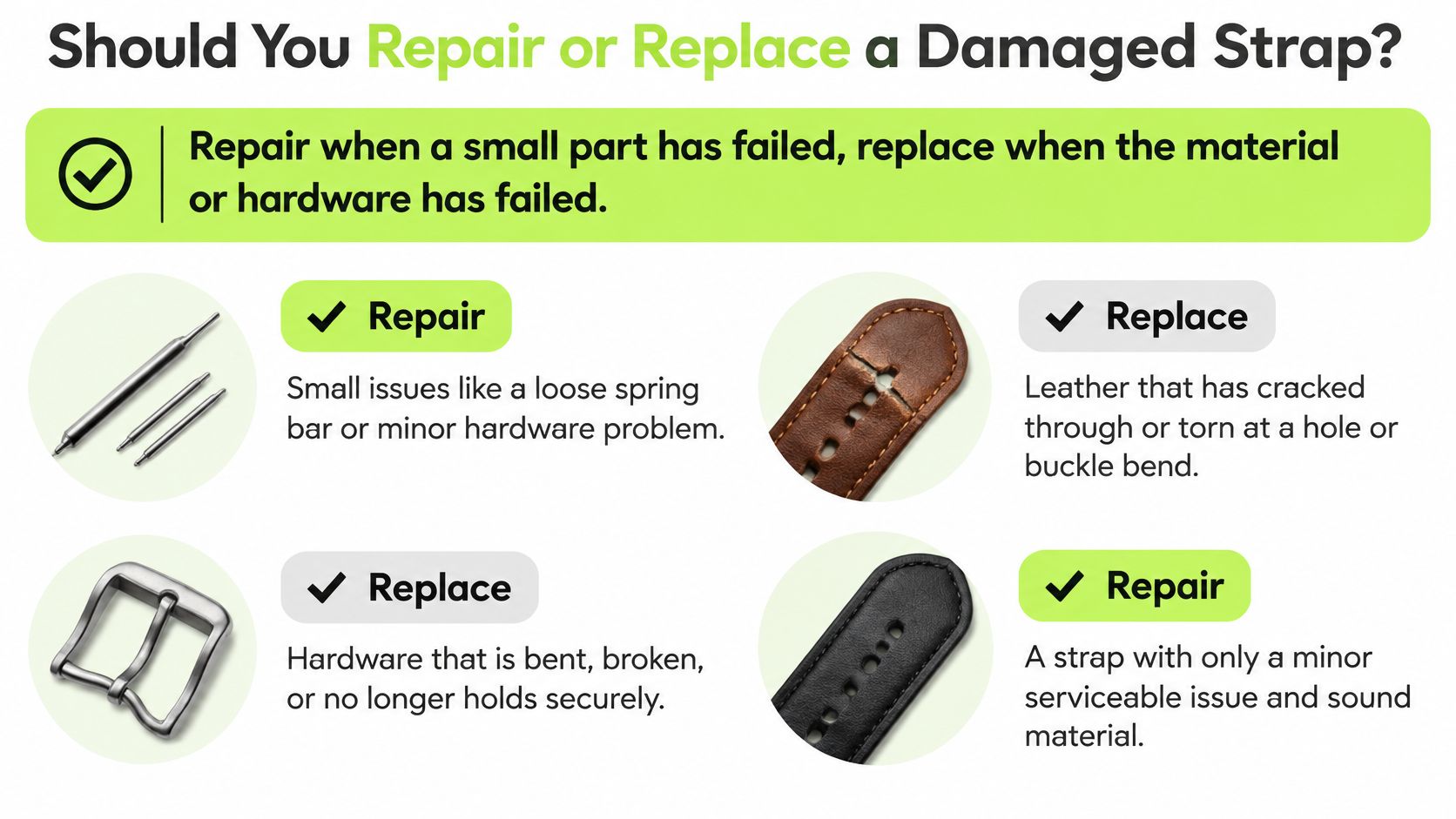
The verdict, component by component
| Component condition | Sensible action |
|---|---|
| Dry leather with intact fibres and stitching | Care for it with a suitable leather conditioner |
| Release mechanism stiff with deposits | Clean it and re-test before replacing anything |
| Link pin, collar or screw that no longer stays seated | Replace the fastener |
| Broken clasp or failed magnetic closure | Replace the closure if serviceable, otherwise the band |
| Cracked, bent or non-locking connector | Replace the connector assembly or strap |
| Strap that keeps releasing after new parts are fitted | Suspect the lug or channel, and seek service |
Conditioning keeps dry leather supple; it does nothing for fibres that have already failed. Tightening a fatigued elastic band can disguise slack in the same way, improving the fit on the wrist without restoring the recovery the weave has lost.
For spring bars, check whether the removed bar still springs back, and replace it if it doesn't or is damaged. A bar that bends, remains compressed or fails to rebound isn't worth transferring into a replacement strap.
After fitting the replacement, check that both strap halves are installed and each bar is centred within its strap opening. Apply a gentle pull before wearing rather than assuming fresh parts guarantee correct installation. If a correctly fitted strap still releases, treat the case as the suspect, because a connector that will not hold against a damaged lug or channel will keep failing with every band you fit.
When replacement is the answer, compare matching widths and connector formats in our watch bands collection, or in our quick-release watch bands collection for watches with conventional lugs, rather than choosing by appearance alone.
Frequently Asked Questions
Can I wear a watch strap repaired with tape?
A watch strap held together with tape shouldn't be trusted for wear because tape doesn't restore its load-bearing attachment. Use tape only to contain loose pieces during storage or transport, with the watch off your wrist.
Does changing a watch strap affect the watch's water resistance?
Changing a conventional external watch strap doesn't normally require opening the watch case, but a strap replacement doesn't verify the watch's water resistance. Follow the watch maker's guidance before swimming or exposing the case to water.
What should I take to a watch repairer?
Take the watch, both strap halves and any loose pins, collars, screws or clasp pieces. Explain whether the failure happened during wear or installation so the repairer can check the relevant retaining surfaces.
Nothing but Bands sells replacement watch bands and offers a Watch Band Finder to help you identify the right width and connector. Have your exact watch model and attachment details to hand when the existing strap is no longer safe to repair.
Ähnliche Beiträge

- November 09, 2026
Pixel Watch vs Galaxy Watch: see who should buy which Android watch, how phone and health tools differ, and why...

- November 06, 2026
Compare Garmin watches for women by case size, style and use, from everyday and running to outdoor and health, with...
