


Keep the Galaxy Watch 7 if you want Samsung's established health basics and you already own standard 20 mm quick-release bands you want to keep using. Choose the Galaxy Watch 8 if you want a thinner case, a brighter screen for outdoor reading, and Samsung's newer sleep and running tools, knowing that Galaxy Watch 7 and Galaxy Watch 8 bands do not swap.
Popular advice treats a higher model number as an automatic upgrade. For Galaxy Watch 7 vs 8, that shortcut misses the point. Both watches do the daily jobs buyers get a smartwatch for, and both share more under the surface than the names suggest. The actual decision is narrower, and one part of it, the strap connector, can cost you a drawer of bands if you ignore it.
Table of Contents
- Who Should Buy the Galaxy Watch 7 or the Galaxy Watch 8
- How Do the Galaxy Watch 7 and Galaxy Watch 8 Specs Compare
- Is the Galaxy Watch 8 Battery Bigger in Real Use
- Does the Galaxy Watch 8 Feel Faster or Better Day to Day?
- Which Galaxy Watch Fits Your Routine?
- Do the Galaxy Watch 7 and Galaxy Watch 8 Share Bands
- Which Band Material Fits Workouts, Office Days, and Sensitive Skin?
- Galaxy Watch 7 vs 8 FAQ
Who Should Buy the Galaxy Watch 7 or the Galaxy Watch 8
Your answer comes down to two questions: which hardware gap you would notice, and whether your current bands still fit. This comparison uses Samsung's published specs and your existing strap collection, so the verdict follows from what Samsung prints, weighed against what you already own.
The published figures show how close these watches sit. Same case sizes, same processor, weights that barely move. What separates them is a brighter screen, a thinner case, a small battery bump, and Samsung's newer wellness tools, plus a connector change that decides whether your straps carry over.
Why the Choice Isn't About Case Size
Both lines come in 40 mm and 44 mm cases, so diameter alone doesn't separate the generations. A smaller wrist doesn't push you toward one model, and a larger wrist doesn't push you toward the other. Pick the case size that sits comfortably, then decide the generation on other grounds.
The shared processor explains why the felt differences sit elsewhere. Day to day, you're comparing a slimmer case under a cuff, easier reading in bright sun, and updated sleep and running tools. If you track training through a phone-based smartwatch fitness app, that workflow carries across either watch, so it shouldn't drive the hardware pick.
Same chip, different strap system. That single line explains most of the Galaxy Watch 7 vs 8 decision.
Plan on two separate decisions. First choose the watch for your routine. Then choose bands for that watch's connector, because a Galaxy Watch 7 strap and a Galaxy Watch 8 strap never interchange.
How Do the Galaxy Watch 7 and Galaxy Watch 8 Specs Compare
The published gaps that matter in Galaxy Watch 7 vs 8 are battery capacity, case thickness, peak brightness, and the band connector, since the chipset name matches on both watches. Samsung lists the Galaxy Watch 8 at 8.6 mm thick in both sizes against 9.7 mm for the Galaxy Watch 7, according to Samsung's Galaxy Watch model comparison, which also lists the same processor, dual-frequency GPS and water rating for both. Weight shifts by about a gram between generations, so the meaningful physical change is thickness. Samsung's Galaxy Watch 8 buying guide rates peak brightness at 3,000 nits against 2,000 nits for the Galaxy Watch 7.
The figures below come from those two Samsung pages, with the rated-use line from Samsung's Galaxy Watch 8 product page:
Galaxy Watch 7 and Galaxy Watch 8 specs as Samsung publishes them
| Spec | Galaxy Watch 7 | Galaxy Watch 8 |
|---|---|---|
| Case sizes | 40 mm and 44 mm | 40 mm and 44 mm |
| Band connector | Standard 20 mm quick release | Dynamic Lug, fits Galaxy Watch 8 and Galaxy Watch 8 Classic only |
| Battery, 40 mm | 300 mAh | 325 mAh |
| Battery, 44 mm | 425 mAh | 435 mAh |
| Rated use Samsung lists | Check Samsung's page for your exact variant | Up to 30 hours with Always On Display on |
| Case thickness | About 9.7 mm | 8.6 mm |
| Weight | 28.8 g (40 mm), 33.8 g (44 mm) | 30 g (40 mm), 34 g (44 mm) |
| Peak brightness | 2,000 nits | 3,000 nits |
| Processor | Five-core Exynos W1000, 3 nm | Five-core Exynos W1000, 3 nm |
| GPS | Dual-frequency GPS | Dual-frequency GPS (L1 and L5) |
| Water rating | 5 ATM, IP68 and MIL-STD-810H | 5 ATM, IP68 and MIL-STD-810H |
How to Read This Table
Read it like two trims of the same car. The engine, a five-core Exynos W1000, is identical, and the curb weight nearly matches too. The rows that steer a purchase are the ones that differ: a slimmer case, a brighter screen, a modest battery bump, and a connector that decides whether straps you already own still fit. Newer wellness tools live in software, so a spec table like this one flatters the older watch.
One cell stays deliberately general: confirm the Galaxy Watch 7's hourly rating on the product page for your exact Bluetooth or LTE variant. Resist converting the Galaxy Watch 7's milliamp hours into hours of use, because capacity is not a promise of endurance.
Three rows deserve a second look before you buy:
- Band connector: the row that decides whether your current straps survive the switch.
- Peak brightness: the row that matters most if you read the watch outdoors.
- Case thickness: the difference your cuff and your wrist will notice first.
Is the Galaxy Watch 8 Battery Bigger in Real Use
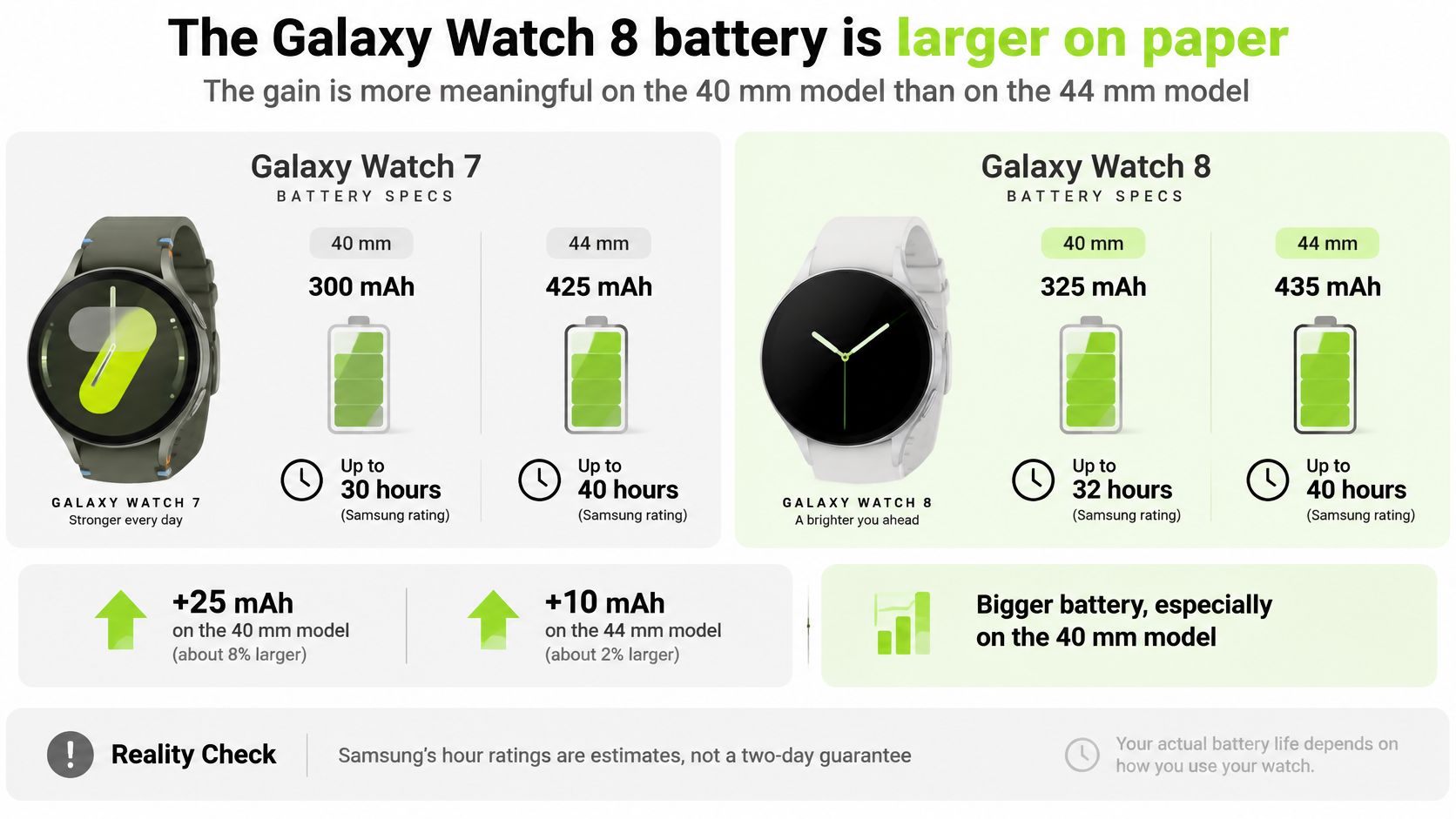
Yes, the Galaxy Watch 8 battery is larger than the Galaxy Watch 7 battery on paper, and the gain is more meaningful on the 40 mm Galaxy Watch 8 than on the 44 mm Galaxy Watch 8, but Samsung's hour ratings are estimates rather than a two-day guarantee. Treat the numbers as a head start, not a promise about your specific week.
The Capacity Math in Plain Terms
Samsung's comparison data, shown on Samsung's Galaxy Watch 7 page, puts the 40 mm Galaxy Watch 8 at 325 mAh against 300 mAh for the 40 mm Galaxy Watch 7, an increase of 25 mAh or about 8.3%, and the 44 mm Galaxy Watch 8 at 435 mAh against 425 mAh, an increase of 10 mAh or about 2.4%. Read that as two different stories. The smaller watch gets a noticeable percentage bump. The larger watch gets a modest one.
That distinction shapes who should care. If you're choosing the 40 mm size because it suits your wrist, the Galaxy Watch 8 gives you proportionally more in reserve than the Galaxy Watch 7 did at that size. If you're choosing the 44 mm size, don't buy the Galaxy Watch 8 for battery alone, because a step that small can disappear inside one bright afternoon.
What Actually Drains Either Watch
Milliamp hours describe the size of the tank. Your settings decide how fast you empty it. These are the levers that change the result most:
- Always On Display: Keeping the face lit all day costs far more than raising your wrist to wake it.
- GPS workouts: A long outdoor run or ride recorded on the watch draws steadily the whole time.
- LTE use: A cellular connection away from your phone works harder than a Bluetooth link to a phone in your pocket.
- Brightness: A screen pushed up for direct sun drains faster than one left on automatic indoors.
- Sleep and health tracking: Wearing the watch overnight spends charge you'd otherwise recover on the charger.
Say you're a commuter who wants a full working day, an evening workout, and overnight sleep tracking before charging. The Galaxy Watch 8 gives you a better chance of finishing that stretch without a top-up, especially in the smaller size. But stack an LTE connection, a long GPS session, and a bright always-on face, and either watch can still run short. That's workload, not a fault.
Practical rule: Judge battery by your heaviest normal day, not by the largest number on the box.
If you already charge daily out of habit, say while you shower, the 44 mm difference may never register. Your routine absorbs it. Battery size also has nothing to do with strap fit, so don't let a bigger cell reassure you about bands. Connector format, not milliamp hours, decides whether a current band survives the upgrade.
Does the Galaxy Watch 8 Feel Faster or Better Day to Day?
The Galaxy Watch 8 runs the same five-core Exynos W1000 as the Galaxy Watch 7, so expect familiar speed. Everyday taps, app launches, notifications, and workout screens should feel much the same when you move between them.
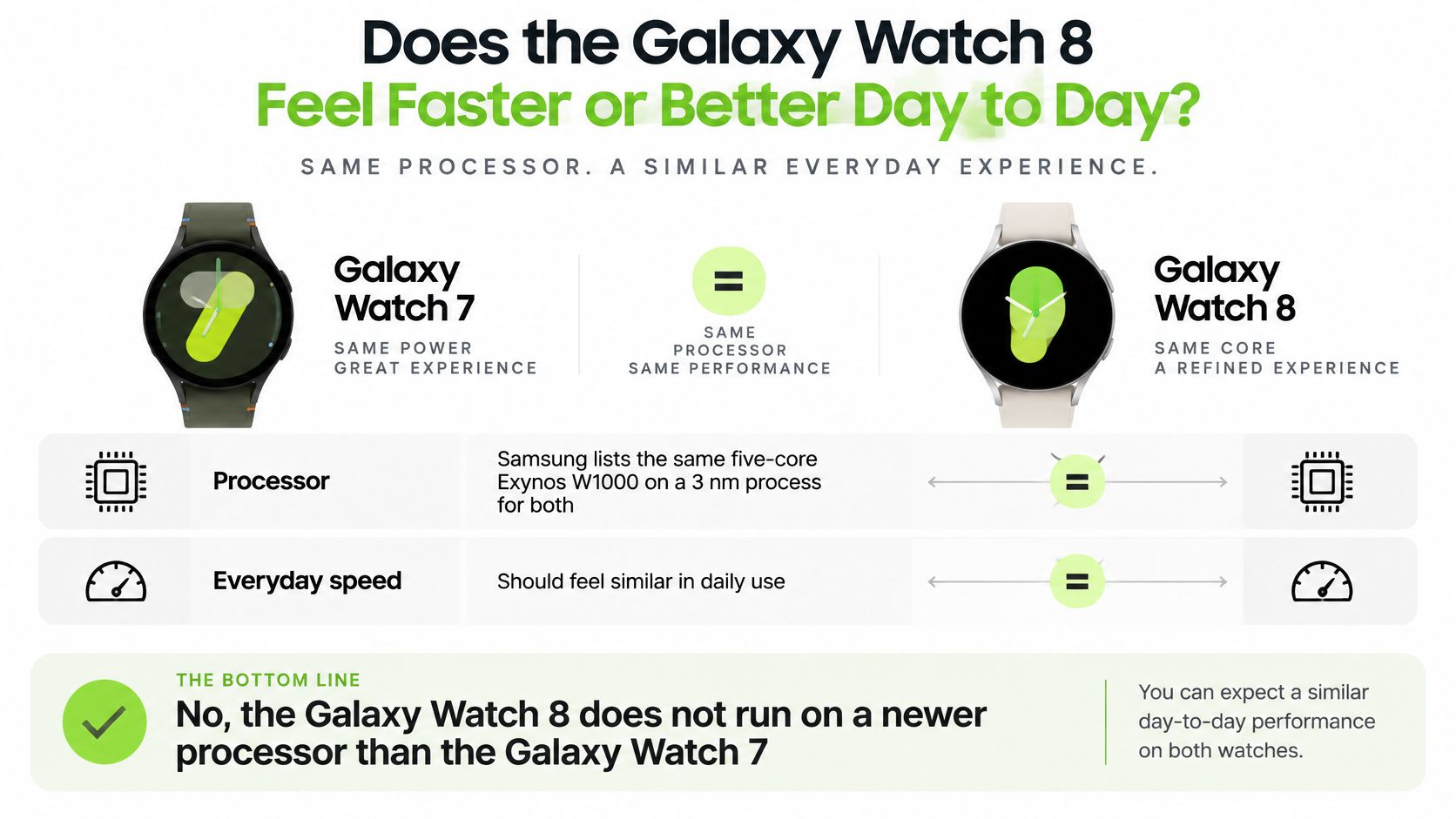
Samsung lists the same five-core Exynos W1000 built on a 3 nm process for both watches in its model comparison above, and Samsung's Galaxy Watch 8 announcement names that chip for the Galaxy Watch 8. The announcement describes faster performance and greater power efficiency without publishing a higher clock speed or a benchmark score you can compare. With the chip unchanged, think of it like the same engine with revised control software: response can be cleaner, while the hardware ceiling stays close.
What You'll Actually Notice Instead
The changes you feel are physical and visual. A slimmer case slides under a shirt cuff and catches less on a jacket sleeve during a workout. A brighter screen means you read pace, heart rate, or a map glance in direct sun without shading the watch with your other hand. For outdoor training, that readability gain matters more than any assumed processing gain.
The short video below walks through the two watches side by side, which helps if you want to see the case difference rather than read about it.
On positioning, Samsung's buying guide lists dual GPS using L1 and L5 signals and Bluetooth 5.3 for the Galaxy Watch 8, and Samsung's Galaxy Watch 8 product page says its Running Coach and Bedtime Guidance need a phone running Android 11.0 or above with at least 1.5 GB of memory. Samsung's model comparison lists dual-frequency GPS for the Galaxy Watch 7 too, so positioning is not a gap between them. Even with dual-band support, tall buildings, tree cover, and recording on the watch alone can still bend a track, so do not expect perfect lines in a dense city center.
Judge the upgrade by the screen you read outdoors and the case you wear all day. If a seller pitches the Galaxy Watch 8 as dramatically faster, ask which published number proves it.
Which Galaxy Watch Fits Your Routine?
Because both watches share a chip and sit within a few grams of each other, the choice reduces to tools, display, and straps.
Which Galaxy Watch fits the day you have
| Your situation | Pick |
|---|---|
| Established heart rate, sleep duration, workouts, and supported ECG or blood pressure | Galaxy Watch 7 |
| You read metrics in bright sun and want the brighter display | Galaxy Watch 8 |
| You will set up newer sleep or running tools and accept their limits | Galaxy Watch 8 |
| You already own standard 20 mm quick-release bands and want to keep them | Galaxy Watch 7 |
| You are weighing a Galaxy Watch 8 Classic alongside a Galaxy Watch 8 | Galaxy Watch 8 band system, which takes different straps from the Galaxy Watch 7 |
When the Galaxy Watch 7 Is Enough
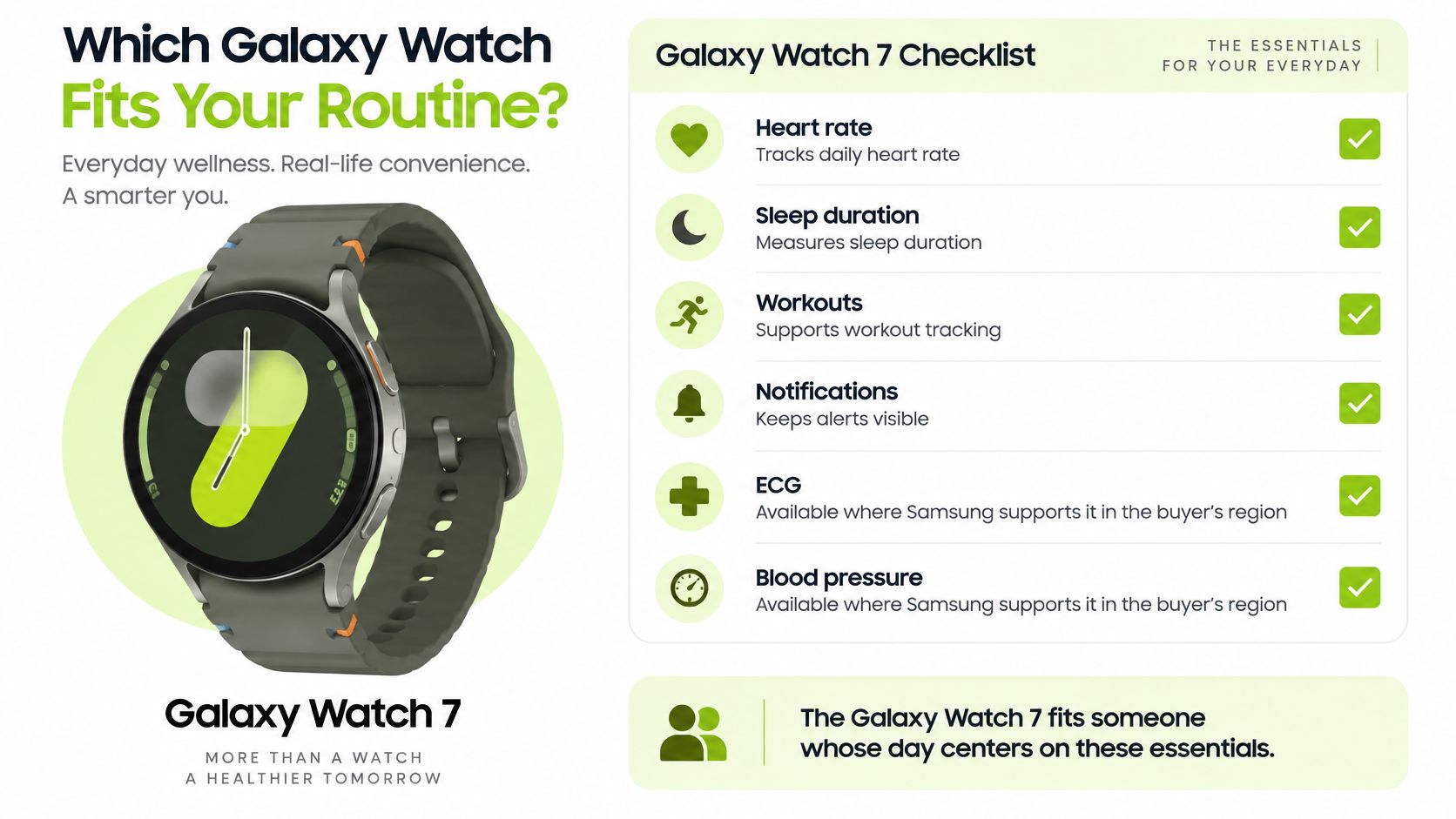
Say your day is a commute, a desk, a lunchtime walk, and a gym session where you check heart rate and duration. The Galaxy Watch 7 covers that. Heart rate, sleep duration, workouts, and notifications form the core loop, with ECG and blood pressure available only where Samsung supports them in your region, so check your country's Samsung page before counting on either.
A commuter who wants only those basics gains nothing from a longer feature menu. Unused wellness tools sit unopened without improving your health. The same logic holds if you already train against an outside plan, for example following guidance on Nike Run Club and nutrition tracking rather than a coach built into the watch.
When the Galaxy Watch 8 Earns Its Place
A runner training outdoors gets more from the Galaxy Watch 8, provided they will set the new tools up. Samsung's Running Coach guide says the coach starts with a running-level test in Samsung Health that you keep running for the full 12 minutes, then builds a plan from your level. On Samsung's Galaxy Watch 8 product page, sleep-apnea detection is described as spotting breathing patterns suggestive of obstructive sleep apnea rather than diagnosing it, and Samsung sets age and sleep-tracking conditions for it, so read those before relying on it. Skip the test or the tracked nights, and these features are decoration.
Vascular Load, Antioxidant Index, and Bedtime Guidance sit in general wellness guidance rather than medical measurement. Treat them as prompts to look closer, and weigh them accordingly.
Decide by the sessions you will open on the watch each week, not by the longest feature list.
Count the bands you already own before ordering. If you own Galaxy Watch 4, 5, 6, or 7 bands you like, staying with the Galaxy Watch 7 keeps them in rotation, while the Galaxy Watch 8 and the 8 Classic share a different strap fitting.
Do the Galaxy Watch 7 and Galaxy Watch 8 Share Bands
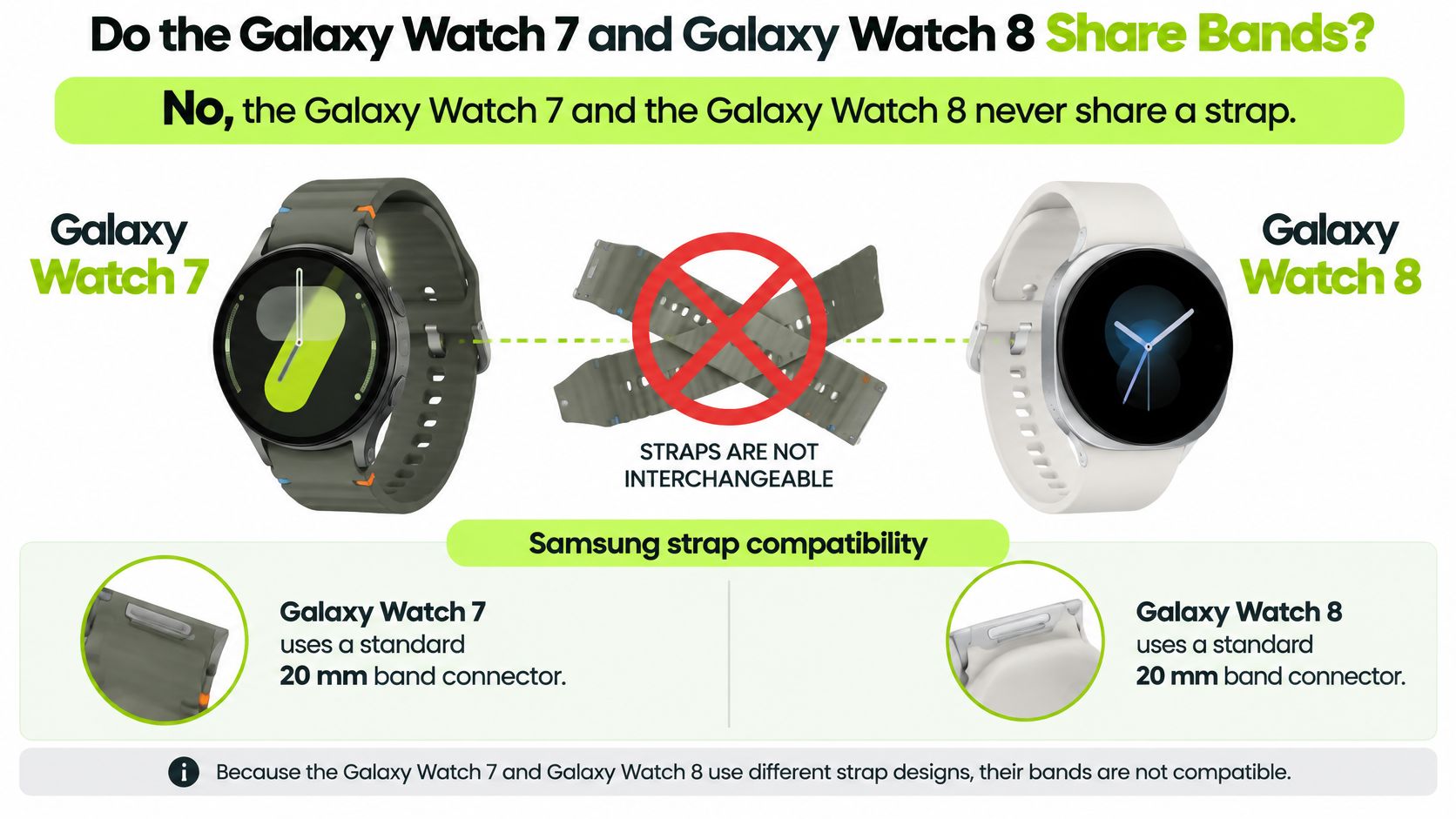
A Galaxy Watch 7 band and a Galaxy Watch 8 band use different connectors, so nothing swaps between them. The two watches share a chip and nearly the same weight, which makes this the deciding difference for anyone who already owns bands, and the most common mistake in Galaxy Watch 7 vs 8 shopping.
The Two Connector Families
As the spec comparison above shows, the Galaxy Watch 7 sits on a standard 20 mm attachment, in the same width family as the Galaxy Watch 4, Galaxy Watch 5, and Galaxy Watch 6. Both Galaxy Watch 7 case sizes take that same 20 mm connector, so case diameter doesn't change the strap fitting. If you're shopping that side, start with Galaxy Watch 7 bands and confirm the connector matches.
The Galaxy Watch 8 series uses a dedicated attachment called Dynamic Lug. Bands made for that attachment fit the Galaxy Watch 8 and the Galaxy Watch 8 Classic only. They don't fit the Galaxy Watch 7, earlier Galaxy Watch models, or the Galaxy Watch Ultra. If you're shopping that side, use Galaxy Watch 8 and 8 Classic bands instead.
Say it plainly in both directions:
- A 20 mm quick-release strap will not go on a Galaxy Watch 8.
- A Galaxy Watch 8 strap will not go on a Galaxy Watch 7.
- A band sold for the Galaxy Watch Ultra is not a substitute for either one.
The Second Trap Is Length
The 20 mm figure describes where the band meets the case, not how far the strap reaches around your wrist. Two bands can share a connector and still fit very differently, so read the stated wrist range on the product page and measure your wrist where you wear the watch, snug but not tight.
Confirm your exact model in the watch's settings or on its case back before ordering, because the names look similar in a listing and the LTE and Classic variants are easy to mix up. If you'd rather answer a few questions than decode listings, the Watch Band Finder at /pages/watch-band-finder narrows bands to your model. Staying on the older watch? Our deeper guide to the Galaxy Watch 7 strap fitting covers the 20 mm side in more detail.
We sell replacement bands only, never watches, and our range splits the same way the connector does: standard 20 mm quick-release bands for the Galaxy Watch 7, and dedicated bands for the Galaxy Watch 8 and 8 Classic. Match the full model name on the listing to the one on your case back, and the connector question answers itself.
Which Band Material Fits Workouts, Office Days, and Sensitive Skin?
Silicone suits workouts, Milanese mesh or steel links suit office days, and a nylon loop suits sensitive skin on both the Galaxy Watch 7 and the Galaxy Watch 8. The material advice doesn't change between the two watches. Only the connector changes, so pick the material inside the fitting your watch takes.
Match the Material to the Day
For workouts, silicone doesn't soak up sweat and rinses clean under a tap, then dries fast. That's a 20 mm quick-release silicone band on a Galaxy Watch 7, or a Dynamic Lug silicone band on a Galaxy Watch 8.
For office days, Milanese mesh or a steel link reads dressier than a sport strap, and genuine leather suits dry days on either watch. A 20 mm quick-release Milanese band suits a Galaxy Watch 7, not a Galaxy Watch 8, which needs a mesh band made for its own attachment.
For sensitive skin, a nylon loop puts fabric rather than steel across the wrist. Milanese and stainless link bands are steel on the underside, so they're the wrong pick for someone who reacts to metal. We make no hypoallergenic, nickel-free, or medical-grade claim for any band. Irritation often comes from trapped moisture or a band worn too tight, so rinse sweat off, dry the band fully before putting it back on, and leave a little room.
We offer bands in stainless steel, silicone, nylon, leather, and Milanese. Browse the full Samsung Galaxy Watch bands range once you know your connector. Follow this order every time: confirm the model, match the connector, check the wrist range, then choose the material for the day.
Galaxy Watch 7 vs 8 FAQ
Can I use my Galaxy Watch 7 bands on a Galaxy Watch 8?
No. Samsung's strap-compatibility guidance says Galaxy Watch 8 series bands use a dedicated attachment that fits only the Galaxy Watch 8 and Galaxy Watch 8 Classic, so standard 20 mm Galaxy Watch 7 bands do not attach.
Do Galaxy Watch 8 and Galaxy Watch 8 Classic bands interchange?
Yes. Samsung designs Galaxy Watch 8 series bands to fit both the Galaxy Watch 8 and the Galaxy Watch 8 Classic, but not the Galaxy Watch 7, earlier models or the Galaxy Watch Ultra.
Do the 40 mm and 44 mm Galaxy Watch 7 take different bands?
No. Both Galaxy Watch 7 case sizes attach bands at a standard 20 mm, the same width as the Galaxy Watch 4, 5 and 6. Check the band's wrist range separately, because 20 mm describes the attachment, not the length.
Whether you keep the Galaxy Watch 7 and its standard 20 mm bands or move to the Galaxy Watch 8 and its Dynamic Lug fitting, we stock replacement bands in silicone, nylon, leather and Milanese for both sides of that split. Confirm your exact model, match the connector, and find the band that fits your watch and your routine at Nothing but Bands.
Ähnliche Beiträge

- November 03, 2026
Are Fitbit waterproof? Most trackers are swimproof to 50 metres, not shower-safe. Check model, activity and band before you get...

- November 02, 2026
Apple makes no yellow Apple Watch case, so a yellow band is the only way to get the look. Fit,...
