


Some Galaxy Watch models work with an iPhone and some don't, and the specific model decides which side of that line you're on. Samsung's compatibility page lists the original Galaxy Watch (2018), Galaxy Watch Active, Galaxy Watch Active2 and Galaxy Watch3 for an iPhone 5 or newer running iOS 9 or later, while Samsung says Galaxy Watch4 and the Wear OS models after it are not compatible with iOS.
The confusion starts with the name. Samsung has put "Galaxy Watch" on two operating systems and several generations of hardware, so a second-hand listing that reads "Samsung Galaxy Watch, Bluetooth" tells you nothing about the phone in your pocket.
Everything below comes from Samsung's own support pages, because compatibility is a published policy, not a measurement.
Table of Contents
- Does the Galaxy Watch Work with an iPhone?
- Which Galaxy Watch Models Work with an iPhone?
- How Do You Pair a Galaxy Watch with an iPhone?
- Which Features Does Samsung Say Are Limited on iPhone?
- Does Bluetooth Mean a Galaxy Watch Works with iPhone?
- Does the Phone Change Which Galaxy Watch Band Fits?
- What Should You Confirm Before Buying a Galaxy Watch for an iPhone?
- Frequently Asked Questions
Does the Galaxy Watch Work with an iPhone?
Yes for four older generations, no from Galaxy Watch4 onward. Samsung lists the Galaxy Watch (2018), Galaxy Watch Active, Galaxy Watch Active2 and Galaxy Watch3 for iPhone pairing, and says its Wear OS models, starting with the Galaxy Watch4, are not compatible with iOS.
Ask whether "a Galaxy Watch" works with an iPhone and you're asking about several generations of products at once. The older group runs Tizen and is set up through Samsung's iOS companion app. The newer group runs Wear OS and is set up from an Android phone, which is why a Watch6 or a Watch Ultra can look similar in a product photo to a Watch3 and behave completely differently at setup.
The check that settles it: find the exact model on Samsung's iOS compatibility list. The Galaxy name tells you the brand, not the answer.
Samsung also notes that on the older models it lists for iPhone, some features and services may not be available, which is a separate question from whether the watch pairs at all. If the phone itself is still part of your decision, an iPhone vs Samsung Galaxy phone comparison from Used Mobiles 4 U sets the two handsets side by side before you commit to either.
Which Galaxy Watch Models Work with an iPhone?
Samsung's published lists cover four Galaxy Watch families on iPhone and rule out every Wear OS model from Galaxy Watch4 onward. The table puts each model, its operating system and Samsung's pairing position in one view.
| Galaxy Watch model | Operating system | iPhone pairing per Samsung |
|---|---|---|
| Galaxy Watch (2018) | Tizen | Yes, with iPhone 5 or newer on iOS 9 or later |
| Galaxy Watch Active | Tizen | Yes, with iPhone 5 or newer on iOS 9 or later |
| Galaxy Watch Active2 | Tizen | Yes, with iPhone 5 or newer on iOS 9 or later |
| Galaxy Watch3 | Tizen | Yes, with iPhone 5 or newer on iOS 9 or later |
| Galaxy Watch4 and Watch4 Classic | Wear OS | No, Samsung lists it as not supported on iOS |
| Galaxy Watch5 and Watch5 Pro | Wear OS | No, Samsung lists it as not supported on iOS |
| Galaxy Watch6 and Watch6 Classic | Wear OS | No, Samsung lists it as not supported on iOS |
| Galaxy Watch7 | Wear OS | No, Samsung lists it as not supported on iOS |
| Galaxy Watch Ultra and Ultra 2 | Wear OS | No, Samsung lists it as not supported on iOS |
| Galaxy Watch8 and Watch8 Classic | Wear OS | No, Samsung lists it as not supported on iOS |
| Galaxy Watch9 | Wear OS | No, Samsung lists it as not supported on iOS |
| Galaxy Watch FE | Wear OS | No, Samsung lists it as not compatible with iOS |
Samsung's wording is precise. The Samsung support answer on Galaxy Watch and iPhone compatibility states that the Galaxy Watch (2018 model), Galaxy Watch Active and Galaxy Watch Active2 are compatible with an iPhone 5 or later running iOS 9 and above, set up through Samsung's Galaxy Wearable app from Apple's App Store, and that newer Samsung watches with Wear OS are not compatible with iOS because they rely on Google Play services. Samsung's regional compatibility table, linked in the pairing section below, adds the Galaxy Watch3 to the iPhone list with the same iPhone 5 and iOS 9 minimum.
Two limits sit alongside the list. Samsung states that iPad and iPod touch are not supported, so a tablet isn't a substitute handset. And Samsung warns that connections involving the iPhone 6s and iPhone 6s Plus on iOS 10 or later may be unstable, which shows that meeting the minimum operating-system version doesn't guarantee identical reliability on every supported iPhone.
A model name in a listing isn't enough on its own, because listings mix generations freely. The Galaxy Watch FE carries the Galaxy Watch name, and Samsung lists it as not compatible with iOS. Confirm the exact model against Samsung's specification or compatibility page before paying, particularly on the used market.
For anyone buying a replacement band, the phone question matters mainly at the point of identifying the watch. An older Galaxy Watch can run with an iPhone, and the physical band size still has to be checked separately against the case and lug design.
How Do You Pair a Galaxy Watch with an iPhone?
Pairing runs through Samsung's own app, and the iPhone's Bluetooth menu alone will not finish the job. On the models Samsung lists for iOS, from the original Galaxy Watch (2018) through the Galaxy Watch3, Samsung's companion app from the App Store handles the setup.
Samsung's device and operating system compatibility page lists the Galaxy Watch, Galaxy Watch Active, Galaxy Watch Active2 and Galaxy Watch3 with iOS 9.0 or higher on an iPhone 5 or newer, and marks the Galaxy Watch4 series onward as not supported. Confirm the model before installing anything.
The steps below cover the setup in order.
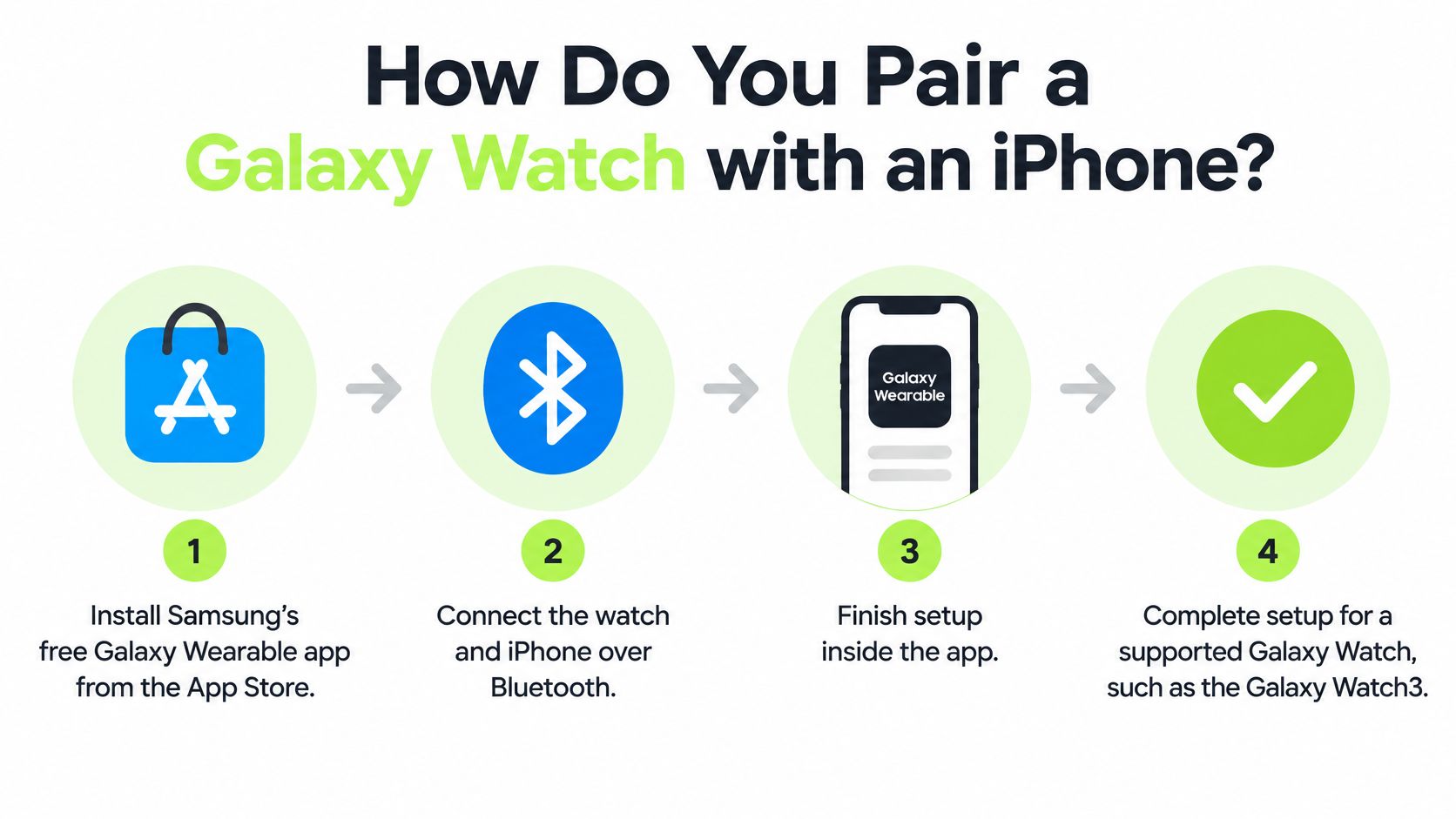
- Confirm the model. Match the exact watch name against Samsung's iOS compatibility list, because Samsung's iOS app only sets up the models Samsung lists.
- Check the handset. Samsung's stated requirement is an iPhone 5 or newer running iOS 9 or later, and iPads and iPod touch are not supported.
- Install the app. Download Samsung's Galaxy Watch companion app from the App Store; Samsung's US page lists it as Galaxy Wearable.
- Open the app and select your watch. Samsung's setup guide says to open the app, tap START THE JOURNEY, select your device and follow the on-screen instructions.
- Complete the connection inside the app. Follow the prompts to the end of setup.
- Know Samsung's one stability caution. Samsung says connections on iPhone 6s and 6s Plus running iOS 10 or later may be unstable.
If you'd rather watch the screens than read them, the walkthrough below follows the same order.
Once the app finishes, remember what pairing settled: whether this watch model can talk to an iPhone at all. The strap is a separate decision governed by the watch case and lug design, and no band can enable iPhone support on a model Samsung leaves off its list.
Which Features Does Samsung Say Are Limited on iPhone?
Yes, Samsung says iPhone use is narrower than Android use. Its guide to setting up a Galaxy Watch with or without a phone says Galaxy Watch devices are primarily designed for use with Samsung Galaxy phones, and that while select earlier models support an iPhone connection, some features and services may not be available. Samsung's list of Galaxy Wearables compatible with iOS names the Galaxy Watch3, Galaxy Watch Active and Galaxy Watch Active2 as supporting the Galaxy Watch iOS app, and lists the Galaxy Watch4, Watch4 Classic, Watch5, Watch5 Pro, Watch6, Watch7 and Watch Ultra as not compatible with iOS.
Samsung's pages don't list the missing features one by one. So before relying on a listed model with an iPhone, check Samsung's page for that exact model rather than assuming that everything an Android setup offers carries over. A pairing can succeed while some functions are reduced or absent, because pairing only proves the watch and phone can talk.
The split is easier to reason about by layer. The watch handles sensors, display and on-wrist controls. The iPhone supplies Samsung's app and the phone link. Samsung decides which services cross that link for each model, so an Android review can describe features your iPhone setup never sees.
A band belongs to the fit question only. It cannot add an iOS setup path, change a Wear OS model into a supported one, or restore a service Samsung lists as unavailable. If the decision is between platforms, our Pixel Watch vs Galaxy Watch comparison covers the hardware side, while the model list above settles whether the phone link exists at all.
Does Bluetooth Mean a Galaxy Watch Works with iPhone?
No. Bluetooth alone doesn't make a Galaxy Watch work with an iPhone, because Samsung's iPhone support depends on the watch's platform and on the phone setup Samsung lists for that exact model.
That's the myth worth killing early, because it survives on packaging. A seller sees the Bluetooth logo, reasons that iPhones have Bluetooth, and answers yes without ever opening Samsung's support site. A pairing screen is not a compatibility statement.
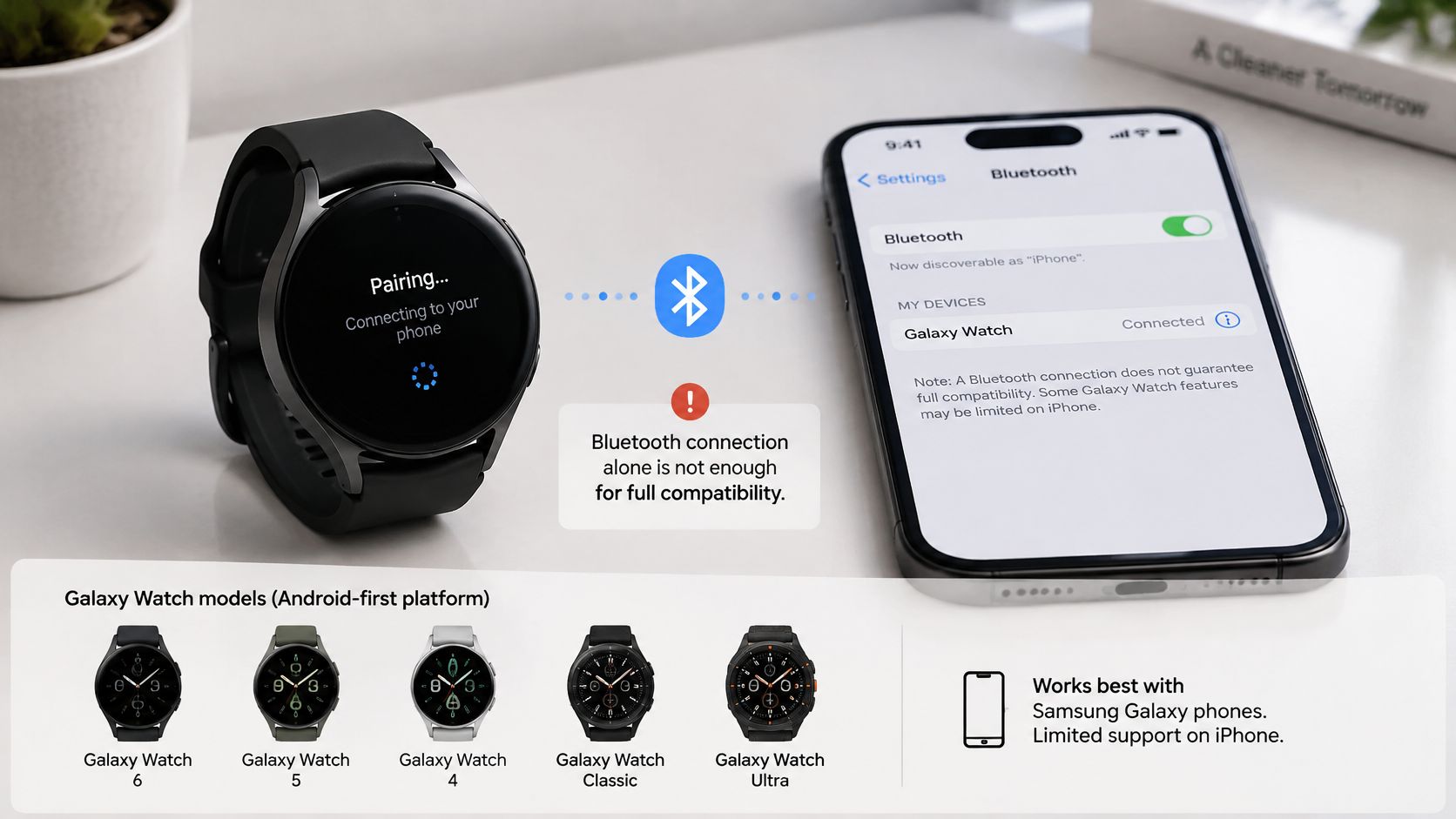
Take a shopper who finds a Galaxy Watch4 advertised as Bluetooth compatible and assumes the question is settled. Samsung's setup guide states that Galaxy Watch models that use Wear OS, such as the Galaxy Watch4 and later, are not compatible with iOS devices and cannot be set up using a Samsung app. Bluetooth on the box doesn't move a Wear OS watch onto Samsung's iPhone list.
Now a used Galaxy Watch3 at an attractive price. Older models can carry outdated software, restricted services or uncertain app support, and a review written near launch may predate Samsung's current guidance entirely. A seller's "works with iPhone" line stays unverified until it matches the model on Samsung's list today.
The radio isn't the rule. Two watches can both list Bluetooth and still sit on opposite sides of Samsung's compatibility table.
That's why the order matters: model first, phone setup second, band last.
Does the Phone Change Which Galaxy Watch Band Fits?
No. Phone pairing and band fit answer two separate questions. Samsung's compatibility list decides whether a given Galaxy Watch model works with an iPhone at all; the band only has to match the lugs on the case. A strap attaches to the watch the way a strap attaches to a backpack: it changes how the device wears, never which phone it can talk to. Swapping bands can't move a watch onto Samsung's iPhone list or enable a feature Samsung lists as unavailable.
| Galaxy Watch model | Band width or connector |
|---|---|
| Galaxy Watch 42 mm | 20 mm quick-release spring bar |
| Galaxy Watch 46 mm | 22 mm quick-release spring bar |
| Galaxy Watch Active | 20 mm quick-release spring bar |
| Galaxy Watch Active2 (40 mm and 44 mm) | 20 mm quick-release spring bar |
| Galaxy Watch3 41 mm | 20 mm quick-release spring bar |
| Galaxy Watch3 45 mm | 22 mm quick-release spring bar |
| Galaxy Watch4 through Galaxy Watch7 | 20 mm quick-release spring bar |
| Galaxy Watch8 and Galaxy Watch8 Classic | Dynamic Lug connector |
| Galaxy Watch Ultra and Ultra 2 | Ultra's own connector |
| Galaxy Watch9 | Dynamic Lug connector, shared with Galaxy Watch8 |
For the older Tizen models that Samsung lists for iOS, the fittings are ordinary quick-release spring bars, so any standard band of the matching width works. That means 20 mm on the Galaxy Watch Active, the Galaxy Watch Active2 (both case sizes), the Galaxy Watch3 41 mm and the 42 mm Galaxy Watch, and 22 mm on the Watch3 45 mm and the 46 mm Galaxy Watch. Match the millimeters to your case size, confirm the width on Samsung's spec page for your model, and the phone never enters the equation.
The materials cover every use:
- Silicone: for sweat and easy cleaning.
- Nylon: for breathability on long days.
- Braided: for a soft, textile feel.
- Magnetic Milanese: for tool-free adjustment.
- Genuine leather: for a dressier look.
For those iPhone-paired Tizen models, our universal quick-release range comes in 20 mm and 22 mm: silicone (Vornis, Jelli, Fluxa, Rovan), nylon (Véllo, Voren, Bravik), braided (Mavric, Tressa), magnetic Milanese (Solin, Mirel) and genuine leather (Harper, Noren, plus Perrin in 22 mm). Our dedicated Samsung bands for Galaxy Watch 8 & 9 and Galaxy Watch Ultra & Ultra 2 fit watches that Samsung pairs with Android phones only. They're our replacement bands rather than Samsung products.
If you own a Galaxy Watch4, our guide to the Galaxy Watch 4 strap covers its bands. When you're ready to compare widths, browse the Samsung Galaxy Watch band collection and confirm your exact model with the Watch Band Finder before ordering.
What Should You Confirm Before Buying a Galaxy Watch for an iPhone?
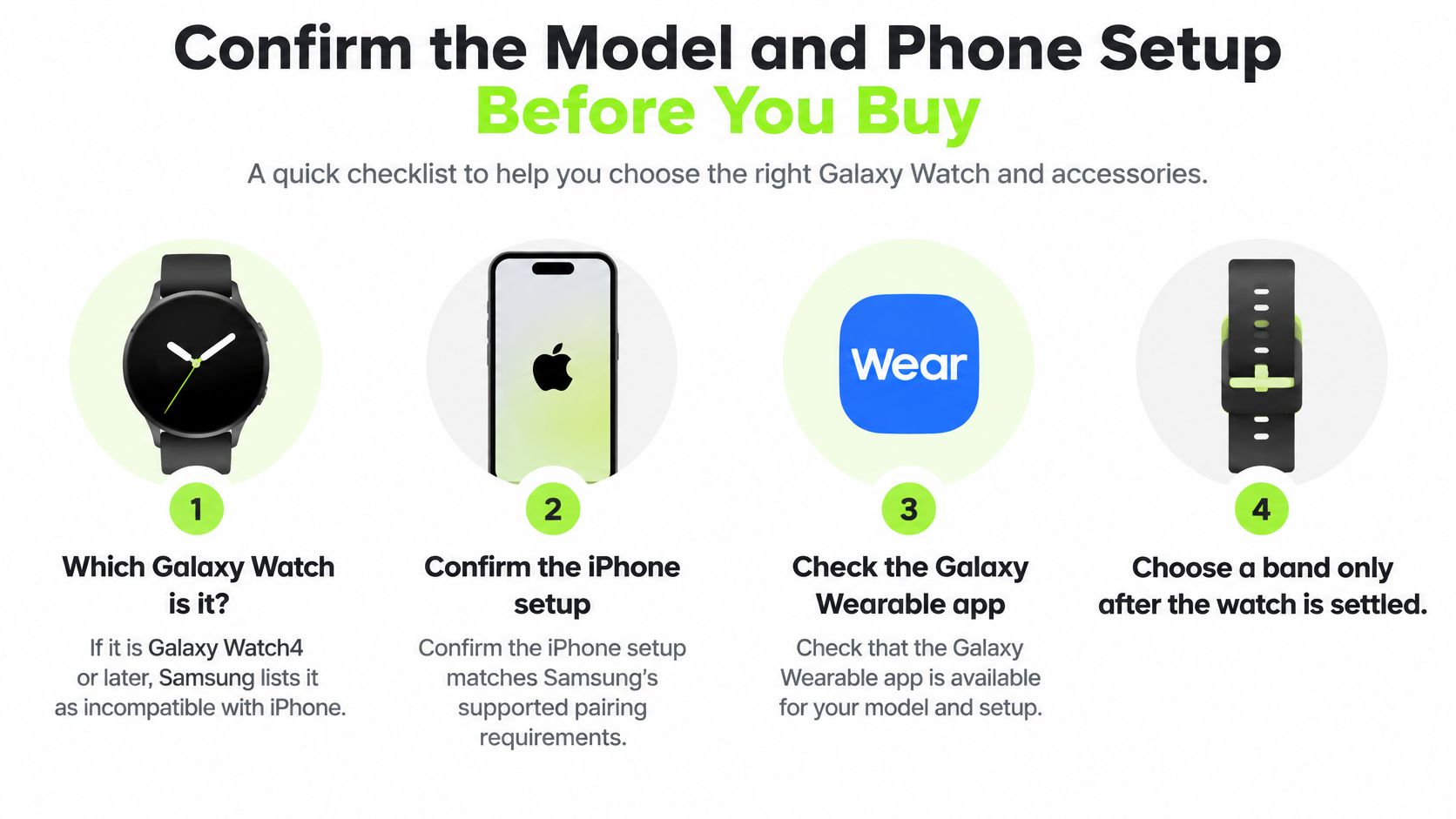
Four checks settle a Galaxy Watch purchase for an iPhone owner, in this order: the exact model, whether Samsung still lists iPhone support for it, which features Samsung says are unavailable, and whether an Android phone is part of your future.
- Which Galaxy Watch is it? If it's a Galaxy Watch4 or later, Samsung lists it as not compatible with iOS, so the answer is no before any other question gets a hearing.
- Does Samsung still list iPhone support for this older model? For a Galaxy Watch3 or Watch Active2, read Samsung's page for that model and the iOS app today rather than trusting a review from its launch period.
- Which features does Samsung list as unavailable on iPhone? Check Samsung's page against your own must-haves, because pairing and feature parity are separate promises.
- Is an Android phone in your future? A watch bought for a phone you plan to switch to is a different decision from one bought for the iPhone in your hand.
The four checks in one view:
The band comes last, and it's the simplest of the five decisions. Confirm the width or connector for the exact model on Samsung's spec page, then choose a strap that matches it, running the model through our Watch Band Finder at /pages/watch-band-finder before you order.
We sell replacement bands, never watches or trackers, so phone compatibility is always settled by Samsung's published page and never by an accessory. Once the watch is settled, the strap is the easy part.
Frequently Asked Questions
Can I get a Galaxy Watch4 or Galaxy Watch5 working with an iPhone through a workaround?
Samsung says Wear OS models such as the Galaxy Watch4 and later are not compatible with iOS devices and cannot be set up using a Samsung app. Samsung notes that third-party apps may offer limited connection options, but it cannot recommend one or guarantee its performance, feature support or security. A band, adapter or accessory does not add iPhone support or features. If you own a Watch4 or Watch5, plan on an Android phone for setup and management.
Can one Galaxy Watch be paired to an iPhone and an Android phone at once?
A Galaxy Watch is set up with one phone through Samsung's companion app, and Samsung's instructions for moving a watch to a new phone start with a reset on the watch before pairing it again. Back up first, then go through the app flow on the new phone. Check Samsung's page for your exact model before you move it between phones, since the setup path differs between the Tizen models and the Wear OS ones.
How do I verify the model before buying a used Galaxy Watch for an iPhone?
Ask the seller for the model name and number as printed on the case or listed in the watch settings, then match it against Samsung's iOS compatibility list rather than the listing title. Photos help too, since case size and bezel design separate generations that share a name. If the seller cannot name the exact model, treat the compatibility claim as unproven.
Your watch settles the phone question first, and the strap stays a separate fit decision. Nothing but Bands sells replacement bands sized by width and connector, from 20 mm and 22 mm quick-release straps for the older iPhone-paired Galaxy Watch models to dedicated bands for the Dynamic Lug and Ultra connectors. If you are refreshing an iPhone-paired Galaxy Watch, pick the width that matches the case you already own.
Gerelateerde artikelen

- November 20, 2026
Find the right smartwatch with longest battery life for your routine: maker claims with their usage conditions, what drains charge,...

- November 18, 2026
A practical guide to Fitbit watches for men: match case size, activity, and battery life to your routine, then find...
