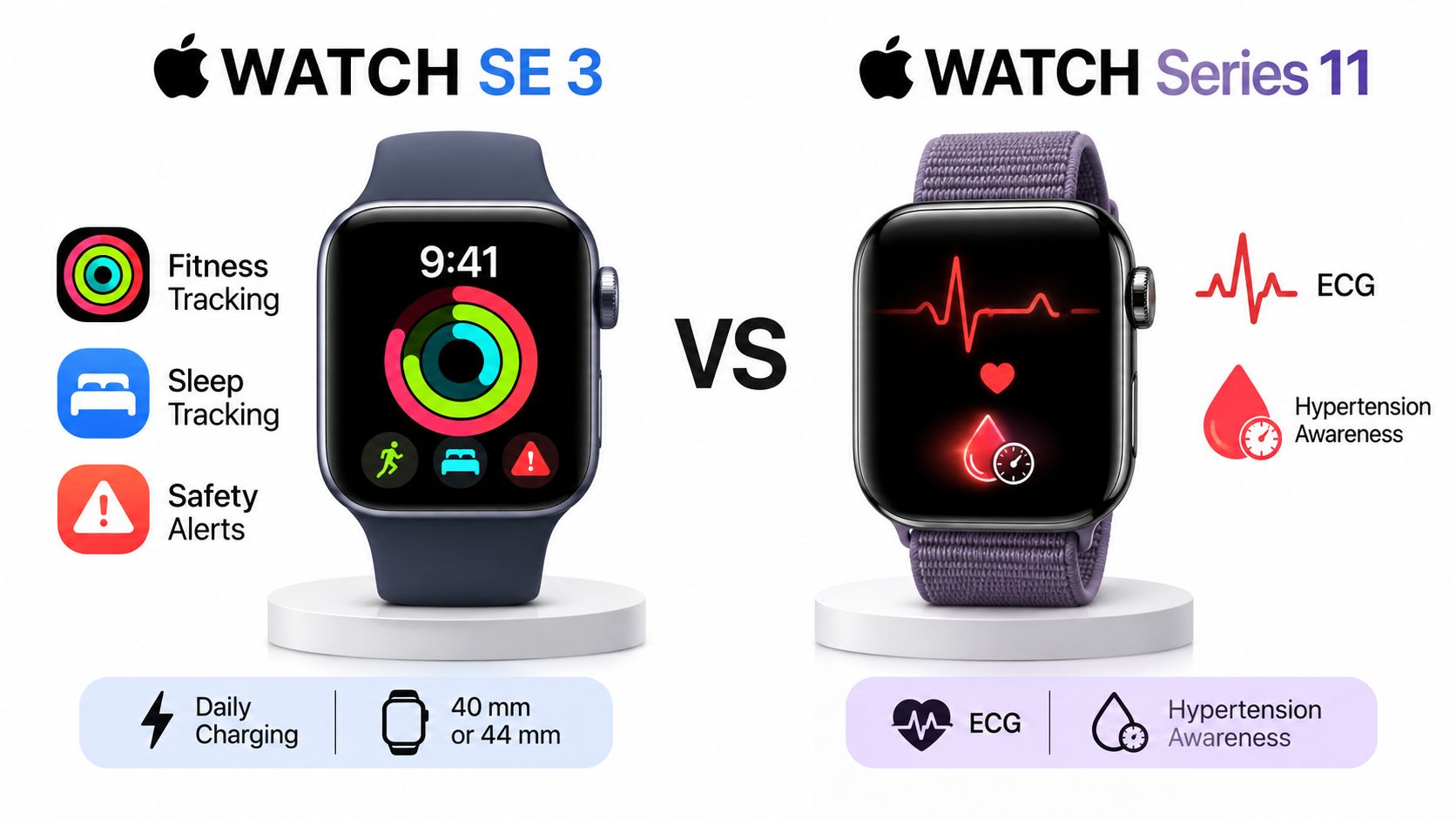
Is the Series 11 worth the higher price for your routine? Choose the SE 3 for Apple's core fitness, sleep and safety tracking. Choose the Series 11 if you need ECG, hypertension notifications, the Blood Oxygen app where supported, or more time between charges. Apple's published specifications rate the SE 3 for up to 18 hours of normal use and the Series 11 for up to 24 (Apple Watch SE 3 specs and Apple Watch Series 11 technical specifications).
Both watches use Apple's S10 system-in-package, so the Series 11's higher price does not buy faster app launches, workout recording or Siri responses. It buys a choice of added health sensors, larger case sizes and more battery margin. For many buyers, one of those differences is enough to justify the higher tier; the rest may not matter to their routine.
Judge each upgrade on its own: whether you'll use the Series 11's additional health features, whether its battery rating fits your schedule, and whether its case sizes suit your wrist and existing bands.
Which Apple Watch Should You Buy, the SE 3 or Series 11?
Which Series 11 extra would you use in a normal week? If you can name one, it may justify the higher price tier. If not, the Apple Watch SE 3 is the more sensible buy for fitness, sleep and safety tracking.
Both watches use Apple's S10 system-in-package, so the Series 11 does not buy you a faster chip for apps, workouts or notifications. Its advantages are health features, different case sizes and more battery margin.
Health features: The Series 11 adds ECG, Blood Oxygen where supported and hypertension notifications. The health section below covers the wider list of features that differ between the two models.
Case size: The SE 3 comes in 40 mm and 44 mm aluminum cases. The Series 11 comes in 42 mm and 46 mm cases, with aluminum or titanium options.
Battery: The Series 11 has higher rated battery life in both normal use and Low Power Mode. That extra margin matters if you wear your watch overnight or want longer between charges.
Both models use Apple's slide-in band connector, but their case sizes differ. A band you already own fits only when its size is compatible with the watch case.
Prices vary by region and promotion, so check Apple's store for the current price. Choose the SE 3 for core tracking; choose the Series 11 if its health features, case options or battery margin meet a specific need.
Apple Watch SE 3 vs Series 11 Specs Side by Side
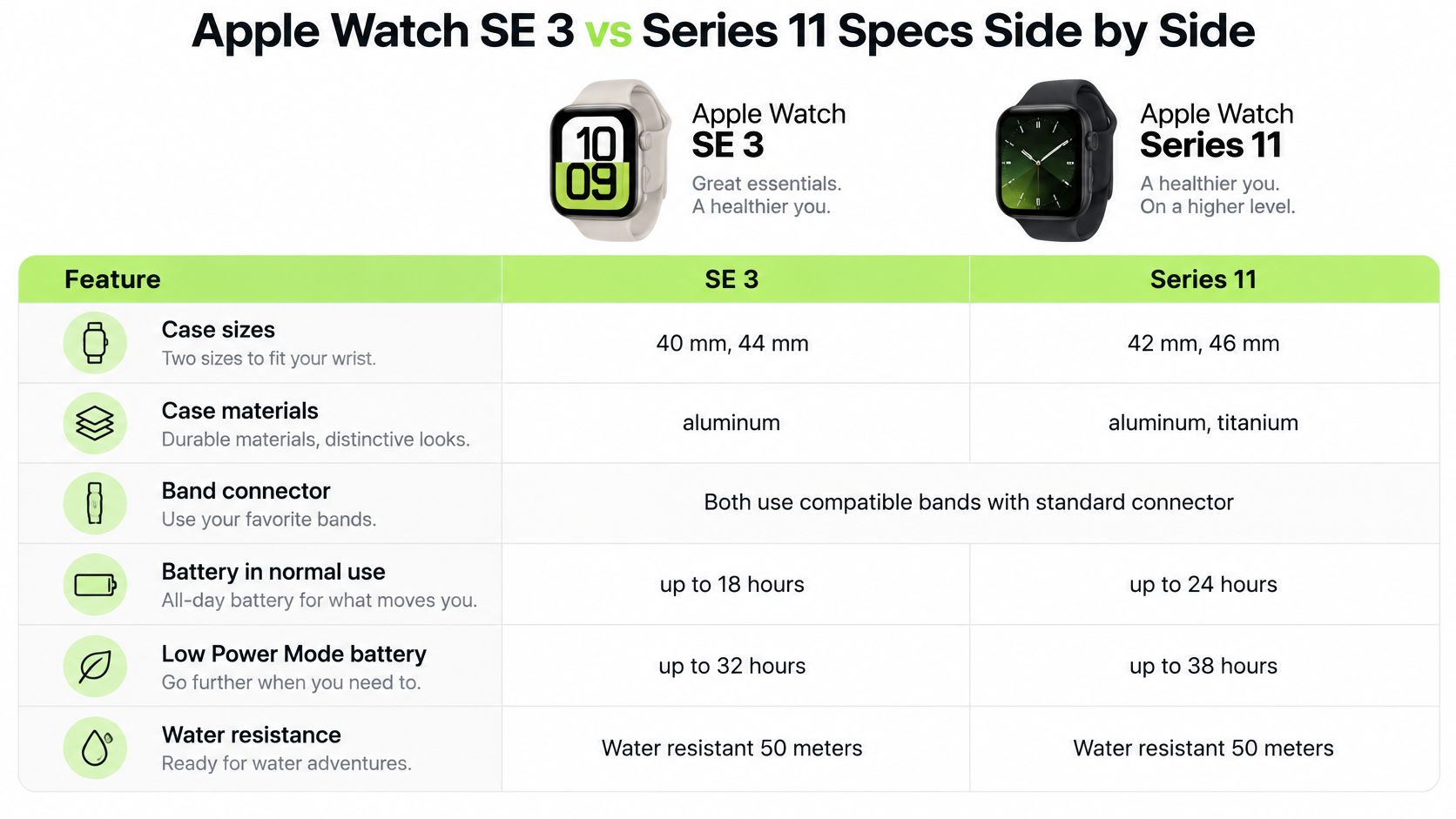
Apple's specification pages put the differences in three places: case size, battery ratings, and health features. The SE 3 comes in smaller cases; the Series 11 adds health features the SE 3 lacks. Both use the same band connector.
Spec
Apple Watch SE 3
Apple Watch Series 11
Case sizes
40 mm and 44 mm aluminum
42 mm and 46 mm aluminum or titanium
Band connector
Apple slide-in connector
Apple slide-in connector
Rated battery, normal use
Up to 18 hours
Up to 24 hours
Rated battery, Low Power Mode
Up to 32 hours
Up to 38 hours
Fast charge
Up to 8 hours of normal use with a 15-minute fast charge
Up to 8 hours of normal use with a 15-minute fast charge
Water resistance
50 m (swimproof)
50 m (swimproof)
ECG app
Not available
Available
Blood Oxygen app
Not available
Available where supported
Hypertension notifications
Not available
Available
These specifications are listed on Apple's Apple Watch SE 3 specification page and Apple Watch Series 11 technical specifications page.
The health-feature gap is straightforward: the Series 11 includes ECG, Blood Oxygen where supported, and hypertension notifications. The SE 3 does not offer those features. If you want any one of them, that alone can justify choosing the Series 11; if you do not, its health list may not warrant the higher price tier.
Case size affects both fit and band compatibility. The SE 3 comes in 40 mm and 44 mm, while the Series 11 comes in 42 mm and 46 mm. Both use Apple's slide-in connector, but a band made for one case-size family does not automatically fit the other.
Apple's specifications also show the display area and dimensions: the 44 mm SE 3 has a 977-square-millimeter display, compared with 759 square millimeters on the 40 mm model. The 44 mm SE 3 is 38 mm wide and 10.7 mm deep. Apple lists the GPS aluminum 44 mm SE 3 at 32.9 grams and the aluminum 46 mm Series 11 at 37.8 grams, a difference of 4.9 grams; the Series 11 is 1.0 mm thinner.
Before buying a band, check the case size on the back of your watch. Match the size family, not just the model name.
How Long Does Each Apple Watch Last on a Charge?
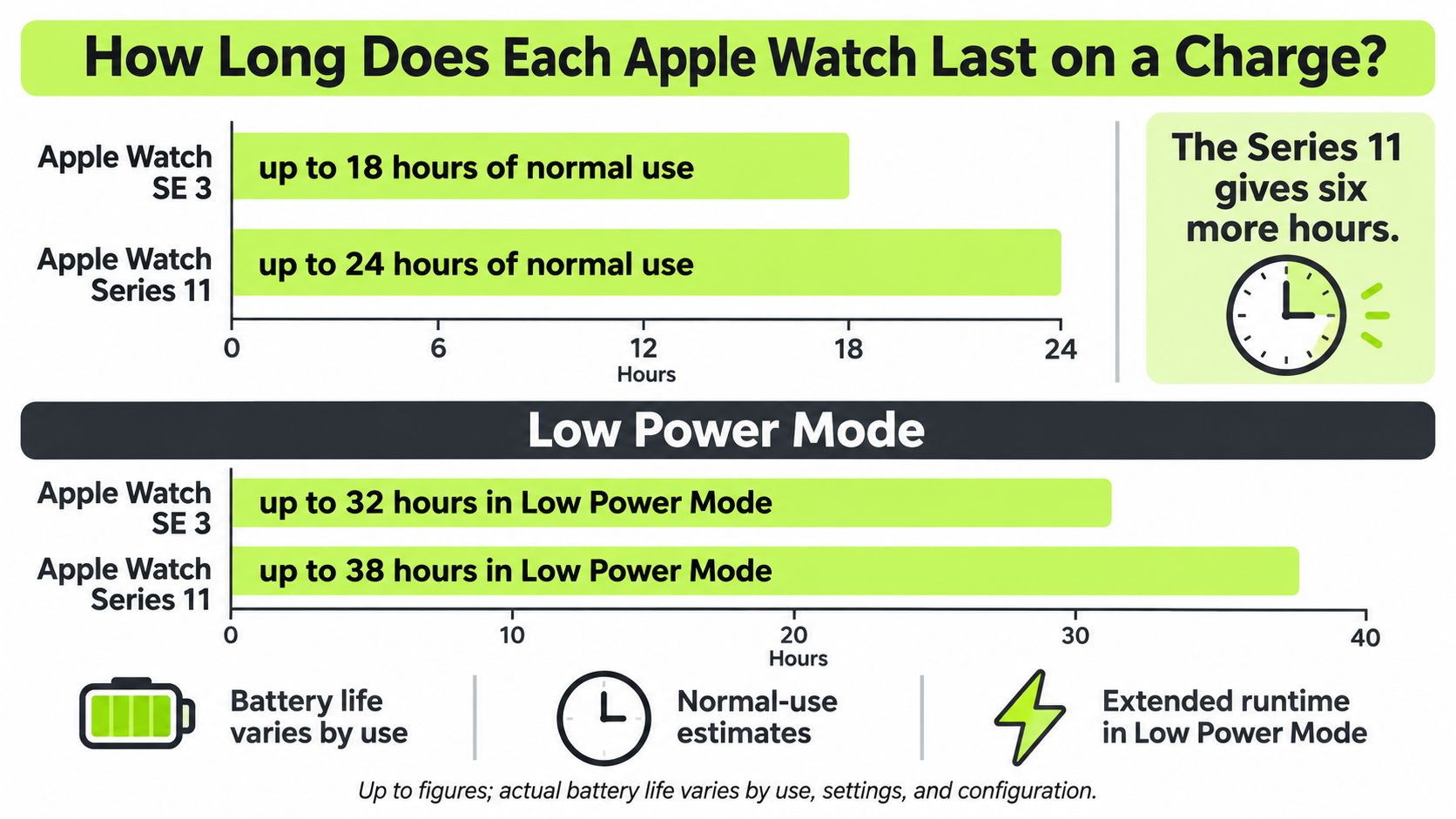
Apple rates the Apple Watch SE 3 for up to 18 hours of normal use and the Apple Watch Series 11 for up to 24 hours, giving the Series 11 six more hours on a charge. In Low Power Mode, Apple lists up to 32 hours for the SE 3 and 38 hours for the Series 11 on its Series 11 technical specifications page.
That difference matters most if you wear your watch overnight. If you charge it while you sleep, either model's rated normal-use battery life may cover your day. If you track sleep after a full day of notifications and a workout, the Series 11 gives you more reserve. Long workout recordings can reduce battery life on either watch.
Apple also lists fast-charging estimates for both models. A short top-up can help you fit sleep tracking into your routine, but the rated charge times are estimates, not a guarantee that every watch will have the same battery level.
Charging rule: build a short charging break into your day if you want to wear your watch overnight.
Use these questions to judge how much the battery gap matters to you:
Count your wearing hours. Include workouts, which use more battery than a day of notifications.
Decide whether you sleep-track nightly. If you do, plan when the watch will charge so it has enough reserve for the night.
Check whether a daytime charge fits your routine. A regular charging break may matter more than the difference between the watches' rated battery life.
Battery figures are maximum estimates. Cellular use, workout recording, notifications, display activity and Low Power Mode settings all affect actual endurance.
Does the Apple Watch Series 11 Add Health Features the SE 3 Lacks?
Yes. Apple's specifications list the ECG app, the Blood Oxygen app where supported, and hypertension notifications for Apple Watch Series 11, but not SE 3. Both models list heart-rate tracking, high and low heart-rate notifications, and sleep-apnea notifications, so those features do not distinguish them.
The practical difference is narrower than the feature lists suggest. ECG gives Series 11 owners a way to take a rhythm reading themselves, while hypertension notifications add a screening feature for eligible users. Blood Oxygen availability depends on market and model configuration, so check whether it is available where you live before paying more for it.
The health gap comes down to which screening features you will use. A feature that is unavailable in your market or does not apply to you is a weak reason to upgrade.
For ECG spot checks: choose Series 11. Apple lists the ECG app on that model, not SE 3.
For hypertension notifications: check eligibility first. Apple says the feature is not intended for people under 22, people already diagnosed with hypertension, or pregnant people, as its Series 11 technical specifications note.
Sleep-apnea notifications are designed to flag signs of moderate to severe apnea in adults without an existing diagnosis. Both watches offer them. Neither watch diagnoses a condition, so buy Series 11 for its specific added screenings, not because its health list is longer.
Which Apple Watch Should You Pick for Your Routine?
Pick the Apple Watch SE 3 if your week is workouts, sleep tracking and safety alerts on a predictable charging schedule. Pick the Apple Watch Series 11 if you want a rhythm check you can run yourself, hypertension notifications, or enough reserve to wear it overnight without planning a top-up.
A runner who charges every night. A midweek 5K, a longer weekend run, sleep tracking in between, a charger on the nightstand. The SE 3 handles that week. Apple's SE 3 product page lists an always-on display, fast charging, wrist-temperature sensing, sleep score and sleep-apnea notifications, and the SE 3 specifications add the S10 chip and 64GB of storage. Nothing in that routine calls for titanium.
A buyer who wants ECG spot checks. Here the decision is already made. One model lists the feature and the other doesn't, and no band, app or workaround adds it later.
A buyer who wants the lighter watch. Compare the sizes you would actually wear. Apple lists the 44 mm SE 3 at 32.9 grams (GPS) against 37.8 grams for the aluminum 46 mm Series 11 (GPS), but the aluminum 42 mm Series 11 (GPS) is listed at 30.3 grams, and the titanium Series 11 cases weigh more than the aluminum ones. On a smaller wrist that matters by the end of a long day.
Someone managing diagnosed hypertension. Apple's hypertension notifications aren't aimed at people who already have the diagnosis. For that buyer the notifications are not a reason to pay for the Series 11.
The honest split: most of the Series 11 premium pays off only for buyers who will use its health sensors or its extra battery reserve.
There's a software side to consider too. If you like closing rings and tracking habits, setting up Pretty Progress on watch puts your goals on the watch face where you'll see them without opening an app. That kind of setup runs on either model, which is another reason not to pay for hardware you won't use.
If you train hard and sweat daily, the strap you choose affects comfort more than the model tier does. Silicone is the usual pick for gym sessions and water, and a finely adjustable sport loop lets you set the tension precisely.
Decide two things in this order: the case size that fits your wrist, and whether you need ECG. Everything else is preference.
Do the Apple Watch SE 3 and Series 11 Share Bands?
Yes, if the two watches belong to the same band-size family. Both use Apple's slide-in connector, and bands fit by case-size family rather than by watch model.
The smaller family covers 38, 40, 41 and 42 mm cases, including the 40 mm SE 3 and 42 mm Series 11. The larger family covers 44, 45, 46 and 49 mm cases, including the 44 mm SE 3, 46 mm Series 11 and 49 mm Ultra. Bands move between watches in the same family, but not between families.
The number 42 can cause confusion. The 42 mm Series 10 and Series 11 cases belong to the smaller family. Older 42 mm cases from Series 1 through Series 3 belong to the larger one, so the number alone doesn't identify the correct band family.
Nothing but Bands sells Apple Watch bands in both families: 38, 40, 41 and 42 mm, and 44, 45, 46 and 49 mm. If you're unsure which family your watch belongs to, the Watch Band Finder on our site matches a band to your exact model. Browse Apple Watch SE bands for the 40 mm or 44 mm case, Apple Watch Series 11 bands for the 42 mm or 46 mm case, or the full Apple Watch band collection to compare materials.
For gym sessions and office days, silicone suits training, while Milanese or leather offers a different look for work. The Apple Watch size guide explains how case size relates to strap length if you're between sizes.
The one action that prevents every wrong order: check the case size printed on the back of the watch, then buy from the matching family.
Frequently Asked Questions
Does the Apple Watch SE 3 have an ECG app?
Apple's comparison information does not list an ECG app on the Apple Watch SE 3, while the Apple Watch Series 11 does list it. A buyer who wants to take a rhythm reading on the watch needs the Apple Watch Series 11, because the SE 3 doesn't carry that feature.
Is Blood Oxygen available on every Apple Watch Series 11?
No. Apple lists the Blood Oxygen app on the Apple Watch Series 11 where supported, so availability varies by market and model configuration. Check Apple's support page for your region before treating the Apple Watch Series 11 as a blood oxygen device.
Where do I find my Apple Watch case size?
The case size is printed on the back of the watch case. On an Apple Watch SE 3 that number is 40 mm or 44 mm, and on an Apple Watch Series 11 it's 42 mm or 46 mm, and it decides which band family fits your Apple Watch.
Nothing but Bands sells replacement bands only, never watches, and every Apple Watch band in the collection uses Apple's slide-in connector in two case-size families: 38, 40, 41 and 42 mm on one side, 44, 45, 46 and 49 mm on the other. Once you've settled on the SE 3 or the Series 11, Nothing but Bands is where you pick the material and colour to match, from silicone for training days to Milanese and leather for the office. Read the case size off the back of your watch, then shop the family that matches.
Scratch the card or use the reveal button to uncover your subscriber gift.
Your five-part guide is on its way. Your first emails focus on fit and care; the subscriber gift also returns in email three.
Written by Alex· Published November 16, 2026
· 11 min read
About the author
Alex — Founder, Nothing but Bands
Alex runs Nothing but Bands from Austin, TX. Every fit claim in these guides is verified against manufacturer specs — including the watches our bands don't fit. More about Alex →